Skip to content
University Logo

Faculty of Computers and Information

Minia University

Academic Year: 2025 / 2026

FCI Logo
Project Logo

DuoCodo

Gamified, Arabic-Centered Programming Learning Platform and Application
Project Team Members
#NameDeptEmail
1Mohamed Mostafa Amer AbdelkaderCSmuhammed.mustafa.work@gmail.com
2Mohamed Ragab Abdelhafez MehranCSragab.168926@gmail.com
3Alaa Mohamed Abdelhakeem AhmedCSalaahakeem58@gmail.com
4Ammar Emad Ahmed Azmy ZewainISza0663008@gmail.com
5Yassin Khaled KhalafISyassenkhaled927@gmail.com
6Marwa Farid MohamedISmarwafarid366@gmail.com
Under Supervision of
Supervisor
Dr. Rehab Emad El-Dein
CS Department
Teaching Assistant
T.A. Mohammed Shaaban
CS Department

List of Figures

Chapter 1: Project Overview

1.1 Main Idea

We aim to create a Duolingo-inspired programming education platform that transforms how beginners learn to code by eliminating overwhelm through structured, gamified micro-lessons. Unlike fragmented resources, this platform provides a clear, progressive learning path—from core programming fundamentals to advanced topics like OOP, algorithms, and web development—all delivered via multi-format explanations (articles, videos, and guided walkthroughs).

At its core, the platform seamlessly integrates:

    • An in-browser code editor (supporting Python and JavaScript) with real-time execution, syntax highlighting, and instant error diagnostics.
    • Hands-on exercises featuring model solutions and optional complexity analysis to deepen understanding of code efficiency.
    • XP systems, unlockable levels, daily streaks, and skill badges to reward consistency.
    • Global leaderboards competitions to fuel engagement.
    • Visual roadmaps highlighting completed, active, and upcoming modules.
    • Mastery dashboards quantifying skill growth and retention.

By combining structured curriculum, instant feedback, and social accountability, the platform turns programming education into an addictive, confidence-building journey—making learning feel like play while ensuring tangible skill development.

1.2 Project Scope

1. Comprehensive Curriculum & Content

  • Structured Learning Path:
    • Tiered modules from absolute fundamentals (variables, loops) to advanced domains (OOP, algorithms, web frameworks, databases).
    • Specialized tracks for Python, JavaScript, and full-stack development.
  • Multi-Format Delivery:
    • Concept primers: Short videos + annotated articles.
    • Interactive Chat Learning: AI mascot chatbot for conversational explanations.

2. Intelligent Code Editor

  • Multi-Language Support:
    • Browser-based execution for Python, JavaScript, HTML/CSS, and more.
  • Enhanced Developer Experience:
    • Real-time syntax + error highlighting, auto-completion, and debugging hints.
  • Accessibility:
    • Dark/light mode, keyboard shortcuts.

3. Dynamic Interactive Exercises

  • Adaptive Challenges:
    • Exercises auto-adjust difficulty based on user performance.
    • "Fix-the-Bug" tasks: Debug pre-written flawed code.
  • Deep-Dive Analysis:
    • Runtime complexity breakdowns (Big O notation).
    • Memory/performance metrics for optimization practice.
  • Solution Libraries:
    • Model answers + multiple approach comparisons (e.g., iterative vs. recursive).

4. Advanced Gamification System

  • Engagement Mechanics:
    • Daily streaks, skill-specific badges (e.g., "Algorithm Ace"), and XP bonuses for consistency.
    • Unlockable content: Secret lessons or tools for high achievers.
  • Competitive Elements:
    • Global/weekly leaderboards (XP-based).

5. Personalized Progress Ecosystem

  • Learning Analytics:
    • Mastery dashboards showing skill proficiency (e.g., "Data Structures: 85%").
    • Time-tracking: Session duration, concepts revisited.

6. Accessibility & Scalability

  • Mobile-responsive design: Seamless tablet/phone access.
  • Offline mode: Download lessons/exercises for practice without internet.

1.3 Problem Statement

Learning programming remains a daunting barrier for beginners, exacerbated by four core gaps in existing solutions:

  1. Structural Deficiency:

    • Resources are fragmented (video tutorials, disjointed exercises) with no coherent progression, leaving learners adrift.
    • Advanced topics (OOP, algorithms) feel inaccessible without scaffolded skill-building.
  2. Practice-Explanation Misalignment:

    • Passive video/article consumption fails to translate to coding competence.
    • Feedback is delayed or absent, leading to reinforcement of errors and frustration.
  3. Motivation Erosion:

    • Isolated learning lacks psychological hooks (rewards, social accountability) to sustain consistency.
    • 80% of beginners quit within 3 months due to diminishing confidence.

1.4 Solution Approach

To bridge these gaps, the platform leverages Duolingo’s engagement model fused with developer-centric depth:

A. Structured Yet Adaptive Onboarding

  • Skill Tree Curriculum:
    • Tiered modules map concepts from syntax basics → real-world stacks (e.g., Flask/React).
    • Diagnostic quizzes auto-route learners to optimal starting points.
  • Bite-Sized, Multi-Modal Lessons:
    • Concepts taught via < 5-min videos, annotated snippets, and interactive sandboxes—all in one flow.

B. Contextual Practice Engine

  • AI-Assisted Feedback:
    • Real-time error explanations + debugging hints (e.g., “Your loop exits early: check conditionals!”).
  • Exercise Evolution:
    • Adaptive difficulty: Problems scale complexity based on user mastery.
    • Project Sprints: Build portfolio-ready micro-apps (e.g., API-driven weather dashboard).

C. Gamification × Depth

  • Progressive Unlock System:
    • Earn XP/badges for accuracy, efficiency (e.g., “O(1) Solver”), and streaks.
  • Competitive Depth:
    • Leaderboards rank speed (solved in 30s) vs. elegance (least code lines).
  • Complexity Playgrounds:
    • Visualize Big O trade-offs via interactive graph comparisons (e.g., O(n²) vs. O(n log n)).

D. Personalized Reinforcement

  • Predictive Roadmaps:
    • Weakness-targeted challenges (e.g., “Struggling with callbacks? Try these 3 exercises!”).
  • Mastery Analytics:
    • Heatmaps track concept retention + time-to-proficiency across skills.

1.5 Project Objectives

1. Deliver a Progressive, Mastery-Based Curriculum

  • Modular Skill Tiers: Implement 10+ competency levels (Novice → Architect) with checkpoint assessments for each tier.
  • Cross-Language Tracks: Offer specialized paths for Python (Data Science/Backend), JavaScript (Frontend/Full-Stack), and Algorithms.
  • Real-World Alignment: Integrate industry frameworks (e.g., React, Flask) and tools (Git, APIs) into advanced modules.

2. Build an Intelligent, Adaptive Practice Ecosystem

  • AI-Driven Exercise Engine:
    • Generate personalized problem sets targeting weak areas (e.g., "80% accuracy on recursion? Try these 5 challenges!").
    • Auto-graded projects with rubrics for code quality, efficiency, and creativity.
  • Multi-Layer Feedback:
    • Provide instant syntax corrections, runtime error diagnostics, and performance benchmarks (CPU/memory usage).

3. Gamify Learning with Depth & Nuance

  • Tiered Reward System:
    • Award skill-specific badges (e.g., "Memory Optimizer") + rarity tiers (Bronze → Platinum).
    • "Double-or-Quit" streaks: Bonus XP for consecutive days, reset on skip.
  • Competitive Arenas:
    • Host weekly efficiency leagues (lowest Big O wins) and speed sprints (fastest debugger).

4. Enable Hyper-Personalized Tracking

  • Predictive Analytics Dashboard:
    • Visualize skill decay (e.g., "Arrays mastery ↓15% in 2 weeks") and recommend refreshers.
    • Track efficiency gains (e.g., "Reduced solution time by 40% this month").
  • Custom Roadmapping:
    • Let users build goal-oriented playlists ("Prep for FAANG Interviews" → auto-adds relevant exercises).

5. Ensure Accessibility & Scalability

  • Inclusive Design:

    • Support screen readers, keyboard navigation, and color-blind modes.
    • Offer text-to-speech explanations for complex concepts.
  • Infrastructure Goals:

    • Offline-first capability: Download modules + editor for remote learning.
    • API extensibility: Integrate with GitHub/LMS platforms for portfolio syncing.

    By achieving these objectives, the platform will not only demystify programming for beginners but also cultivate a motivated, skilled community ready to tackle real-world coding challenges.


Chapter 2: Project Background

2.1 Project Background

Figma is a versatile, cloud‑based design platform widely used for crafting user interfaces, wireframes, and interactive prototypes. It enables designers and stakeholders to collaborate in real time, streamlining the design process from ideation to final output. Figma’s rich feature set — including vector editing, component‑based design, version history, and a robust plugin ecosystem — makes it central to modern UI/UX workflows. As a browser‑based tool, it removes installation barriers and ensures cross‑device accessibility.

For more detailed imformation. you can refer to Figma.

Nuxt.js is a high-level framework built on Vue.js, optimized for developing server-rendered applications and static websites. It offers features like automatic routing, server-side rendering (SSR), static site generation, and a modular architecture. With built-in support for SEO, performance optimizations, and a rich community-driven ecosystem, Nuxt simplifies the development of scalable, high‑performance web apps.

For more detailed imformation. you can refer to Nuxt.js.

.NET is a powerful, open-source development platform created by Microsoft for building modern, scalable, and high-performance applications. It supports multiple languages such as C#, F#, and VB.NET, and enables developers to create applications across web, desktop, mobile, cloud, and IoT environments. Known for its strong type system, robust security features, and extensive class libraries, .NET streamlines development while ensuring reliability and maintainability. With the introduction of .NET Core and now .NET 8, it offers cross-platform support and exceptional performance.

For more detailed information, you can refer to .NET.

Microsoft SQL Server is a robust, enterprise-grade relational database management system (RDBMS) developed by Microsoft. It is designed to store, manage, and retrieve data efficiently while ensuring high performance, security, and reliability. SQL Server supports both structured query language (SQL) for relational data and JSON for semi-structured data, making it suitable for diverse modern applications. It offers advanced features such as ACID compliance, indexing, views, triggers, stored procedures, and built-in analytics through SQL Server Analysis Services (SSAS). With strong support for scalability, data integrity, and transaction management, SQL Server is widely used in enterprise environments for web applications, business intelligence, and large-scale data solutions.

For more detailed information, you can refer to Microsoft SQL Server.

OpenRouter is an open‑source API platform that offers a unified interface to multiple large language models (LLMs). It enables developers to seamlessly integrate AI features—such as natural language processing, chat interfaces, and content generation—while managing authentication, fallback strategies, and cost efficiency. OpenRouter simplifies switching between or combining models from different providers.

For more detailed imformation. you can refer to OpenRouter.

Gemini API is a developer-friendly interface provided by Google to access the capabilities of its Gemini family of large language models (LLMs). It allows developers to integrate advanced AI features into their applications, including natural language understanding, code generation, content summarization, and multi-modal reasoning (text, image, and more). The Gemini API is accessible through Google AI Studio and is designed to support rapid prototyping and scalable deployment of generative AI solutions. With robust security, comprehensive documentation, and seamless integration with Google Cloud, the Gemini API enables powerful, flexible AI experiences across a wide range of use cases.

For more detailed imformation. you can refer to Gemini API documentation.

Monaco Editor is the highly customizable, in‑browser code editor that powers Visual Studio Code. It supports syntax highlighting, IntelliSense, code folding, and more. Lightweight yet powerful, Monaco is perfect for embedding code editing experiences within web applications such as educational platforms, developer tools, or live coding playgrounds.

For more detailed imformation. you can refer to Monaco Editor.

Cloudflare is a leading web performance and security platform that provides a wide range of services to protect and accelerate websites, APIs, and applications. It acts as a reverse proxy between users and web servers, offering features such as DDoS protection, content delivery network (CDN), SSL/TLS encryption, firewall rules, and performance optimization. By caching content at global edge locations and filtering malicious traffic, Cloudflare helps improve loading speeds, reduce server load, and enhance overall security. It also offers developer tools like Cloudflare Pages and Workers for deploying scalable, serverless applications.

For more detailed imformation. you can refer to: CloudFlare.

Elzero Web School

DescriptionTechniques UsedAdvantagesDisadvantages
Elzero Web School is an excellent free resource for Arabic-speaking beginners and intermediate learners who want to build strong web development skills through structured, practical learning.- External resources and useful tool recommendations included
- A Q&A section to ask questions and receive community support
- Step-by-step structured study plans for better learning flow
- Dedicated learning paths for Frontend, Backend, and Full Stack
- No built-in progress tracking to monitor course completion
- Users cannot rate or review courses or lessons

Reference: https://elzero.org

Codeforces

DescriptionTechniques UsedAdvantagesDisadvantages
A well-known platform that hosts regular contests like Div 1 and Div 2. It includes a robust rating system and editorial support to develop algorithmic thinking.- Mathematical algorithms
- Rating system
- Editorial learning
- Regular contests with large community participation
- Detailed editorial explanations
- Transparent and active rating system
- Interface can be intimidating for beginners
- Problems often require deep mathematical insight

Reference: https://codeforces.com

CodeChef

DescriptionTechniques UsedAdvantagesDisadvantages
An Indian educational platform hosting contests like Long Challenge and Lunchtime, with a vast problem archive and community engagement.- Long format contests (Long Challenge)
- Short contests (Lunchtime)
- Tutorial-based learning
- Great for long-term learning with multiple contest formats
- Offers tutorials and mentorship programs
- Sometimes suffers from server lags during contests
- Problems can be less curated compared to Codeforces or LeetCode

Reference: https://www.codechef.com

HackerRank

DescriptionTechniques UsedAdvantagesDisadvantages
Focuses on algorithms, SQL, and data structures with a live coding environment, widely used for tech interviews.- Structured learning paths
- Auto-grading system
- Skill-specific tracks (SQL, AI, etc.)
- Live coding interface
- Beginner-friendly interface and structured learning paths
- Great for practicing specific skills (e.g. SQL, AI)
- Instant feedback and auto-grading
- Contest competitiveness is relatively low
- Less challenging for advanced users

Reference: https://www.hackerrank.com

LeetCode

DescriptionTechniques UsedAdvantagesDisadvantages
A premier platform for coding interview prep with 2,500+ problems and company-specific questions.- Interview prep questions
- Company-tagged problems
- Weekly contests
- Solution discussions
- Focused on technical interview preparation
- Community solutions and tutorials
- Weekly contests to benchmark skills
- Some premium features are behind a paywall
- Less emphasis on advanced algorithms

Reference: https://leetcode.com

TopCoder

DescriptionTechniques UsedAdvantagesDisadvantages
One of the oldest platforms, known for SRM (Single Round Matches) and Marathon Matches focusing on complex, long-term problems.- SRM (Single Round Match)
- Marathon Match
- High-difficulty algorithm challenges
- Real-world modeling problems
- Highly competitive and professional-grade problems
- Real-world challenges and big prizes
- Community of expert coders
- Interface feels outdated
- Steeper learning curve for newcomers

Reference: https://www.topcoder.com

AtCoder

DescriptionTechniques UsedAdvantagesDisadvantages
A Japanese platform offering well-structured contests (ABC, ARC, AGC) with a focus on clean problem statements and difficulty progression.- ABC, ARC, AGC contests
- Clean and structured problems
- Difficulty progression
- On-time weekly contests
- High-quality problems and fair difficulty curve
- Regular, punctual contests
- Structured for serious learners
- Japanese-first interface; some translations may be rough
- Smaller international community than others

Reference: https://atcoder.jp

CodinGame

DescriptionTechniques UsedAdvantagesDisadvantages
Gamifies coding challenges with multiplayer and story-based games like Clash of Code and Code vs Zombies.- Game-based problem solving
- Real-time multiplayer coding
- Visual programming challenges
- Language flexibility (25+)
- Fun and visual way to learn coding
- Supports 25+ programming languages
- Great for casual or team play
- Not focused on algorithm depth
- Less suitable for serious competitive programming

Reference: https://www.codingame.com

CodeCombat

DescriptionTechniques UsedAdvantagesDisadvantages
An RPG-style platform that teaches Python, JavaScript, and HTML through story-driven games and challenges.- RPG-style game interface
- Code-to-play mechanics
- Curriculum-based learning
- Beginner visual feedback
- Ideal for children and beginners
- Game-based engagement with rewards
- Offers structured curriculum
- Too basic for experienced developers
- Some content requires a subscription

Reference: https://codecombat.com

Codewars

DescriptionTechniques UsedAdvantagesDisadvantages
Uses "Kata" - short coding exercises - to improve coding progressively with ranking and community feedback.- Community challenge creation
- Rank-based progression
- Peer-reviewed solutions
- Unique ranking and progression system
- Community-driven challenges and solutions
- Good for practicing idiomatic code
- Lacks formal contest system
- Quality of community challenges can vary

Reference: https://www.codewars.com

CheckiO

DescriptionTechniques UsedAdvantagesDisadvantages
Offers gamified learning of Python and JavaScript through short, interactive problem-solving challenges.- Gamified challenges
- Code review mechanism
- Puzzle solving
- Interactive feedback
- Fun and visual interface
- Encourages reviewing others' code
- Python-focused challenges are especially polished
- Less suitable for advanced algorithm training
- Limited language support

Reference: https://checkio.org

2.3 Summary

In this chapter, the tools that will be used in implementation like (Node.js, Nuxt.js, Figma, Gemini API, OpenRouter, Monaco Editor, and CloudFlare). were described. Then the related work was described, (Which is listed in the previous table), and the advantages, disadvantages, and benefits of each one, then compared with the project.


Chapter 3: Feasibility and Project Planning

3.1 Feasibility Study

3.1.1 Technical Feasibility

  • Familiarity with Applications:

    • The target learners and educators in our region are already familiar with mobile educational apps and interactive tutorials (e.g. Duolingo, Code.org) in Arabic. Using a gamified, Arabic-language interface makes the platform intuitive; users require no extra training to log in, practice coding, or track progress.
    • Core team members have experience building web/mobile learning tools, so we understand typical user workflows (account setup, interactive lessons).
    • Because the UI and content are in Arabic, language barriers are eliminated, further smoothing the learning curve for beginners.
  • Familiarity with Technology:

    • Our team has strong expertise in the chosen tech stack: we have built Vue/Nuxt.js and .NET applications before and are proficient with SQL Server databases. This means we can efficiently develop the front-end UI and the back-end server.
    • We have experience with embedding real-time code editors (the platform will use Microsoft’s Monaco Editor, the same engine as VS Code) and handling Python and JavaScript code execution on the server.
    • We are comfortable working with AI APIs; in past projects we have integrated services (e.g. OpenAI APIs) and we can similarly use OpenRouter to connect to the Gemini API for intelligent hints. Overall, our familiarity is high and we have confidence that we have the coding, design, and integration skills needed to implement all planned features.
  • Project Size:

    • The core team will include about 6 members (detailed below), which is appropriate for a mid-size project.
    • The platform’s scope involves a moderate variety of features: a real-time code editor (supporting Python and JS), gamification mechanics (XP, badges, streaks, daily goals), AI-driven hints. This is a mid-level complexity for an experienced team.
    • The development timeline is relatively tight: with a target launch by May 2026 (about 6 months from planning start), the schedule is ambitious. However, by assigning parallel sprints for front-end, back-end, and content creation, and by leveraging reusable components (Nuxt/Vue libraries, Monaco Editor, etc.), we believe the team can meet this deadline.

3.1.2 Organizational Feasibility

  • Project Advisor: Dr. Rehab Emad El-Dein

  • Champion: The development team and supervisors provide time and effort for the system.

  • System Users:

    1. Learners: Arabic-speaking students and self-learners who use the platform to learn programming through structured courses, interactive exercises, and real-time code challenges. They earn XP, badges, and streaks as they progress.
    2. Mentors/Instructors: More experienced developers or educators who contribute by answering questions, reviewing user code, curating content, and moderating the community. Mentors help ensure quality and provide additional support (similar to Duolingo “language mentors”).
    3. Administrators/Content Creators: A small team of admins who upload new course material, monitor the system, and handle technical support.
  • Development Team Breakdown: The team is organized into specialized roles with overlapping collaboration to ensure flexibility:

    • Back-end Developers (2):
      Build and maintain the server-side logic in .NET, manage the SQL Server database, and implement APIs. One of the back-end developers will also take on DevOps responsibilities, handling cloud infrastructure, CI/CD pipelines, and security. Together, they will also implement real-time code execution and integration with AI APIs.

    • Front-end Developers (2):
      Develop the user interface using Nuxt.js, ensuring a responsive and intuitive design across desktop and mobile browsers. They will integrate the Monaco editor, implement gamification features (XP, badges, leaderboards), and collaborate closely with the mobile developer to keep design consistent.

    • Mobile Developer (1):
      Focuses on building and optimizing the mobile application version of the platform, ensuring a smooth experience on iOS and Android. Works with front-end and back-end teams for synchronization and performance.

    • AI Engineer (1):
      Specializes in integrating AI features, including intelligent hints and personalized feedback, through APIs like OpenRouter/Gemini. This role also explores adaptive learning models to tailor exercises to each learner’s progress.

    • Content & Instructional Design (shared responsibility):
      Instead of dedicated content creators, all team members will collaborate on producing and localizing course material in Arabic. This includes designing structured lessons, writing exercises, and embedding gamification mechanics. Team members’ technical expertise ensures content is accurate, while shared responsibility distributes workload evenly.

Figure 3.1: Development Team Roles

3.1.3 Economic Feasibility

  • Tangible Benefits:

    • Course Revenue: With a pay-per-course model at an average price of $30 per course, enrolling 5,000 users in Year 1 (our target) would generate roughly $150,000 in Year-1 sales. As user growth continues, Year 2 and 3 revenues could be, for example, $225,000 and $300,000 (assuming 50% year-over-year user growth).
    • Additional Revenue Streams: We can develop premium content or certification services in later years (e.g. advanced courses, official completion certificates) to create new revenue. Partnerships or bulk licenses with schools or companies could also add income.
    • Economies of Scale: Because hosting and maintenance costs (see below) are largely fixed per year, each additional user above Year 1 yields mostly profit. For instance, once we cover the $20,000/year hosting expense and $50,000/year marketing, further enrollments significantly improve margins.
  • Intangible Benefits:

    • Learner Engagement: The gamified, Duolingo-style approach will keep students motivated. Studies show gamification (points, streaks, badges) significantly boosts user engagement and retention. By making coding fun and rewarding, we help learners persist.
    • Education Impact: Providing coding education in Arabic removes language barriers and makes computer science more accessible. This can broaden participation in tech education and help develop local talent in programming.
    • Brand and Market Position: Successfully launching this platform will position our team as innovators in Arabic EdTech. Positive reputation and user testimonials will attract future investments, partnerships, and possibly expansion into new topics or markets.

Development and Operational Costs (Years 0–3):

ItemYear 0Year 1Year 2Year 3Total
Development (one-time)$280,000$0$0$0$280,000
Dev team salaries$180,000$180,000
Content creation$100,000$100,000
Hosting/AI/maint.$0$20,000$20,000$20,000$60,000
Marketing$0$50,000$50,000$50,000$150,000
Total Cost$280,000$70,000$70,000$70,000$490,000

ROI and Cumulative Net:

MetricYear 0Year 1Year 2Year 3Total
Revenue$0$150,000$225,000$300,000$675,000
Total Cost$280,000$70,000$70,000$70,000$490,000
Net Profit-$280,000$80,000$155,000$230,000$185,000
Cumulative Net-$280,000-$200,000-$45,000$185,000

3-Year ROI: $185,000 ÷ $490,000 ≈ 37.8%
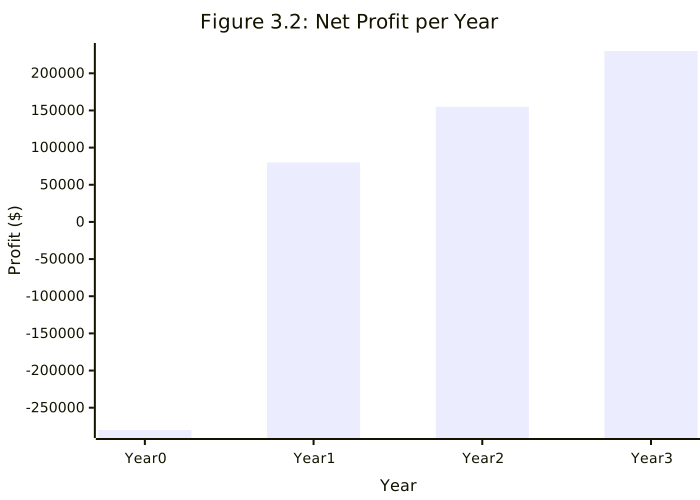
Figure 3.2: Net Profit per Year

Break-even Analysis

The break-even point occurs when cumulative revenue surpasses cumulative costs:

  • Year 1: Cumulative revenue = $150,000, cumulative cost = $350,000 → still negative (-$200,000).
  • Year 2: Cumulative revenue = $375,000, cumulative cost = $420,000 → still negative (-$45,000).
  • Year 3: Cumulative revenue = $675,000, cumulative cost = $490,000 → positive cumulative net ($185,000).

Therefore, the project is expected to break even during Year 3, after which all additional revenue contributes to profit.

To illustrate:

  • Break-even revenue threshold: $490,000 (total 3-year cost).
  • Achieved at ~16,333 paid enrollments (490,000 ÷ $30).
  • Based on projected growth, this milestone will be reached in the third year of operation.
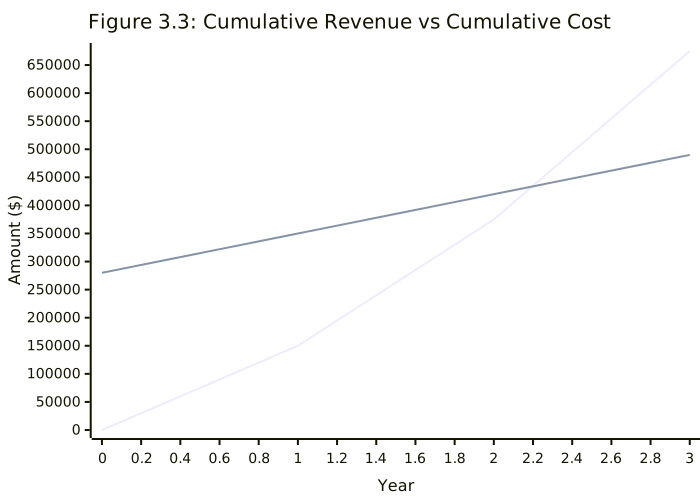
Figure 3.3: Cumulative Revenue vs Cumulative Cost - Chart showing break-even point analysis over a 3-year period
Figure 3.3: Cumulative Revenue vs Cumulative Cost

3.2 Risk Management

This section identifies key risks for the coding education platform across technical, operational, and legal domains. Each risk is assessed with a likelihood (Low/Medium/High), impact (Low/Medium/High), and mitigation strategies. Where appropriate, a qualitative risk matrix is used to emphasize prioritization.

3.2.1 Technical Risks

RiskDescriptionLikelihoodImpactMitigation
Scalability & UptimeHigh traffic or data growth could overwhelm the platform. Without modular architecture and robust testing, performance bottlenecks and downtime can occur.HighHighDesign a scalable, microservices-based architecture; use horizontal scaling (load balancing, CDN, caching); implement automated testing and monitoring to detect and prevent bottlenecks.
External API IntegrationReliance on third-party APIs (e.g. Gemini, OpenRouter) can introduce outages or unpredictable behavior. Third-party services may have downtime or breaking changes.MediumHighVet and monitor external APIs closely (uptime/SLA checks); implement timeouts and retries; use circuit breakers to protect against surges; prepare fallback or degraded modes if an API fails.
Real-time Code ExecutionRunning user-submitted code in real time is error-prone. Sandbox failures, resource exhaustion, or vulnerabilities could crash the executor, harming reliability.MediumHighIsolate execution in secure sandboxes or containers; enforce resource limits (memory/time); continuously test with diverse workloads; scale the execution engine separately; monitor and auto-recover.

3.2.2 Operational Risks

RiskDescriptionLikelihoodImpactMitigation
Timeline DelaysRequirement changes, scope creep, or underestimation can derail schedules. Over-optimistic estimates may lead to extended deadlines.HighHighUse thorough upfront planning and clear requirements; apply realistic time estimates with contingency; use agile sprints for incremental delivery and reviews.
Resource ConstraintsLimited team size or skill shortages create bottlenecks.MediumHighCross-train staff and onboard talent early; use contingent resources; maintain a pipeline of developers; forecast and reallocate workloads proactively.
Content Development BottlenecksCreating high-quality, engaging coding lessons and exercises is time-consuming, which can delay releases or reduce quality.MediumMediumDevelop content iteratively with SMEs; reuse or adapt existing materials; employ instructional designers; prioritize high-impact modules first.
RiskDescriptionLikelihoodImpactMitigation
Data Privacy (Minors)Collecting data on children raises strict legal requirements (e.g., COPPA, GDPR). Failure to comply can cause severe penalties.MediumHighApply "privacy by design": minimize data collection, encrypt sensitive data, obtain parental consent, maintain clear privacy policies, and conduct regular audits.
Copyright & LicensingUsing third-party or community code/assets risks license infringement. Even one noncompliant license could result in legal or financial penalties.LowMediumEnforce strict review of all content/code; use license scanners; prefer permissive or original content; educate users on plagiarism; remediate infringing material.
Terms-of-Service ViolationsUsers may post disallowed content (hate speech, copyrighted code, malicious submissions) or cheat, violating the platform's ToS.MediumMediumPublish comprehensive ToS; implement moderation and reporting tools; enforce rules via filters and manual review; respond promptly and revise policies regularly.

3.3 Project plan

TO DO


3.4 Gantt Chart

TO DO


Chapter 4: System Analysis

4.1 Function Requireements

4.1.1 User Management System

User Registration and Authentication

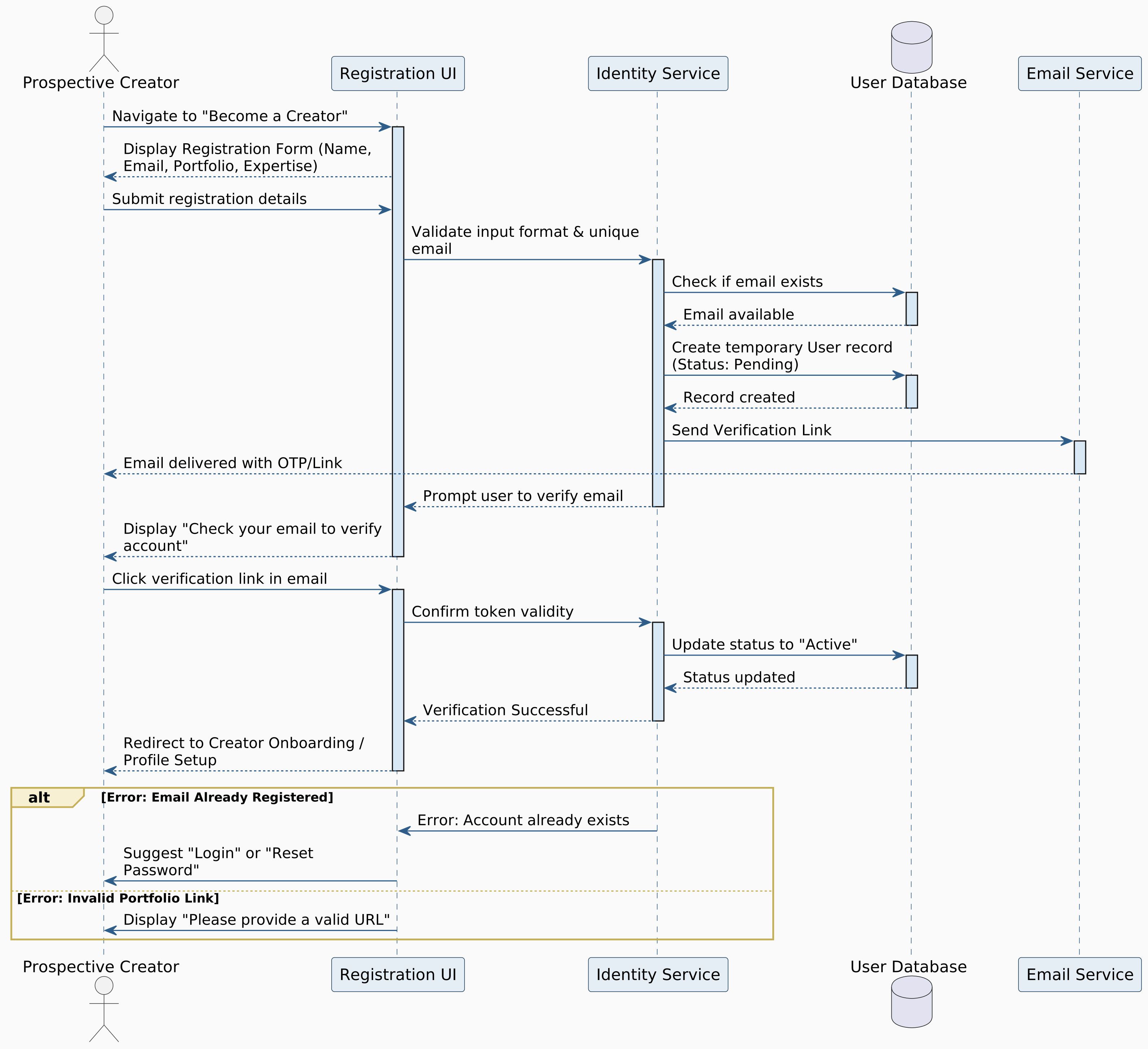
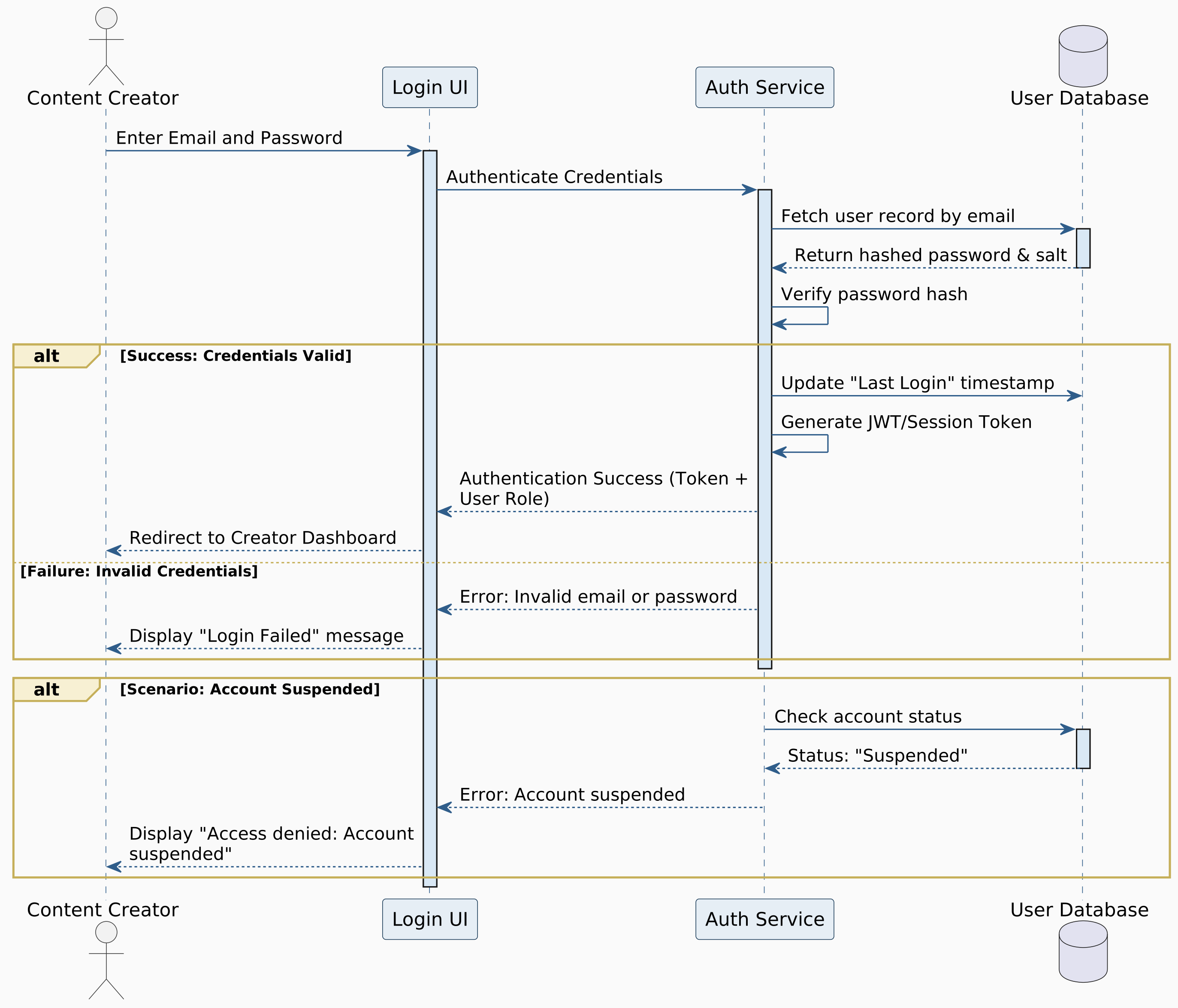
  • FR-1.1: System shall allow users to create accounts using email, username, and password.
  • FR-1.2: System shall support social login (Google, GitHub) for quick registration.
  • FR-1.3: System shall implement email verification for new accounts.
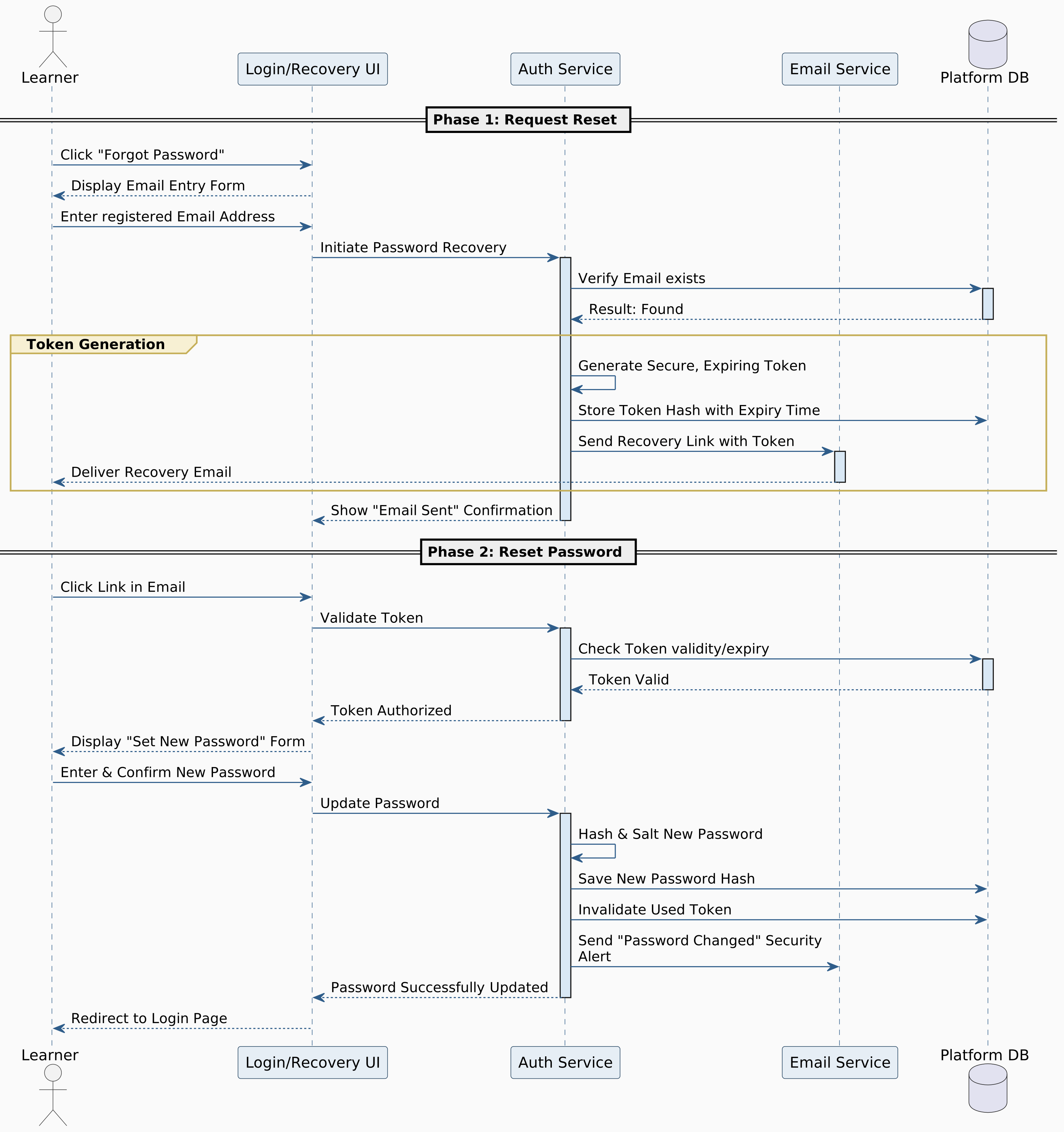
  • FR-1.4: System shall provide secure password reset functionality via email.
  • FR-1.5: System shall enforce strong password policies (minimum 8 characters, special characters).
  • FR-1.6: System shall implement two-factor authentication (2FA) as an additional security feature.
Optional Feature: Two-factor authentication (2FA).

User Profiles and Settings

  • FR-1.7: System shall allow users to create and edit personal profiles with avatar, bio, and learning goals.
  • FR-1.8: System shall allow users to select preferred programming languages (Python, JavaScript, etc.).
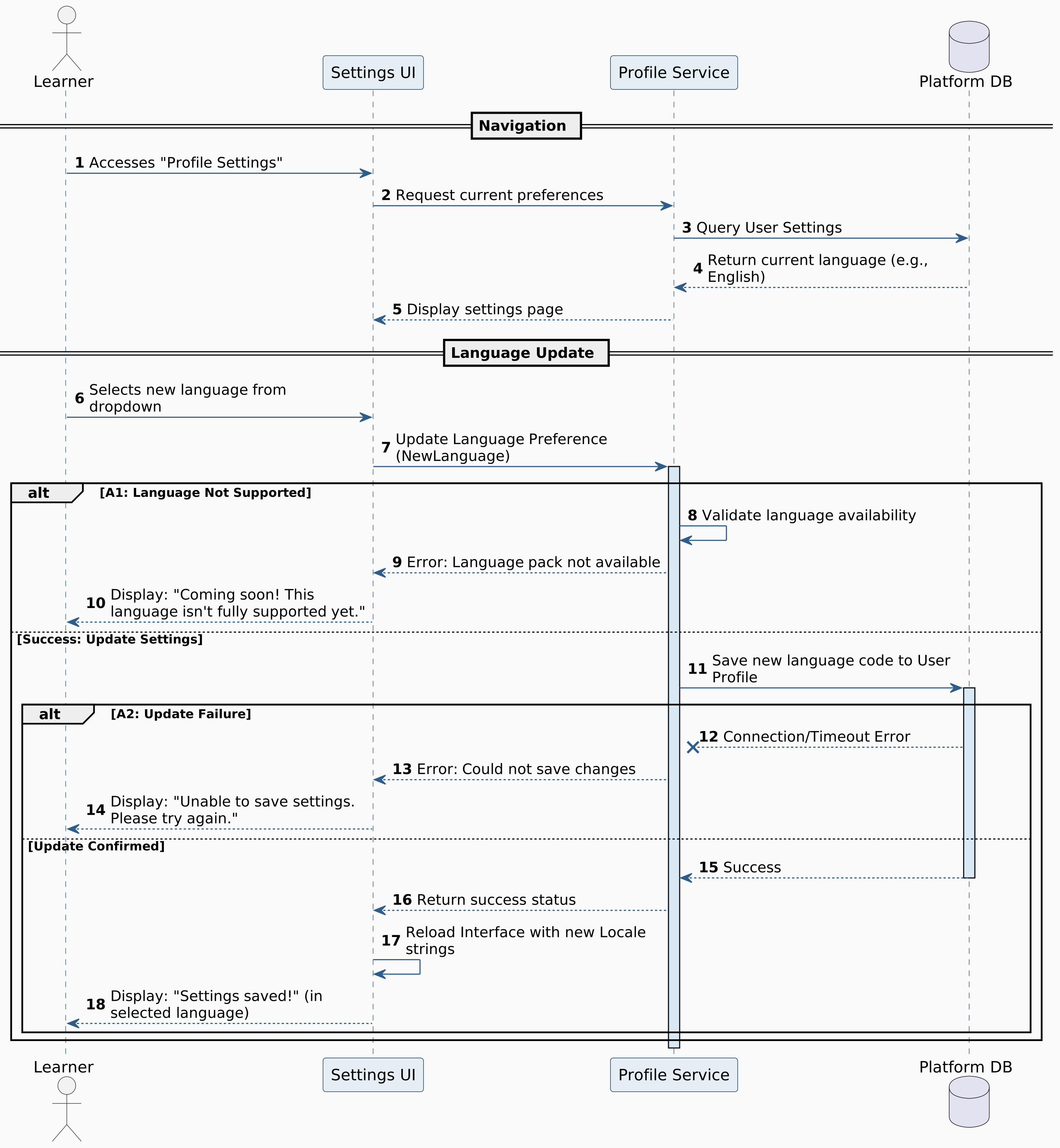
  • FR-1.9: System shall support multiple language interface options (Arabic, English).
Optional Feature: Language interface options.

User Roles and Permissions

  • FR-1.10: System shall support multiple user roles: Learner, Administrator, Content Creator.
  • FR-1.11: System shall implement role-based access control for different platform features.

4.1.2 Learning Management System

Course Structure and Navigation

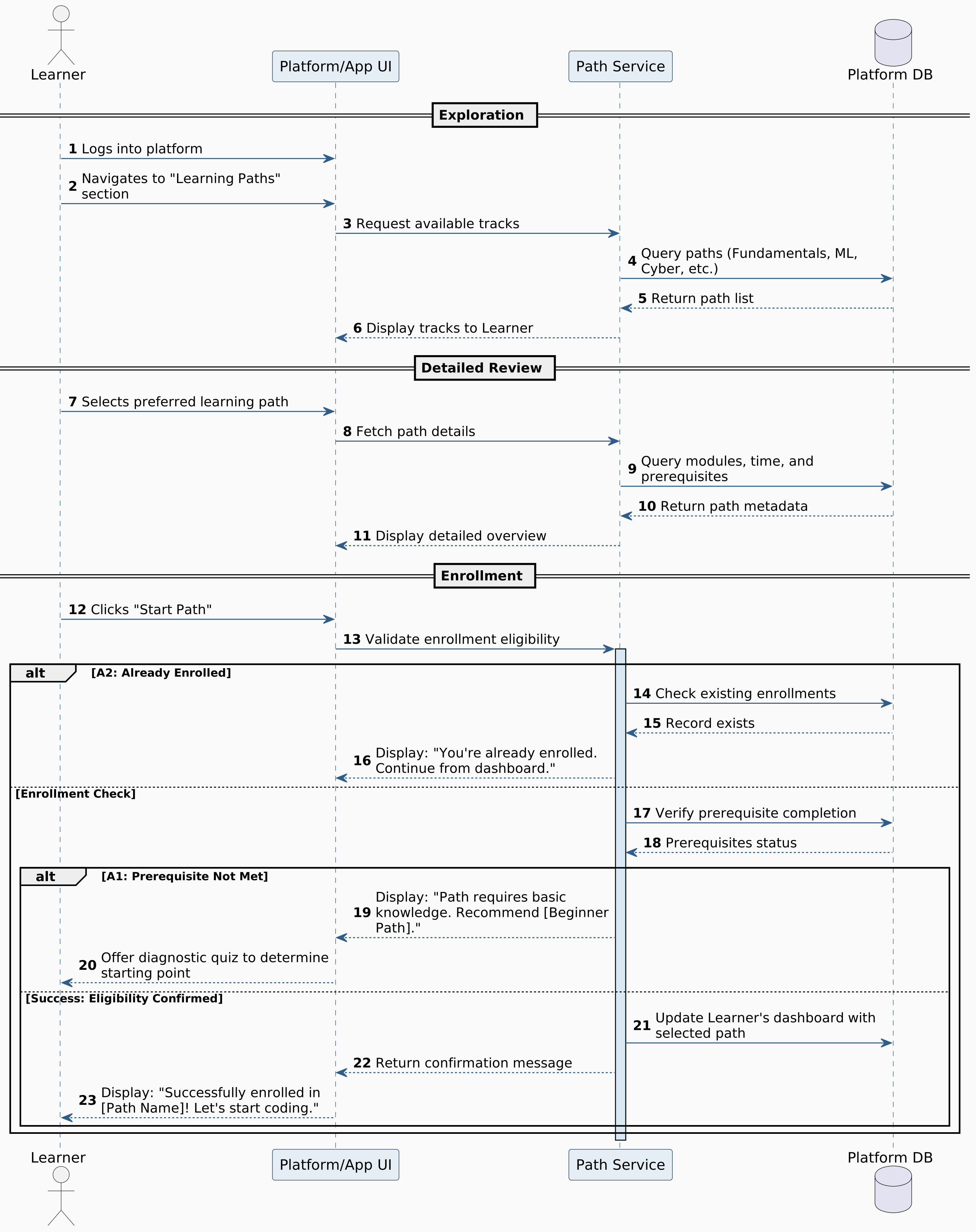
  • FR-2.1: System shall organize content into structured learning paths from fundamentals to advanced topics.
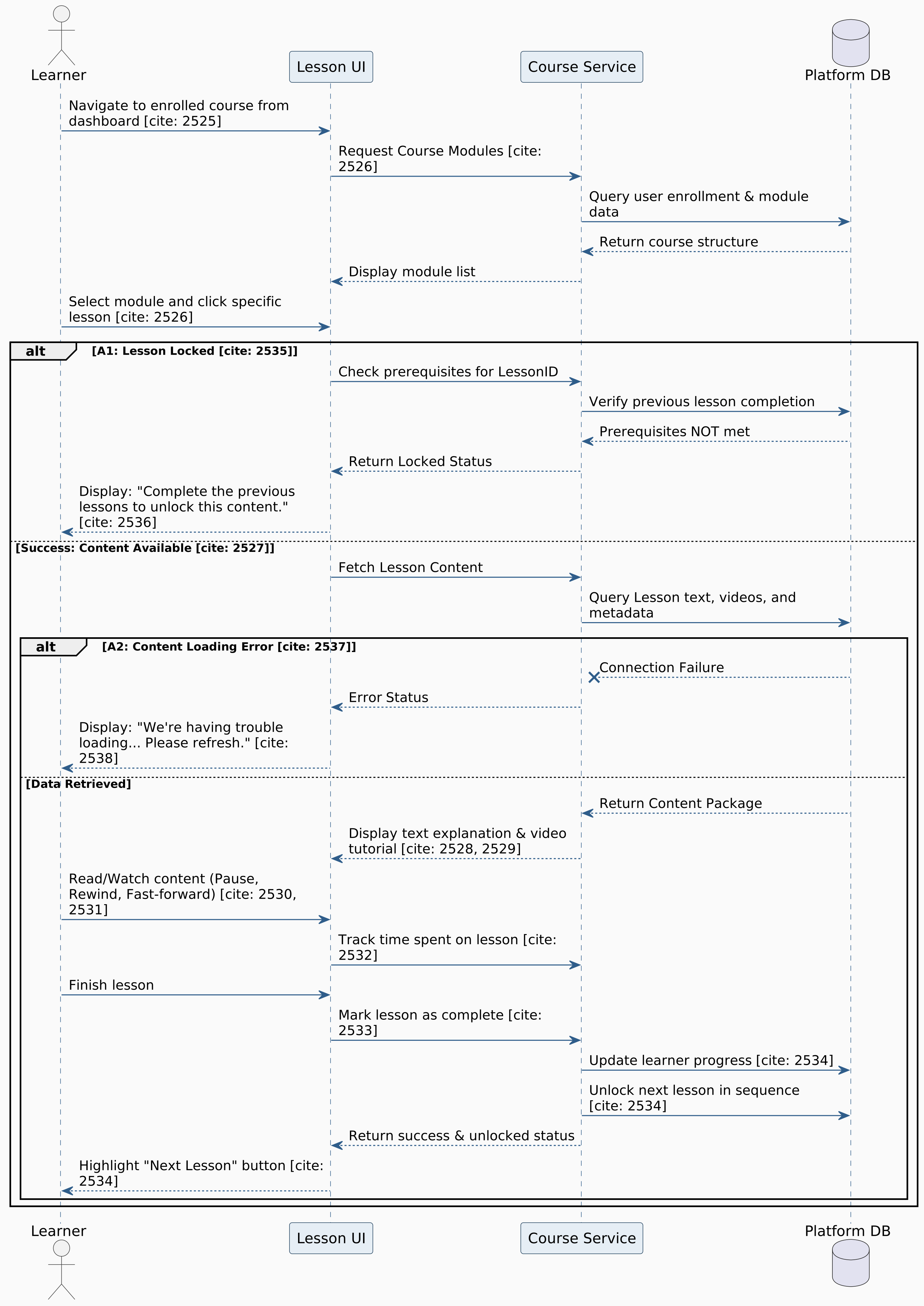
  • FR-2.2: System shall implement prerequisite-based lesson unlocking mechanisms.
  • FR-2.3: System shall provide a visual learning roadmap showing completed, current, and locked modules.
  • FR-2.4: System shall support multiple learning tracks (Python, JavaScript, Web Development, OOP, Algorithms).
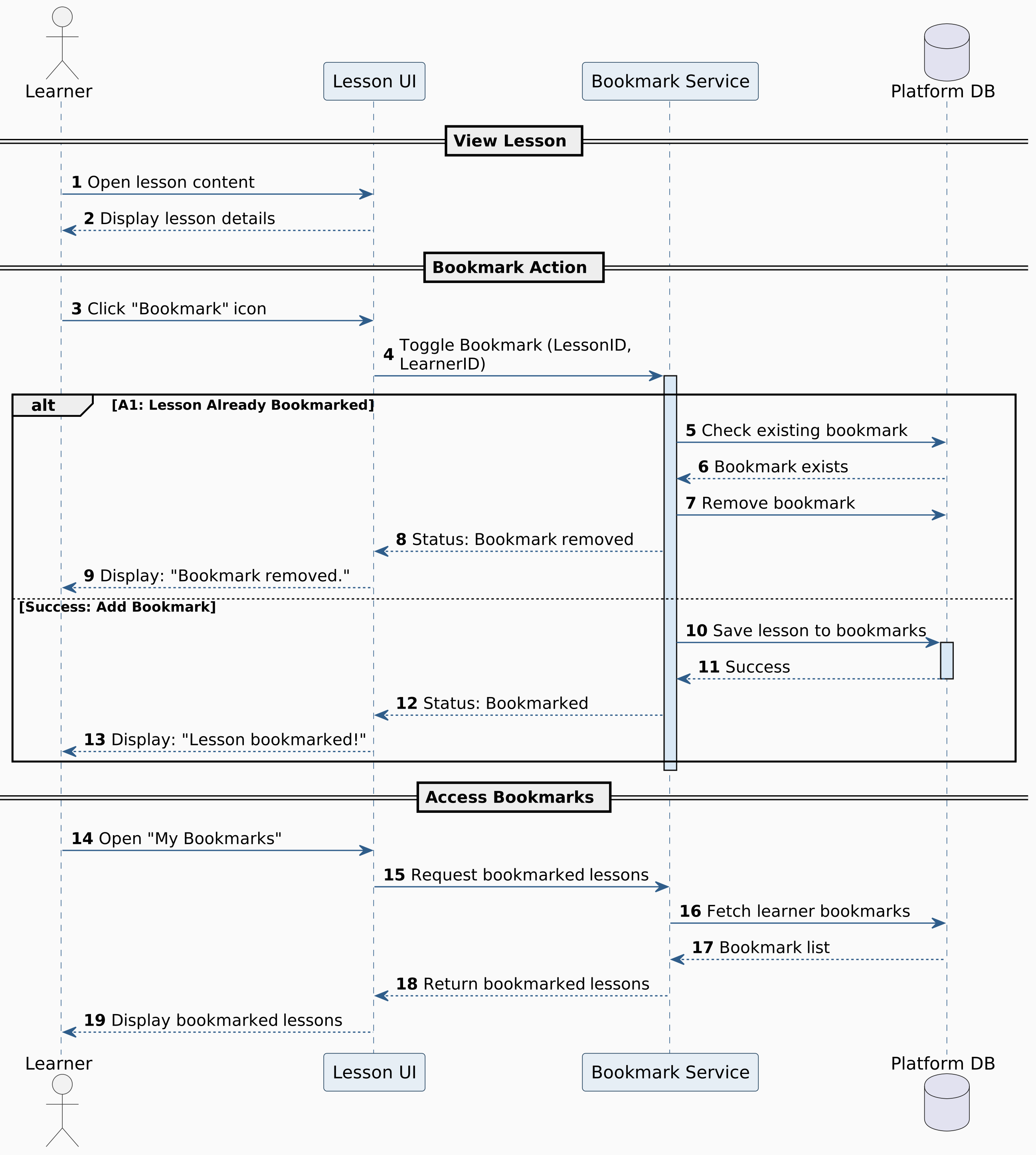
Optional Feature: Lesson bookmarking.

Lesson Content Delivery

  • FR-2.5: System shall support multi-format lesson content (text, videos, interactive demos).
  • FR-2.6: System shall provide step-by-step coding walkthroughs with highlighted code segments.
  • FR-2.7: System shall include conceptual explanations before practical exercises.
  • FR-2.8: System shall support rich text formatting, code syntax highlighting, and embedded media.
Optional Feature: Estimated completion time per lesson.

Adaptive Learning Features

  • FR-2.9: System shall track user performance and recommend personalized learning paths.
  • FR-2.10: System shall adjust exercise difficulty based on user success rates.
  • FR-2.11: System shall provide spaced repetition reminders for previously learned concepts.

4.1.3 Code Editor and Execution Environment

In-Browser Code Editor

  • FR-3.1: System shall embed Monaco Editor for in-browser code editing.
  • FR-3.2: System shall support syntax highlighting for Python, JavaScript, etc.
  • FR-3.3: System shall provide auto-completion and IntelliSense features.
  • FR-3.4: System shall include line numbering, code folding, and bracket matching.
  • FR-3.5: System shall support multiple editor themes (dark/light mode).
  • FR-3.6: System shall provide keyboard shortcuts for common coding operations.

Code Execution and Testing

  • FR-3.7: System shall execute user code securely using APIs.
  • FR-3.8: System shall display real-time output and error messages.
Optional Feature: Test case validation, execution performance metrics.

Code Analysis and Feedback

  • FR-3.9: System shall provide instant syntax error detection and suggestions.
  • FR-3.10: System shall offer code optimization suggestions and best practices.
  • FR-3.11: System shall compare user solutions with model answers.
  • FR-3.12: System shall highlight potential bugs or logical errors using LLM.
Optional Feature: Code complexity analysis with Big O insights.

Blockly Integration

  • FR-3.13: System shall provide a block-based workspace with customizable categories (Logic, Math, Control, Events, etc.).
  • FR-3.14: System shall allow users to generate source code (JavaScript/Python) from block structures.
  • FR-3.15: System shall enable code execution within the application environment.
  • FR-3.16: System shall support saving and loading block configurations in XML/JSON format.
Optional Feature: Custom block expansion.

4.1.4 Interactive Exercise System

Exercise Types and Structure

  • FR-4.1: System shall support coding challenges, bug fixing, code completion, and multiple-choice exercises.
  • FR-4.2: System shall provide clear problem statements with input/output examples.
  • FR-4.3: System shall include starter code templates when appropriate.
  • FR-4.4: System shall support progressive difficulty within exercise sets.
  • FR-4.5: System shall offer optional hints and explanations.

Validation and Grading

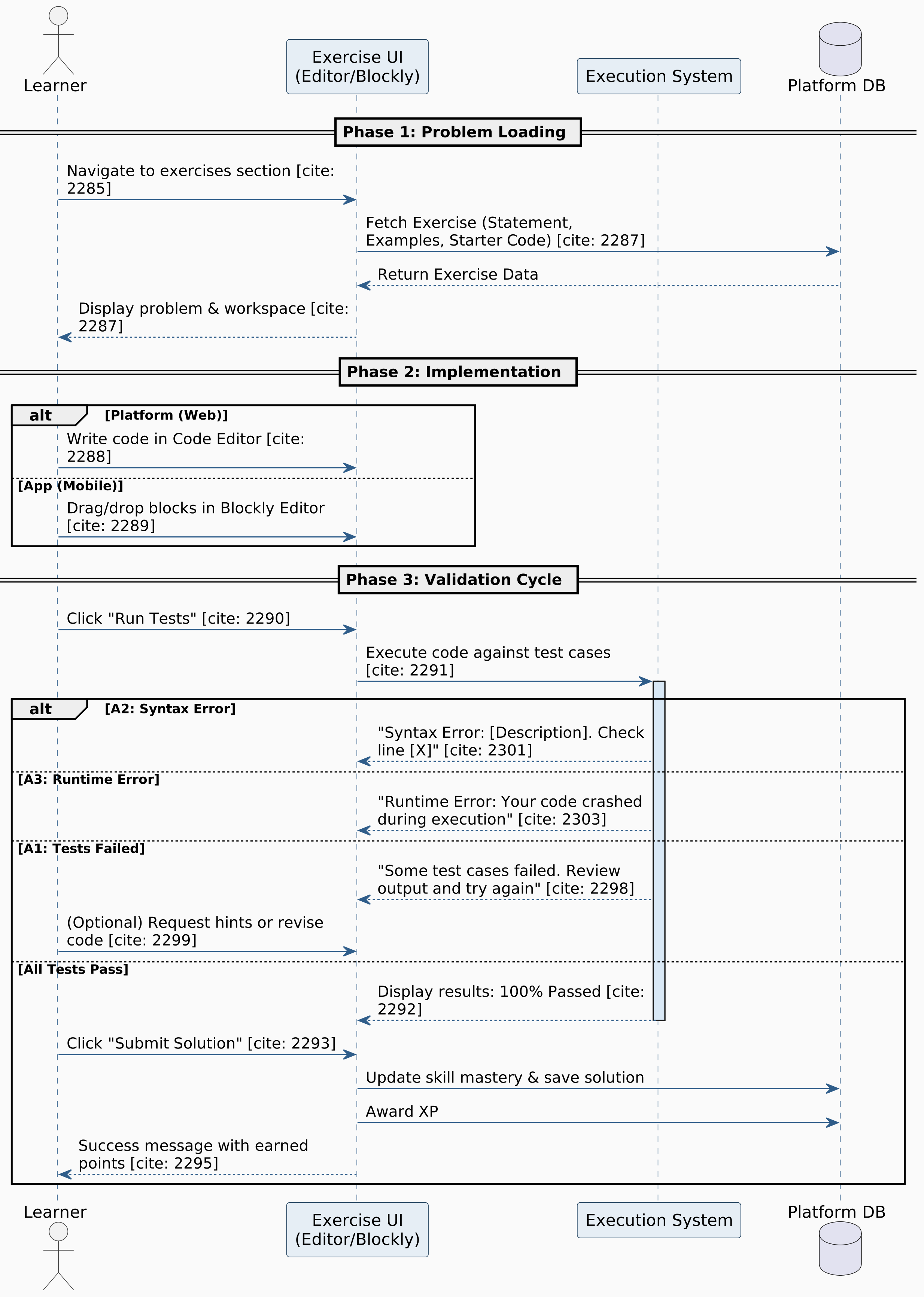
  • FR-4.6: System shall automatically validate solutions against test cases.
  • FR-4.7: System shall track solution attempts and provide retry mechanisms.
Optional Feature: Immediate feedback, partial credit.

Solution Management

  • FR-4.8: System shall provide "section of solutions" after successful completion.
  • FR-4.9: System shall allow users to submit multiple approaches to the same problem.
Optional Feature: Save and version solutions.

4.1.5 Gamification System

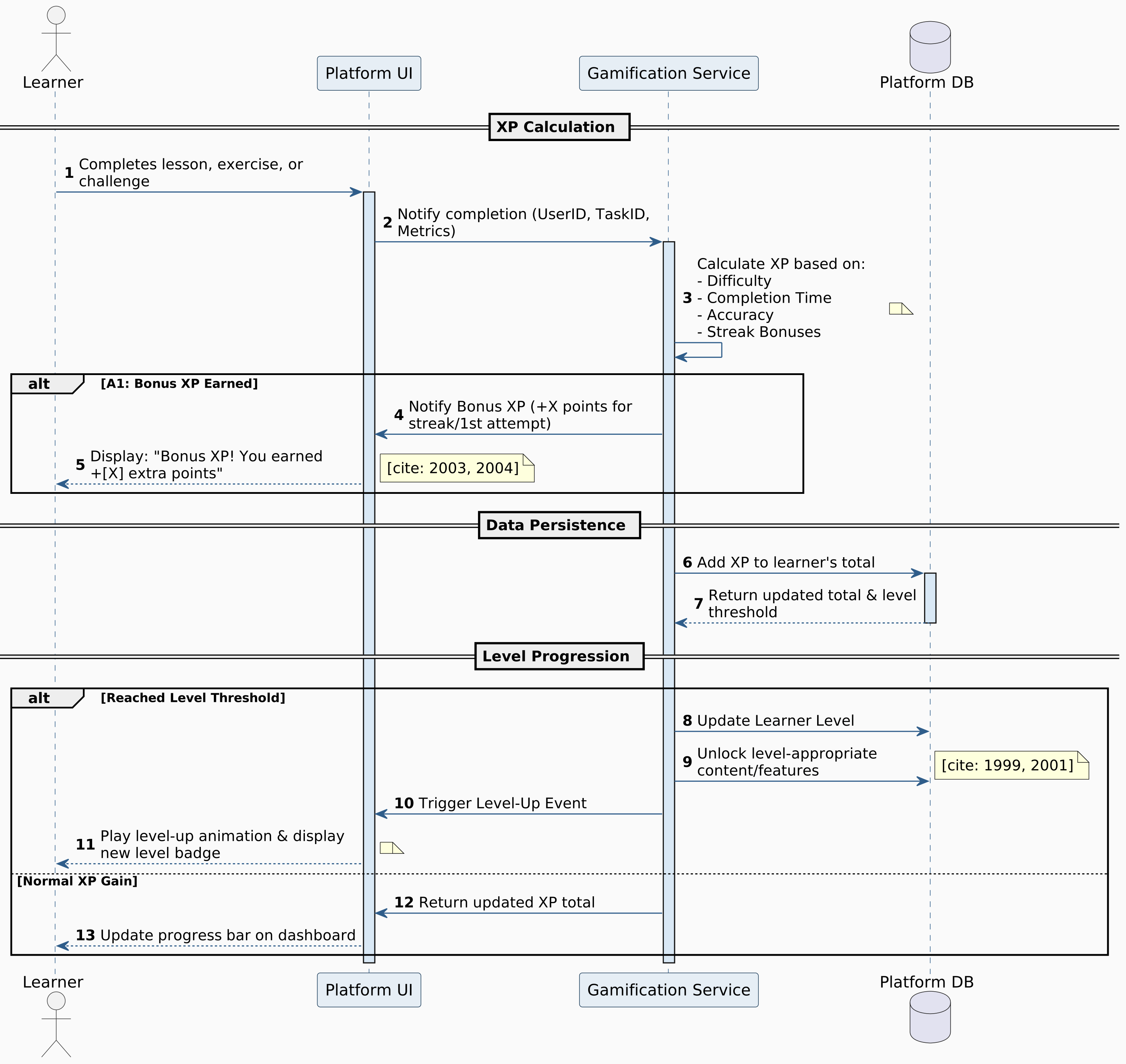
Points and Experience (XP)

  • FR-5.1: System shall award XP for completed lessons, exercises, and achievements.
  • FR-5.2: System shall implement progressive XP requirements for level advancement.
  • FR-5.3: System shall provide XP bonuses for consecutive learning streaks.
  • FR-5.4: System shall award bonus points for first attempts.
  • FR-5.5: System shall display XP progress bars and level indicators.

Achievement System

  • FR-5.6: System shall implement badge categories (completion, mastery, collaboration).
  • FR-5.7: System shall provide rare and legendary badges for exceptional achievements.
  • FR-5.8: System shall display badge galleries on user profiles.
  • FR-5.9: System shall notify users upon earning new achievements.
Optional Feature: Skill-specific badges.

Leaderboards and Competition

  • FR-5.10: System shall maintain global and weekly leaderboards.
  • FR-5.11: System shall support friend-based leaderboards and challenges.
  • FR-5.12: System shall provide leaderboard filtering by time, skill level, or language.

Streaks and Daily Goals

  • FR-5.13: System shall track daily learning streaks with visual indicators.
  • FR-5.14: System shall send streak reminder notifications.
  • FR-5.15: System shall provide streak recovery options.
Optional Feature: Personalized daily goals.

Certification Management

  • FR-5.16: System shall display all available certifications with details.
  • FR-5.17: System shall allow eligible users to enroll in certification tracks.
  • FR-5.18: System shall create a certification dashboard showing progress and deadlines.

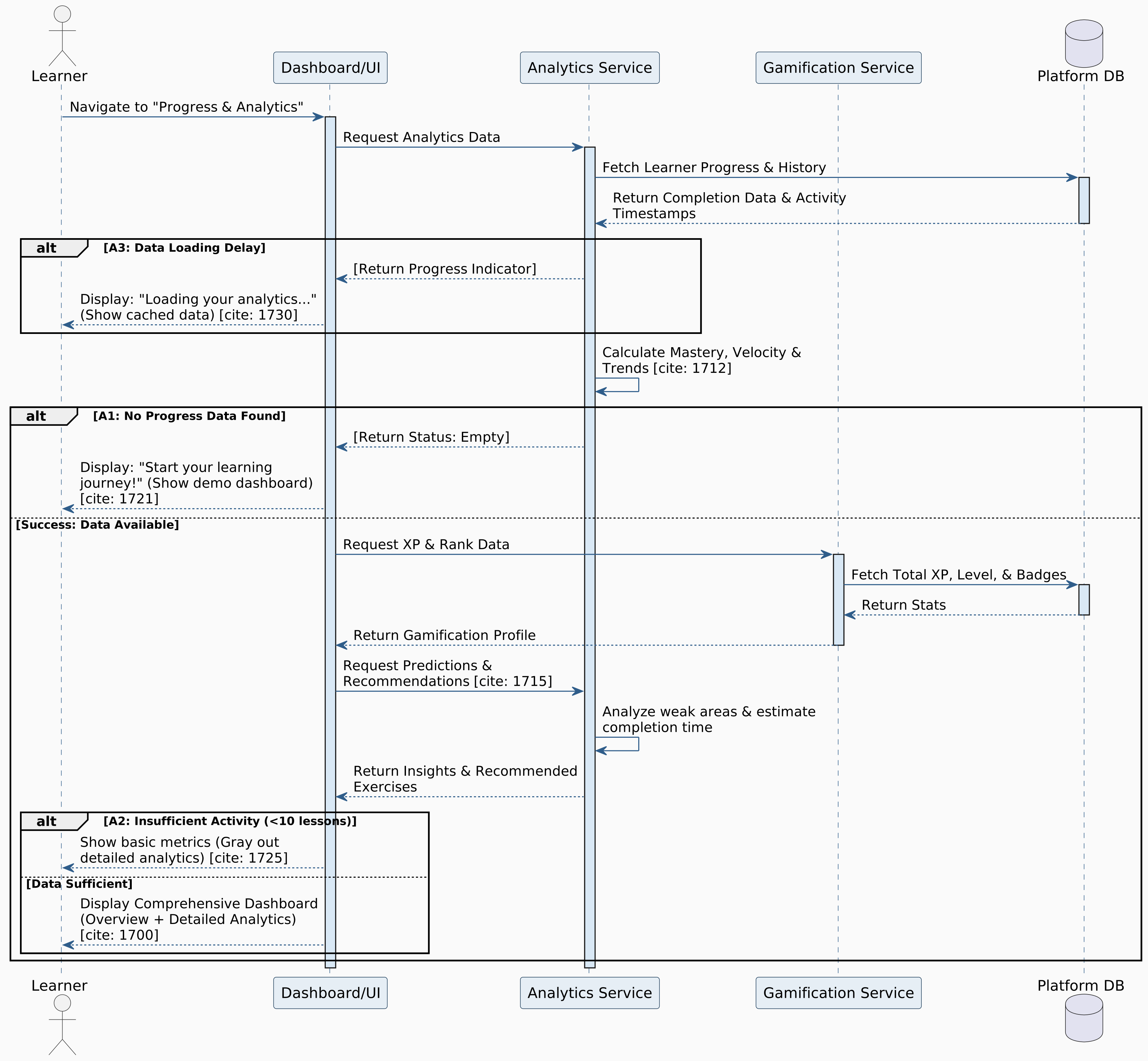
4.1.6 Progress Tracking and Analytics

Individual Progress Monitoring

  • FR-6.1: System shall maintain comprehensive learning history per user.
  • FR-6.2: System shall calculate and display skill mastery percentages.
  • FR-6.3: System shall track time spent on topics and exercises.
  • FR-6.4: System shall identify strengths and weaknesses.

Performance Analytics

  • FR-6.5: System shall track accuracy rates and improvement trends.
  • FR-6.6: System shall monitor learning velocity.
  • FR-6.7: System shall calculate estimated completion time for coursework.

Visual Progress Representation

  • FR-6.8: System shall provide interactive progress roadmaps.
  • FR-6.9: System shall display skill trees showing mastered and locked concepts.
Optional Feature: Charts and graphs for analytics.

4.1.7 AI-Powered Features

Intelligent Hints and Assistance

  • FR-7.1: System shall integrate AI APIs (Gemini via OpenRouter) for contextual hints.
  • FR-7.2: System shall provide progressive hint levels.
  • FR-7.3: System shall analyze user code and suggest improvements.
  • FR-7.4: System shall generate explanations for complex programming concepts.
  • FR-7.5: System shall adapt hint complexity based on user skill.

Personalized Learning Recommendations

  • FR-7.6: System shall suggest relevant exercises when users struggle.
Optional Feature: Learning schedules, AI practice problems.

Automated Content Generation

  • FR-7.7: System shall generate variations of exercises for extra practice.
  • FR-7.8: System shall generate code examples for abstract concepts.

4.1.8 Content Management System

Course and Lesson Administration

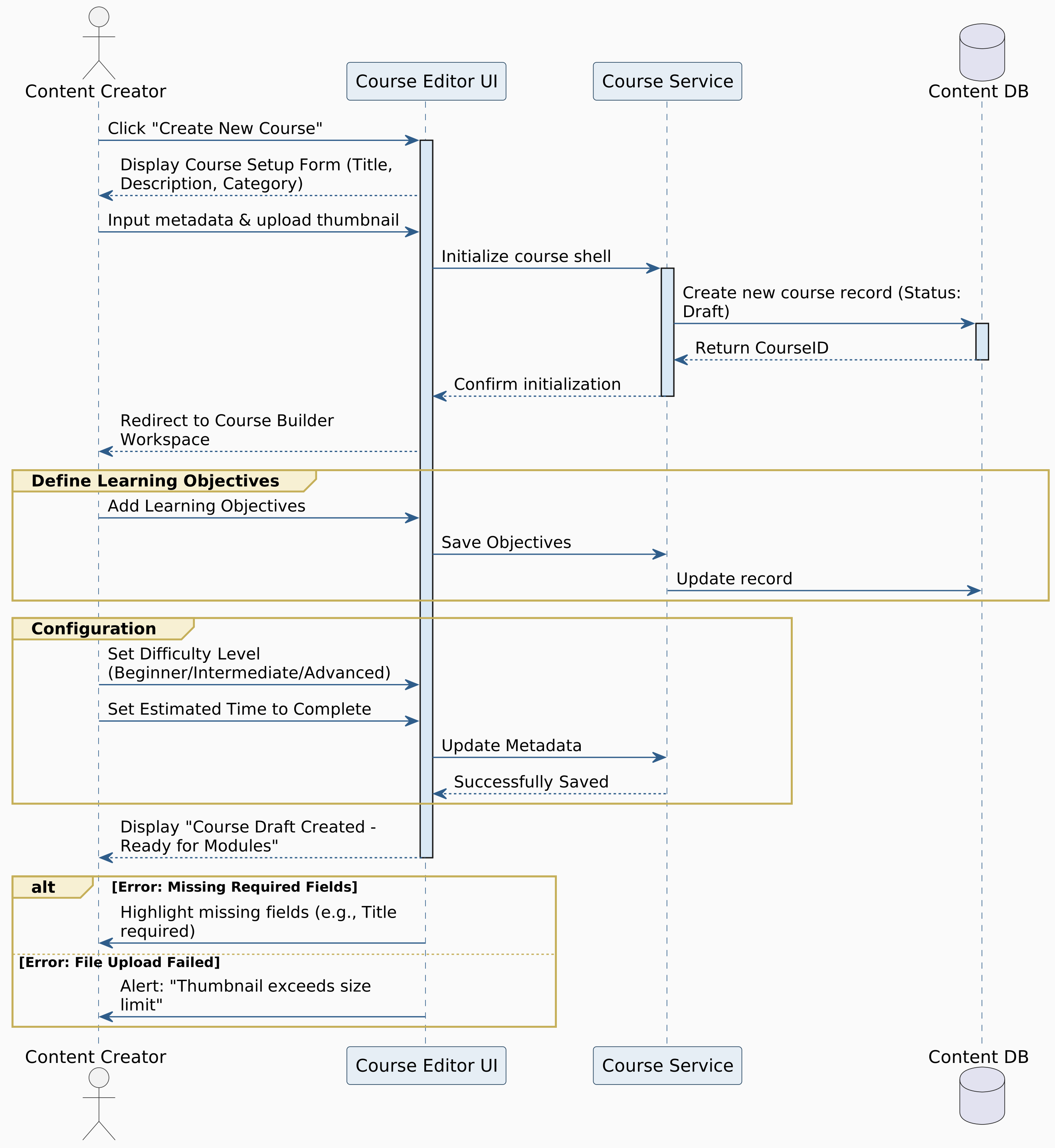
  • FR-8.1: System shall provide a content creation interface for authorized users.
Optional Feature: Content scheduling, review workflows.

Exercise and Assessment Management

  • FR-8.2: System shall allow creation of coding exercises with test cases.
  • FR-8.3: System shall support exercise difficulty categorization.
  • FR-8.4: System shall validate exercises before publication.
Optional Feature: Exercise cloning and templates.

Multimedia Content Support

  • FR-8.5: System shall support video upload or embedding.
  • FR-8.6: System shall support content localization for multiple languages.
Optional Feature: Image embedding and interactive content creation.

4.1.9 System Administration

User Management

  • FR-9.1: System shall provide an administrative dashboard for managing user accounts.
  • FR-9.2: System shall support user role assignment and permission management.

Platform Monitoring and Analytics

  • FR-9.3: System shall maintain system logs and audit trails.
  • FR-9.4: System shall provide usage statistics and dashboards.

Content Moderation

  • FR-9.5: System shall support manual content review and moderation workflows.
  • FR-9.6: System shall maintain content removal and user warning systems.

4.1.10 Integration and API Features

Third-Party Integrations

  • FR-10.1: System shall integrate with external authentication providers (OAuth or BetterAuth).
  • FR-10.2: System shall connect with AI services (OpenRouter, Gemini API).

Platform APIs

  • FR-10.3: System shall provide RESTful APIs for web and mobile apps.
  • FR-10.4: System shall support webhook integrations.

Mobile and Cross-Platform Support

  • FR-10.5: System shall deliver a responsive web interface optimized for mobile.
  • FR-10.6: System shall provide mobile-specific features (push notifications).
  • FR-10.7: System shall ensure cross-browser compatibility.
Optional Feature: Offline content caching.

4.1.11 Security and Privacy

Data Protection

  • FR-11.1: System shall encrypt sensitive user data at rest and in transit.
  • FR-11.2: System shall implement secure session management and timeouts.
  • FR-11.3: System shall provide privacy controls and data deletion options.
  • FR-11.4: System shall comply with GDPR and COPPA standards.

Platform Security

  • FR-11.5: System shall implement input validation and sanitization.
  • FR-11.6: System shall protect against XSS, CSRF, and SQL injection.
  • FR-11.7: System shall secure API endpoints with authentication and authorization.
  • FR-11.8: System shall implement rate limiting and DDoS protection.

4.2 Non-Function Requirements

4.2.1 Performance

NFR-1.1: Response Time

  • Landing page load: 2 seconds (3G or better)
  • Monaco editor initialization: 3 seconds
  • Code execution results: 5 seconds (standard exercises)
  • API responses: 1 second (login, save, submit)
  • Search/filtering: 2 seconds

NFR-1.2: Throughput

  • Concurrent users: 1,000+ without degradation
  • Simultaneous code executions: 500+
  • Peak submissions: 10,000/hour

NFR-1.3: Resource Utilization

  • Client memory: ≤ 500MB
  • Monaco editor: ≤ 200MB
  • Database queries: 100ms (95% of operations)
  • CDN cache hit rate: 90%+

NFR-1.4: Rendering Performance

  • Interactive elements response: 100ms
  • Animation frame rate: 60 FPS
  • Roadmap rendering (100 nodes): 1.5 seconds

4.2.2 Availability

NFR-2.1: System Uptime

  • Annual uptime: 99.5% (~43.8 hours downtime)
  • Maintenance windows: ≤ 4 hours/month (low-usage periods)

NFR-2.2: Service Availability

  • Core features: 24/7 availability
  • AI hints: 95% uptime
  • Leaderboards: 98% uptime

NFR-2.3: Geographic Availability

  • Global accessibility with focus on Arabic-speaking regions

NFR-2.4: Graceful Degradation

  • AI unavailable → pre-generated hints available
  • Execution service down → lessons & content accessible

4.2.3 Scalability

NFR-3.1: Horizontal Scalability

  • Stateless architecture for seamless load balancing
  • Connection pooling for efficient resource management

NFR-3.2: User Growth

  • Year 1: 50,000 users
  • Year 3: 200,000 users (without major changes)

NFR-3.3: Content Scalability

  • Launch: 500 lessons, 5,000 exercises
  • Future: 2,000 lessons, 20,000 exercises
  • Support new languages without refactoring

NFR-3.4: Database Scalability

  • PostgreSQL with read replicas
  • Quarterly query plan reviews

4.2.4 Reliability

NFR-4.1: Error Rate

  • System error rate: &lt0.5%
  • Code execution failures: &lt1% (system errors only)

NFR-4.2: Data Integrity

  • ACID compliance for progress data (Atomicity, Consistency, Isolation, Durability)
  • Daily backups with 30-day point-in-time recovery

NFR-4.3: Fault Tolerance

  • No single point of failure
  • Database failover: 60 seconds automatic

NFR-4.4: Data Consistency

  • Leaderboards: eventual consistency within 5 minutes
  • User profiles: immediate consistency
  • Cache invalidation: 30 seconds

4.2.5 Interoperability

NFR-5.1: API Standards

  • RESTful design with standard HTTP methods
  • JSON responses with consistent structure
  • OpenAPI/Swagger documentation

NFR-5.2: Third-Party Integration

  • OAuth 2.0 (Google, GitHub)
  • Webhook support with JSON payloads

NFR-5.3: Data Exchange

  • Export formats: JSON, CSV
  • Version-control compatible storage

NFR-5.4: Browser Compatibility

  • Chrome, Firefox, Safari, Edge (latest versions)
  • Browsers released within 2 years

NFR-5.5: Mobile Compatibility

  • Responsive: 320px–2560px
  • Native notifications (FCM/APNs)

4.2.6 Usability

NFR-6.1: Learnability

  • Account setup → first lesson: 5 minutes
  • Interactive tutorial: &lt10 minutes

NFR-6.2: UI Design

  • Material Design principles
  • Arabic (RTL) and English (LTR) support
  • 3 font size options

NFR-6.3: Accessibility

  • Keyboard navigation (tab, arrows, enter)
  • ARIA labels and semantic HTML
  • Color-blind modes with alternative indicators

NFR-6.4: Error Handling

  • User-friendly messages (Arabic/English)
  • Contextual help tooltips
  • Searchable help center accessible from all pages

NFR-6.5: Localization

  • Full Arabic/English localization
  • Language switching without progress loss
  • Regional date, time, and number formatting

NFR-6.6: Responsiveness

  • Immediate visual feedback
  • Progress indicators for operations > 1 second

4.2.7 Maintainability

NFR-7.1: Code Quality

  • Test coverage: ≥ 80% (critical components)
  • Peer review required before merge

NFR-7.2: Documentation

  • API docs with examples and schemas
  • Architecture diagrams (system, database, data flow)
  • Code comments for complex logic

NFR-7.3: Modularity

  • Reusable, independently testable components
  • Versioned migration scripts

NFR-7.4: Logging & Monitoring

  • Centralized logs with 90-day retention
  • Automated alerts for critical errors

NFR-7.5: Deployment

  • Automated CI/CD pipelines
  • Rollback capability: 10 minutes

4.2.8 Recovery

NFR-8.1: Backup & Restore

  • Daily full + 6-hour incremental backups
  • 30-day point-in-time recovery
  • Weekly integrity verification

NFR-8.2: Disaster Recovery

  • Semi-annual testing
  • RTO: 4 hours
  • RPO: ≤ 1 hour data loss

NFR-8.3: Failure Detection

  • Alert within 2 minutes of critical failure

NFR-8.4: Data Recovery

  • Individual account restoration
  • Checksum validation with automatic rollback

NFR-8.5: Service Recovery

  • Resume after maintenance: 5 minutes
  • Automatic session restoration
  • Clear incident messaging

NFR-8.6: Transaction Recovery

  • Automatic completion or manual review
  • Transaction log maintenance

4.3 Functional Decomposition

Decomposition Diagram - Part 1

Figure 4.1: Decomposition Diagram Part 1

Decomposition Diagram - Part 2

Figure 4.2: Decomposition Diagram Part 2

Chapter 5: System Architecture

5.1 Actor-goal List

ActorGoals
Learner1. Register, log in, and manage their own profiles.
2. Choose preferred programming languages and interface languages.
3. Follow structured learning paths and unlock lessons progressively.
4. Learn via text, videos, and interactive demos.
5. Practice coding using Monaco Editor with syntax highlighting, auto-completion, and real-time feedback.
6. Receive AI-powered hints, explanations, and recommendations.
7. Complete exercises, earn XP, badges, and certifications.
8. Track progress, mastery, and performance analytics.
9. Participate in leaderboards, streaks, and challenges.
Content Creator / Instructor1. Create and manage courses, lessons, and coding exercises.
2. Categorize exercises by difficulty and validate before publishing.
3. Add multimedia (videos, images) and localized content.
4. Review and update educational materials.
5. Generate content in different formats (text, code, interactive demos).
Administrator1. Manage user accounts and assign roles/permissions.
2. Monitor platform analytics and logs.
3. Moderate content and enforce warnings or removals.
4. Oversee data security, backups, and system performance. "-"
5. Configure integrations and APIs for external services. "-"
AI System
(Gemini / OpenRouter)
1. Provide contextual hints and adaptive learning recommendations.
2. Analyze learner code to detect errors and suggest improvements.
3. Generate additional exercises and code examples. "-"
4. Adjust hint complexity based on user skill level. "-"

5.2 Use Cases Diagram

Figure 5.1: Use Cases Diagram

5.3 Use Cases Format

This section presents use cases for the DuoCodo platform organized by user role. The cases progress from administrative functions through content creation to learner interactions, using three format levels: Brief (one-line), Casual (structured scenarios), and Fully Dressed (comprehensive specifications).

5.3.1 Administrator Use Cases

Brief Format Use Cases

1. View System Logs
The administrator views system activity logs, error reports, and security events to monitor platform health.

2. Check Platform Statistics
The administrator views key metrics including total users, active learners, course enrollments, and system performance indicators.

3. View User List
The administrator displays a searchable list of all registered users with basic information and account status.

Casual Format Use Cases

4. Manage User Accounts
Actor
Administrator
Main Success Scenario
The administrator logs into the admin dashboard.
The administrator navigates to the "User Management" section.
The system displays a searchable, filterable user list with columns:
Username
Email
Role (Learner/Content Creator/Admin)
Account status (Active/Suspended/Deactivated)
Registration date
Last login
Total XP/Activity level
The administrator can search by username, email, or user ID.
The administrator can filter by:
Role type
Account status
Registration date range
Activity level (active/inactive)
The administrator selects a specific user to view details.
The system displays comprehensive user profile:
Personal information
Enrolled courses
Progress statistics
Activity history
Violation reports (if any)
The administrator can perform actions:
Edit user information
Reset password
Change account status
Adjust user role
View security logs
The administrator makes necessary changes and clicks "Save."
The system updates user information and logs the administrative action.
The affected user receives notification of account changes (if applicable).
Alternative Scenarios
A1. User Not Found
At Step 4, if search returns no results:
"No users found matching '[search term]'. Try different keywords or check spelling."
A2. Concurrent Admin Actions
At Step 9, if another admin is editing the same user:
"Administrator [Name] is currently editing this account. Changes may conflict."
System prevents conflicting simultaneous edits.
A3. Cannot Modify Super Admin
At Step 8, if attempting to change super admin permissions:
"Super Administrator accounts cannot be modified. Contact platform owner for changes."
A4. Bulk Action Requested
At Step 8, if admin selects multiple users:
The system offers bulk actions: suspend, send message, export data
Admin confirms bulk action
System processes with progress indicator

5. Assign User Roles
Actor
Administrator
Main Success Scenario
The administrator navigates to "Role Management" in the admin panel.
The system displays available roles:
Learner (default)
Content Creator
Mentor/Reviewer
Administrator
Super Administrator
The administrator searches for a specific user.
The administrator selects the user and clicks "Change Role."
The system displays current role and available role options.
The administrator selects the new role from the dropdown.
If promoting to Content Creator or higher, the system prompts:
"This role grants elevated permissions. Confirm you want to proceed?"
The administrator confirms the role change.
The system updates the user's role and permissions.
The system sends notification to the user:
"Your account role has been updated to [New Role]. You now have access to [features]."
The system logs the role change with timestamp and admin identifier.
The user's interface updates to reflect new capabilities on next login.
Alternative Scenarios
A1. Insufficient Permissions
At Step 6, if the admin lacks authority to assign certain roles:
"You cannot assign [Role Name]. Only Super Administrators can grant this role."
A2. User Already Has Role
At Step 6, if attempting to assign current role:
"This user already has the [Role Name] role."
A3. Content Creator Requirements Not Met
At Step 8, if promoting to Content Creator but user hasn't met criteria:
"This user hasn't completed Content Creator training. Assign role anyway?"
Admin can proceed with override or require training first.
A4. Demoting Active Content Creator
At Step 8, if demoting a creator with published content:
"This user has [X] published courses. Demoting will affect content management. Reassign content?"
Admin must decide how to handle existing content.

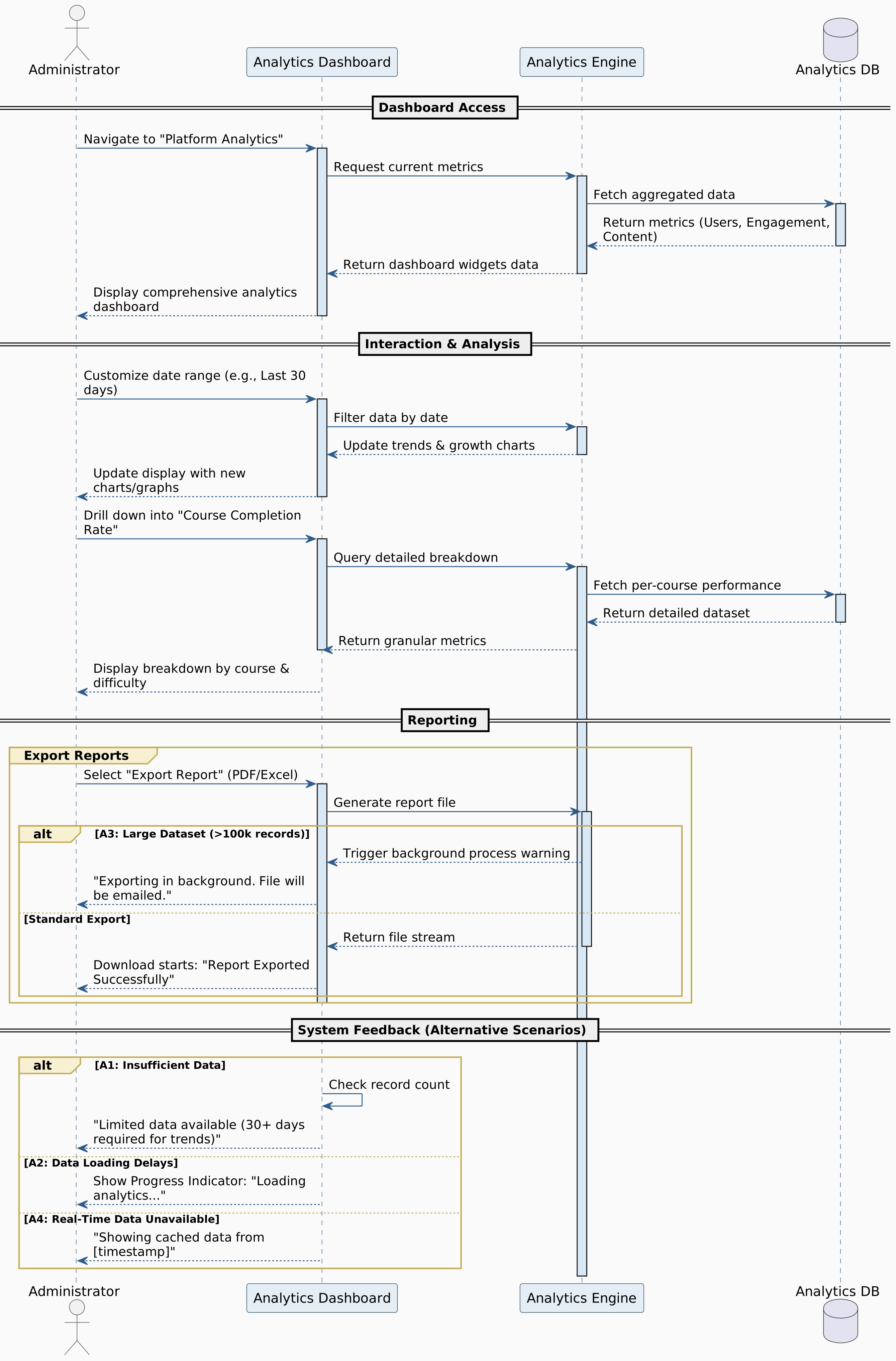
6. Monitor Platform Analytics
Actor
Administrator
Main Success Scenario
The administrator logs into the admin dashboard.
The administrator navigates to "Platform Analytics."
The system displays a comprehensive analytics dashboard with widgets:
User Metrics: Total users, new registrations, active users (daily/weekly/monthly)
Engagement Metrics: Average session duration, lessons completed, exercises submitted
Content Metrics: Total courses, lessons, exercises; most popular content
Performance Metrics: System uptime, response times, error rates
Revenue Metrics: Enrollments, certification purchases, subscription status
Geographic Distribution: User locations, regional activity
The administrator can customize the date range (last 7 days, 30 days, 90 days, custom).
The administrator can filter by:
User segment (learners, content creators)
Course categories
Learning paths
Device types (desktop, mobile)
The administrator views detailed charts and graphs:
User growth trends (line graph)
Enrollment distribution (pie chart)
Peak usage times (heatmap)
Course completion rates (bar chart)
The administrator can drill down into specific metrics:
Clicks on "Course Completion Rate"
System shows breakdown by course, difficulty level, and time period
The administrator identifies trends:
Notice a drop in engagement on weekends
See spike in mobile usage
Identify popular learning paths
The administrator can export reports in multiple formats:
PDF (executive summary)
Excel (detailed data)
CSV (raw data)
The administrator schedules automated reports:
Weekly summary email
Monthly executive dashboard
Quarterly performance review
The system saves admin's preferred dashboard configuration.
Alternative Scenarios
A1. Insufficient Data
At Step 3, if platform is newly launched with minimal data:
"Limited data available. Analytics become more meaningful after 30+ days of activity."
A2. Data Loading Delays
At Step 3, if analytics take time to compile:
"Loading analytics... This may take a minute for large datasets."
A3. Export Limit Exceeded
At Step 9, if requesting very large data export:
"This export contains 100,000+ records. It will be processed in the background and emailed when ready."
A4. Real-Time Data Unavailable
At Step 3, if requesting real-time metrics during system maintenance:
"Real-time data temporarily unavailable. Showing last cached data from [timestamp]."

7. Review and Filter System Logs
Actor
Administrator
Main Success Scenario
The administrator navigates to "System Logs" in the admin panel.
The system displays log categories:
Security logs (authentication, failed logins, permission changes)
Error logs (application errors, API failures)
User activity logs (major actions, submissions)
Content logs (course creation, updates, deletions)
System performance logs (response times, resource usage)
The administrator selects "Security Logs."
The system displays recent security events with details:
Timestamp
Event type
User involved
IP address
Action taken
Outcome (success/failure)
The administrator can filter logs by:
Date/time range
Event severity (info, warning, error, critical)
User or IP address
Event type
The administrator searches for specific events (e.g., "failed login attempts from IP X").
The system highlights matching log entries.
The administrator can expand log entries for detailed information:
Full error stack trace
Request parameters
System state at time of event
The administrator can export filtered logs for analysis.
The system allows the administrator to flag logs for follow-up investigation.
The administrator can set up alerts for specific log patterns:
Multiple failed logins from same IP → possible attack
Spike in errors → system issue requiring attention
Alternative Scenarios
A1. Excessive Log Volume
At Step 4, if millions of log entries exist:
"Showing most recent 10,000 entries. Narrow your search or time range for specific logs."
A2. Sensitive Information in Logs
At Step 8, if logs contain sensitive data:
The system masks passwords, tokens, personal data
Only super admins can view unmasked logs with additional authentication
A3. Log Storage Full
At Step 2, if log storage approaching limit:
"Warning: Log storage at 85% capacity. Archive or delete old logs to prevent data loss."

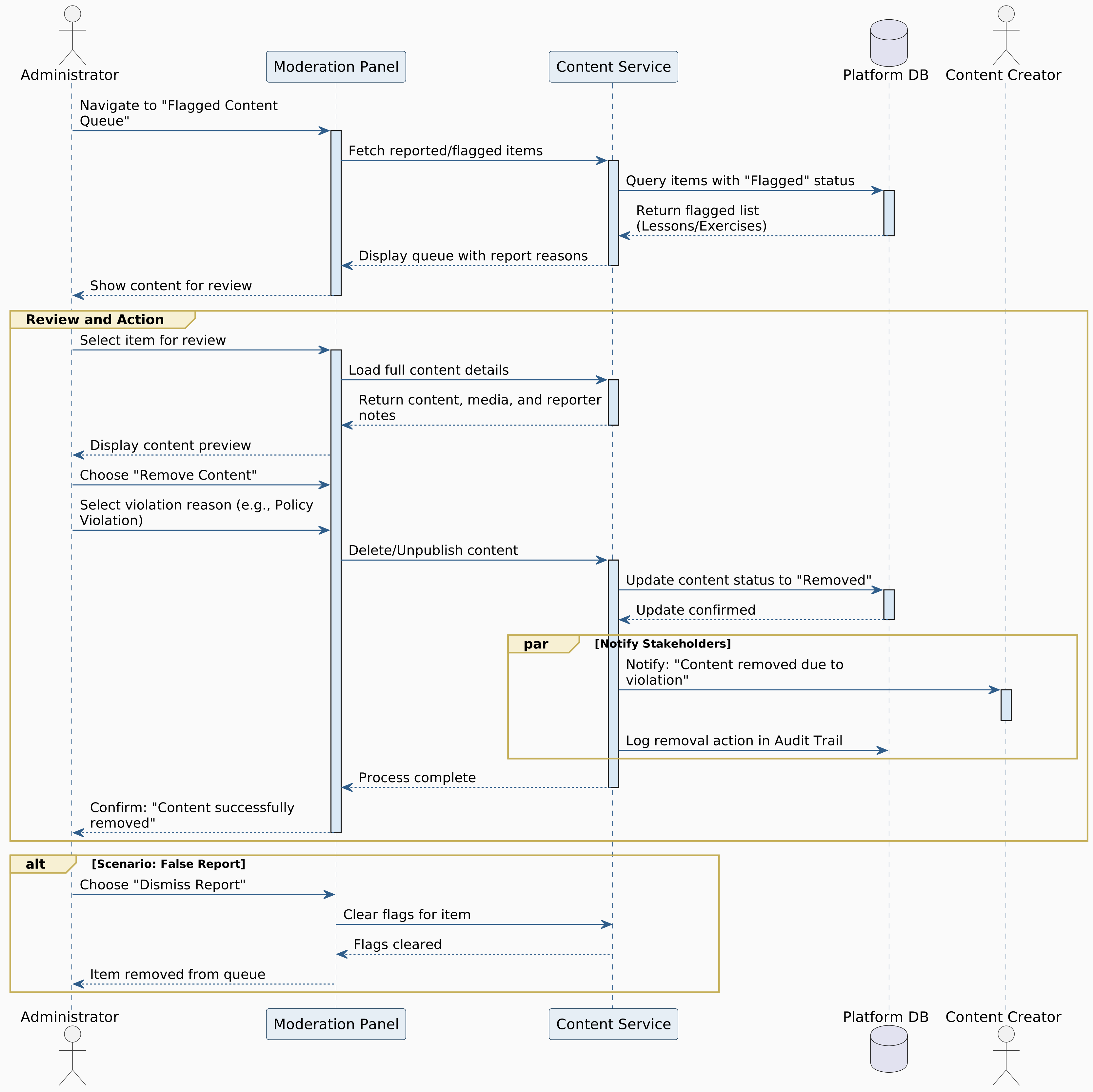
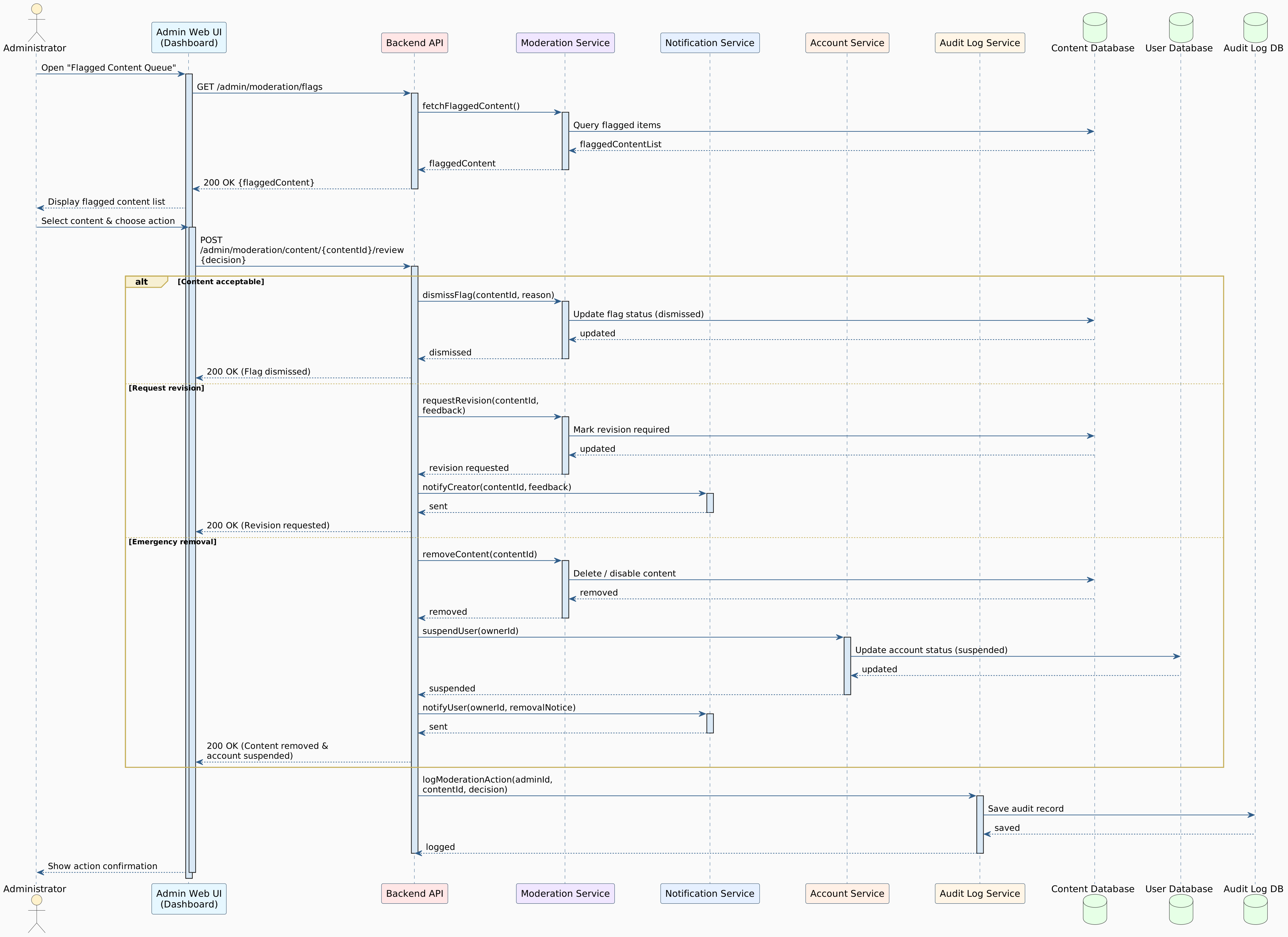
8. Remove Inappropriate Content
Actor
Administrator
Main Success Scenario
The administrator receives a content flagging notification or browses flagged content.
The administrator navigates to "Content Moderation" section.
The system displays pending moderation queue:
Flagged courses
Flagged exercises
Flagged forum posts
Flagged solutions
Reported user profiles
Each item shows:
Content preview
Reporter information
Reason for flag
Timestamp
Content creator
The administrator selects a flagged item to review.
The system displays the full content with context.
The administrator evaluates against platform guidelines:
Offensive language
Plagiarized content
Inappropriate images
Misleading information
Spam or advertising
Copyright violations
If content violates guidelines, the administrator chooses action:
Remove content immediately
Require revision by creator
Issue warning to creator
Suspend creator account
The administrator selects "Remove Content."
The system prompts for removal reason (required for transparency).
The administrator enters: "Contains plagiarized code from [source]. Violates copyright policy."
The system removes the content from public view.
The system notifies the content creator:
"Your content '[Title]' has been removed for: [Reason]. You may appeal this decision or create compliant content."
If repeat violation, the system automatically escalates to account suspension.
The system logs all moderation actions for audit trail.
The reporter receives notification that their flag was reviewed and action taken.
Alternative Scenarios
A1. Content Doesn't Violate Guidelines
At Step 8, if content is acceptable:
Administrator selects "Dismiss Flag"
Enters reason: "Content reviewed - no violation found. Appropriate educational material."
Reporter notified that content was reviewed but approved
Flag dismissed from queue
A2. Borderline Content
At Step 8, if content is questionable but not clearly violating:
Administrator selects "Request Revision"
Specifies improvements needed
Creator has 7 days to revise
If not revised, content is removed
A3. False/Malicious Reporting
At Step 7, if multiple flags from same user are consistently dismissed:
"User [X] has filed 5+ false reports. Possible abuse of flagging system."
Administrator can warn or restrict user's flagging ability
A4. Emergency Content Removal
At Step 1, for severe violations (illegal content, safety concerns):
Administrator uses "Emergency Remove" option
Content immediately removed without notification delay
Account automatically suspended pending investigation
Legal team notified if necessary

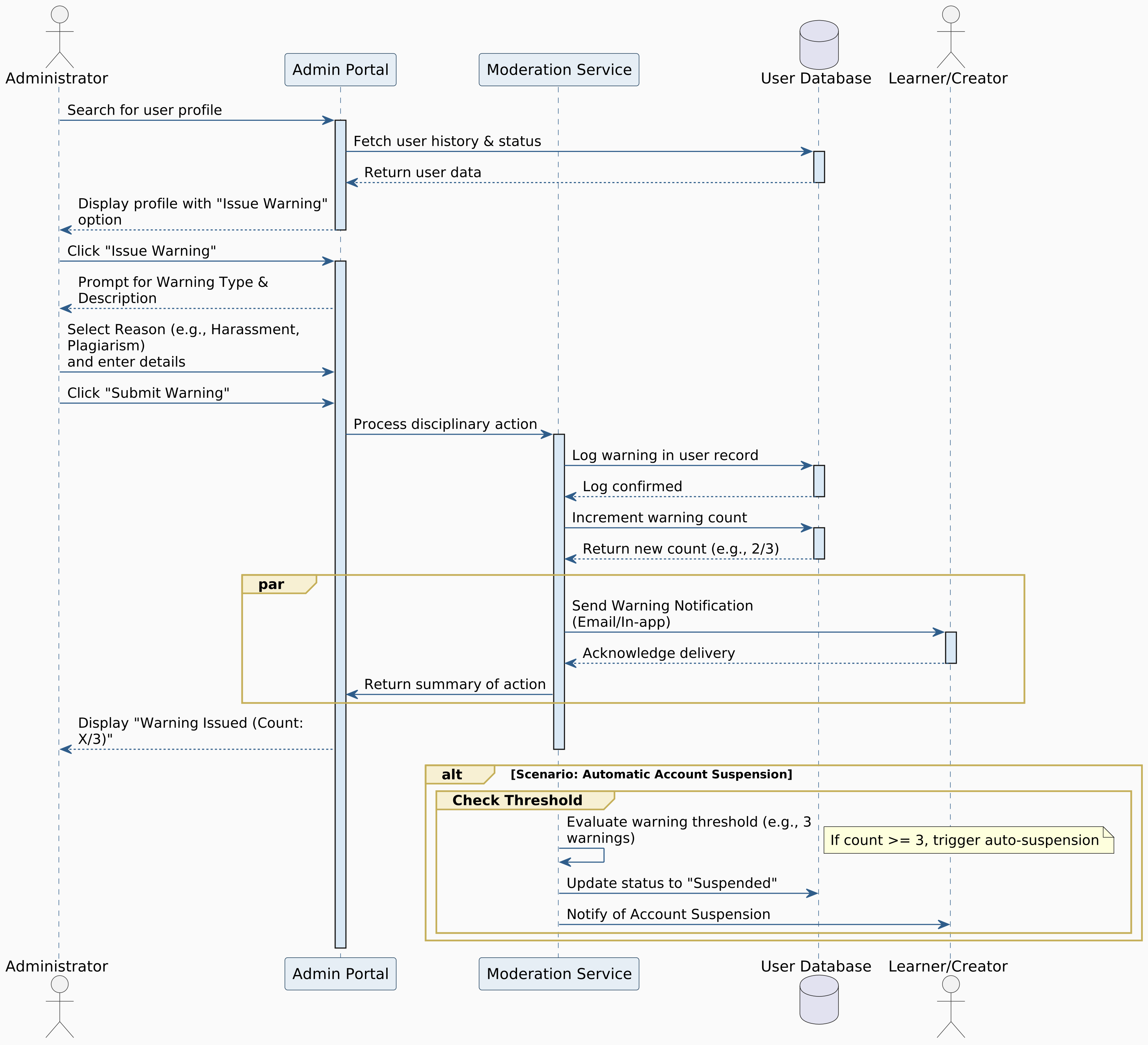
9. Issue User Warnings
Actor
Administrator
Main Success Scenario
The administrator identifies a policy violation (minor infraction).
The administrator navigates to the user's account.
The administrator clicks "Issue Warning."
The system displays warning form with fields:
Violation type (dropdown: spam, inappropriate language, plagiarism, etc.)
Severity (Minor, Moderate, Severe)
Description of violation
Evidence (attach screenshots, links)
Suggested corrective action
The administrator fills in the form:
Violation: "Inappropriate forum language"
Severity: Minor
Description: "Used profanity in discussion thread on [date]"
Action: "Please review community guidelines and maintain respectful communication"
The administrator selects "Send Warning."
The system records the warning on user's account.
The system sends notification to the user:
Email and in-platform notification
Clear explanation of violation
Link to relevant policy
Consequences of repeated violations
The warning appears on user's account record (visible to admins only).
The system tracks warning count:
1st warning: Notice only
2nd warning: 24-hour activity restriction
3rd warning: 7-day suspension
4th warning: Permanent ban
User can acknowledge warning or submit an appeal.
The system logs the warning issuance.
Alternative Scenarios
A1. User Appeals Warning
After Step 11, if user submits appeal:
Administrator reviews appeal and additional context
Can uphold, modify, or rescind warning
User notified of appeal decision with explanation
Decision is final unless escalated to senior admin
A2. Warning Escalation Required
At Step 5, if violation is more serious than initially assessed:
Administrator changes severity to "Severe"
"This user has [X] prior warnings. Escalated action may be warranted."
Administrator can proceed with suspension instead
A3. Pattern of Violations
At Step 3, if user has prior warnings:
"This user has [X] prior warnings. Escalated action may be warranted."
Suggests automatic penalties based on policy
A4. Warning Expiration
Warnings expire after 90 days of good behavior
System automatically archives expired warnings
User's slate cleaned if no violations in 90 days

Fully Dressed Format Use Cases

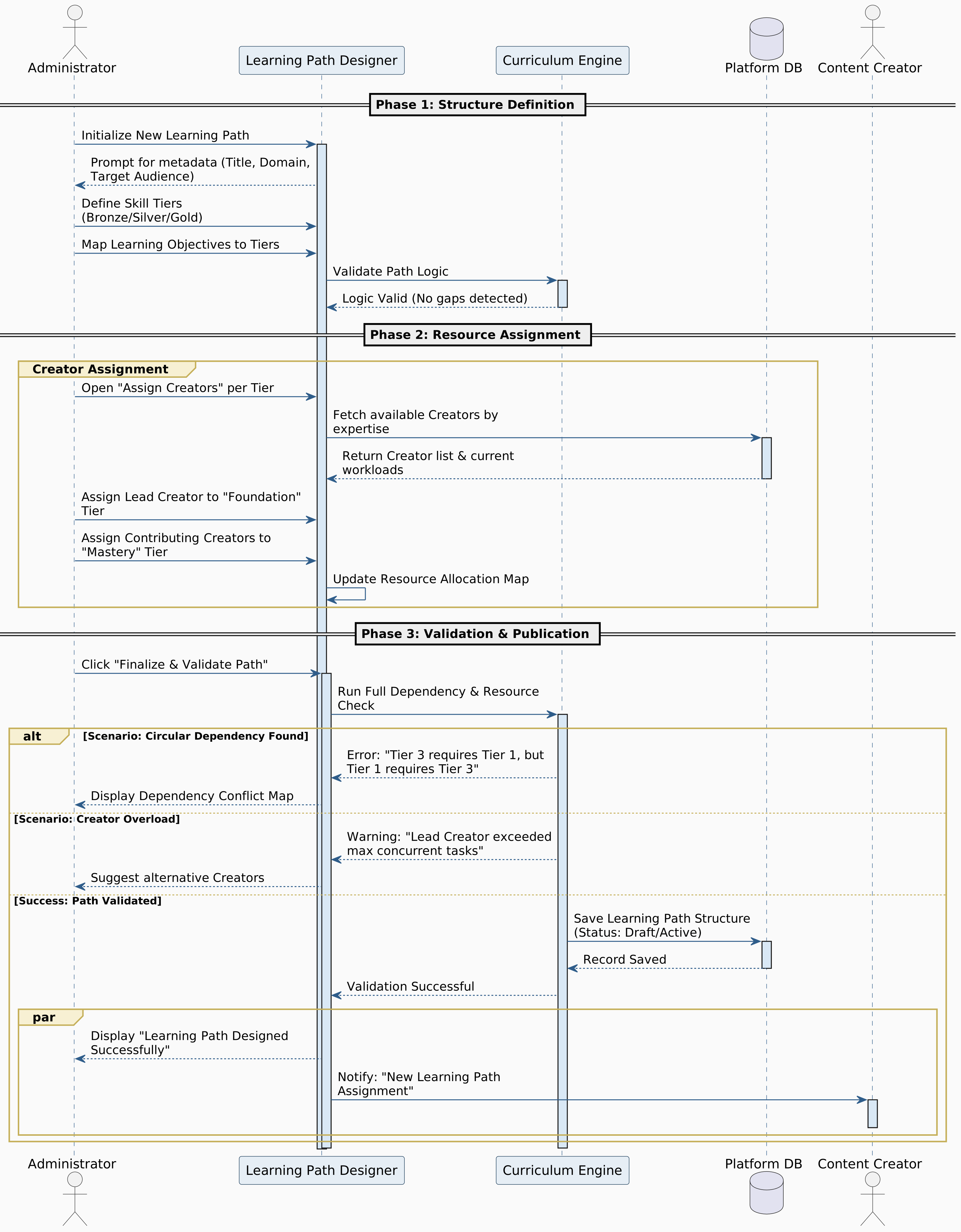
10. Design Learning Path
Primary Actor
Administrator
Administrator: Wants to design a coherent, strategic curriculum that aligns with platform goals.
Content Creators: Need clear assignments and guidance on what content to create.
Learners: Need a clear, logical progression that builds on previous knowledge.
Platform: Needs well-structured paths that improve learning outcomes and retention.
Preconditions
Administrator must be logged in with appropriate privileges.
Multiple courses and lessons should exist in the system (or be planned).
Administrator should have curriculum design knowledge.
Postconditions
A complete learning path structure is created.
Content creators are assigned to specific modules/tiers.
Path is organized into skill tiers with clear progression.
Path is ready for content creation phase.
Path can be published when all content is completed.
Main Success Scenario
The administrator navigates to "Learning Path Management" in the admin panel.
The administrator clicks "Create New Learning Path."
The system displays the path creation wizard with fields:
Path name (e.g., "Python Full-Stack Developer")
Path description and learning objectives
Target audience (beginners, intermediate, advanced)
Estimated total duration (e.g., 6 months, 200 hours)
Career outcomes or certifications earned
Prerequisites (if any)
The administrator enters the basic path information.
Step 1: Define Skill Tiers Structure
The system displays a visual canvas for organizing content
The administrator creates skill tiers (levels):
Tier 1: Foundation (variables, data types, basic syntax)
Tier 2: Core Concepts (loops, functions, data structures)
Tier 3: Intermediate (OOP, file handling, APIs)
Tier 4: Advanced (frameworks, databases, deployment)
Tier 5: Mastery (architecture, optimization, real projects)
For each tier, the administrator defines:
Tier name and description
Learning objectives
Expected number of courses/lessons
Estimated time to complete tier
Tier completion criteria
Step 2: Assign Content Requirements
For each tier, the administrator specifies required content types:
Number of video lessons needed
Number of coding exercises needed
Number of quizzes/assessments needed
Step 3: Set Prerequisites and Dependencies
The administrator defines relationships between tiers:
Tier 2 requires 100% completion of Tier 1
Tier 3 requires 80% mastery of Tier 2 skills
Optional branches for advanced learners
The system visualizes dependencies as a flowchart.
Step 4: Assign Content Creators to Tiers
For each tier/module, the administrator clicks "Assign Creator."
The system displays a list of available content creators with:
Expertise areas
Current workload
Previous content quality ratings
Availability status
The administrator selects one or multiple creators for each tier:
Primary creator (responsible for main content)
Contributing creators (assist with specific topics)
Reviewer (quality checks)
The system displays assignment summary showing which creators are assigned where.
Step 5: Create Content Creation Timeline
The administrator sets deadlines for each tier:
Tier 1 content: Due in 4 weeks
Tier 2 content: Due in 8 weeks
And so on...
The administrator can set milestones (e.g., "50% of Tier 1 lessons by week 2")
Step 6: Configure Assessment Checkpoints
The administrator adds evaluation points between tiers:
End-of-tier quizzes (specify passing score: 70%)
Portfolio projects (define requirements)
Skill validation exercises
The administrator defines checkpoint passing criteria.
Step 7: Set Adaptive Learning Rules (Optional)
The administrator configures adaptive progression rules:
If learner struggles with topic X → recommend supplementary exercises
If learner excels → offer accelerated track options
If learner abandons for 7+ days → send encouragement notification
Step 8: Define Milestones and Rewards
The administrator creates milestone achievements:
25% completion → "Python Beginner" badge + 500 XP
50% completion → "Python Intermediate" badge + 1000 XP
75% completion → "Python Advanced" badge + 1500 XP
100% completion → Certificate + "Python Master" badge + 3000 XP
Step 9: Configure Enrollment Options
The administrator sets:
Enrollment type: Free / Paid / Premium
Entry requirements: Diagnostic quiz score / Prior experience
Maximum concurrent enrollments (if limited)
Certification fee (if applicable)
The administrator writes a compelling path overview for learners:
What you'll learn (detailed breakdown)
Career opportunities (job roles, salary ranges)
Success stories from graduates (if available)
The administrator adds preview content (free introductory lessons).
The administrator reviews the complete path structure.
The administrator clicks "Validate Learning Path."
System Validation Process:
Checks for circular dependencies (A requires B, B requires A)
Verifies all tiers have assigned creators
Ensures prerequisite logic is sound
Validates that content requirements are reasonable
Estimates total time commitment is realistic
The system reports validation results.
If validation passes, the administrator sees: "✓ Learning path structure validated successfully."
The administrator sets the path status:
Draft (visible only to admin and assigned creators)
In Development (creators can start working)
Beta (open to limited testers once content is ready)
Published (publicly available after all content is completed)
The administrator selects "In Development" to activate content creation.
Step 10: Notify Assigned Content Creators
The system sends notifications to all assigned creators:
"You've been assigned to create content for '[Path Name]' - [Tier/Module Name]."
Notification includes:
Content requirements
Deadlines
Guidelines and templates
Contact info for coordination
Assigned creators receive task assignments in their dashboards.
The system creates a project management view showing:
Content creation progress for each tier
Creator task statuses
Upcoming deadlines
Bottlenecks or delays
The administrator can monitor progress and send reminders.
The system displays: "Learning path '[Path Name]' created successfully! Content creators have been notified."
Alternative Scenarios
A1. Circular Dependency Detected
At Step 23, if prerequisites create a loop:
"✗ Circular dependency detected: Tier A → Tier B → Tier C → Tier A"
Shows visual diagram of the problematic chain
Validation fails; administrator must restructure
Suggests which prerequisite to remove to break cycle
A2. No Content Creators Available
At Step 10-11, if no creators match the required expertise:
"⚠ No content creators with '[Skill]' expertise are currently available."
Administrator options:
Recruit new creators
Assign less experienced creator with mentor support
Delay tier creation until suitable creator is available
A3. Content Creator Declines Assignment
After Step 28, if a creator declines:
Creator provides reason (workload, expertise mismatch, timeline)
System notifies administrator
Administrator must reassign to another creator
Timeline may need adjustment
A4. Unrealistic Time Commitment
At Step 23, if total estimated time is excessive:
"⚠ This path requires ~500 hours. Average learner completion for similar paths is 6-12 months. Consider breaking into multiple paths or reducing content."
Shows completion rate data for paths of similar length
Administrator can proceed or revise
A5. Content Requirements Exceed Creator Capacity
At Step 13, if deadlines are too aggressive:
"⚠ Current assignments require 200 hours of content creation in 4 weeks. Assigned creators have capacity for 120 hours. Adjust timeline or add creators."
Administrator must revise timeline or add more creators
A6. Tier Without Learning Objectives
At Step 6, if a tier lacks clear objectives:
"⚠ Tier [X] has no defined learning objectives. Creators need clear goals."
Administrator must add objectives before proceeding
A7. Missing Assessment Checkpoints
At Step 14-15, if few or no checkpoints exist:
"⚠ This path lacks assessment checkpoints. Learners may progress without adequate skill validation."
Recommends adding checkpoints every 20-30 hours of content
Administrator can add checkpoints or acknowledge and proceed
A8. Duplicate or Overlapping Path
At Step 22, if a very similar path exists:
"⚠ A similar learning path exists: '[Path Name]'. Overlap: 60% of content. This may confuse learners or dilute enrollments."
Shows comparison of content overlap
Administrator options:
Differentiate the new path clearly
Merge with existing path
Archive old path if replacing it
Proceed with justification
A9. Creator Workload Imbalance
At Step 11-12, if one creator is overloaded:
"⚠ [Creator Name] is assigned to 3 tiers with deadlines in the same month. Consider redistributing workload."
Suggests alternative creators
Administrator can adjust assignments
A10. Budget Constraints for Paid Creators
At Step 11, if assigning paid creators:
"⚠ Current assignments will cost $[X], exceeding the $[Y] budget. Adjust assignments or increase budget."
Administrator must optimize assignments
Extensions
E1. Path Branching
Administrator can design choice points in the path:
After Core Python, learner chooses:
Branch A: Data Science specialization
Branch B: Web Development specialization
Branch C: Automation/DevOps specialization
Each branch has unique content, assigned to specialized creators
E2. Collaborative Path Design
Multiple administrators can co-design a path:
Each contributes expertise in specific areas
System tracks changes and responsibilities
Approval workflow for major structural changes
E3. Path Templates
Administrator can use templates for common path types:
"Beginner to Professional" template
"Specialization Track" template
"Certification Prep" template
Templates include suggested tier structures and checkpoints
E4. Content Reuse from Existing Paths
Administrator can import tiers/modules from other successful paths:
Select existing content to include
System links to original content (doesn't duplicate)
Credits original creators
Useful for building hybrid or cross-domain paths
E5. Dynamic Path Updates
After publication, administrator can update path without disrupting active learners:
Add new optional modules
Deprecate outdated content (remains accessible to enrolled learners)
Update prerequisites if needed
System notifies active learners of updates with opt-in
E6. Path Analytics Dashboard (Post-Publication)
After content is created and path is published, administrator accesses analytics:
Enrollment trends over time
Completion rates per tier
Common drop-off points
Average time per module
Learner satisfaction ratings
Employment outcomes (if tracked)
Creator performance metrics
Data informs path improvements
E7. Certification Integration
Administrator can configure official certification:
Final comprehensive exam specifications
Portfolio review criteria
Interview simulation requirements
Digital credential design
Verification method (blockchain, QR code)
E8. Corporate/Academic Partnerships
Paths designed for institutions:
Align with specific curriculum standards
Include institutional branding
Provide instructor dashboard for monitoring groups
Export transcripts and grades
Bulk enrollment management
Special Requirements
  • The visual path designer must support drag-and-drop for organizing tiers.
  • The system must prevent circular dependencies through real-time validation.
  • Administrator must be able to visualize the entire path structure at a glance.
  • All creator assignments must be logged with timestamps.
  • System must send automated reminders to creators as deadlines approach.
  • Content creation progress must be trackable in real-time.
  • Administrators must be able to export path structure as PDF for documentation.
  • The system must support versioning for path updates.
  • All prerequisite logic must be clearly documented and testable.
  • System must handle paths with 50+ courses without performance degradation.
  • Path analytics must aggregate data without exposing individual learner privacy.
  • Paths must support localization for international audiences.

5.3.2 Content Creator Use Cases

Brief Format Use Cases

1. View Created Content
The content creator views a list of all courses, lessons, and exercises they have authored.

2. Preview Lesson
The content creator previews how learners will see and interact with a lesson before publishing.

3. Duplicate Exercise
The content creator clones an existing exercise as a template for creating similar challenges.

4. Delete Draft
The content creator removes unpublished course materials or exercises from their drafts.

Casual Format Use Cases

5. Register Account
Actor
Content Creator
Main Success Scenario
The Content Creator navigates to the "Sign Up" page of the platform.
The Content Creator selects the "Content Creator" role from account type options.
The Content Creator provides required details:
Full name
Email address
Password (with confirmation)
Username
Resume/CV upload
The Content Creator agrees to Terms and Conditions and submits the form.
The system validates input (email format, password strength, username uniqueness, resume/CV format).
The system sends a verification email to the provided address.
The Content Creator clicks the OTP in the email.
Admin activates the account after reviewing the resume/CV.
The system redirects to the login page.
The Content Creator logs in successfully and sees a welcome message.
Alternative Scenarios
A1. Email Already Exists
At Step 5, if the email is already registered, the system displays:
"An account with this email already exists. Please log in or use a different email."
A2. Weak Password
At Step 5, if the password doesn't meet security criteria (minimum 8 characters with uppercase, lowercase, numbers, special characters), the system displays:
"Your password must be at least 8 characters long and include uppercase, lowercase, numbers, and symbols."
A3. Username Taken
At Step 5, if the username is already in use, the system displays:
"This username is already taken. Please choose a different one."
A4. Admin Reject Resume/CV
At Step 8, if the admin rejects the uploaded resume/CV after review, the system displays:
"Your resume/CV did not meet our criteria. Please update and resubmit."

6. Login to System
Actor
Content Creator
Main Success Scenario
The content creator navigates to the login page.
The content creator enters their email and password.
The content creator clicks "Login."
The system validates credentials.
The system authenticates the content creator and redirects to the dashboard.
The content creator sees their personalized dashboard with progress and recommendations.
Alternative Scenarios
A1. Incorrect Credentials
At Step 4, if credentials are invalid, the system displays:
"Incorrect email or password. Please try again."
A2. Account Not Verified
At Step 4, if the email is not verified, the system displays:
"Please verify your email address before logging in. Check your inbox for the OTP."
A3. Account Suspended
At Step 4, if the account is suspended, the system displays:
"Your account has been suspended. Please contact support for assistance."

7. Create Course
Actor
Content Creator
Main Success Scenario
The content creator logs into the platform.
The content creator navigates to "Content Management" section.
The content creator clicks "Create New Course."
The system displays a course creation form with fields:
Course title
Course description
Programming language (Python/JavaScript/Multi-language)
Difficulty level (Beginner/Intermediate/Advanced)
Estimated duration
Prerequisites
Course thumbnail image
The content creator fills in all required information.
The content creator organizes the course into modules:
Adds module titles
Orders modules sequentially
Assigns estimated time per module
The content creator clicks "Create Course."
The system validates all inputs and generates a unique course ID.
The system creates the course structure and saves it as a draft.
The system displays:
"Course created successfully! Now you can add lessons and exercises."
The content creator is redirected to the course dashboard to begin adding content.
Alternative Scenarios
A1. Missing Required Fields
At Step 7, if required fields are empty:
"Please complete all required fields: [Field Names]."
Incomplete fields are highlighted in red.
A2. Duplicate Course Title
At Step 8, if a course with the same title exists:
"A course with this title already exists. Please choose a different title or modify the existing course."
A3. Invalid Image Format
At Step 5, if the thumbnail isn't in an accepted format:
"Please upload an image in JPG, PNG, or WebP format."
A4. Course Creation Limit Reached
At Step 3, if the creator has reached their course limit:
"You've reached the maximum number of draft courses (5). Please publish or delete existing drafts."

8. Create Lesson
Actor
Content Creator
Main Success Scenario
The content creator selects an existing course from their dashboard.
The content creator selects a module within the course.
The content creator clicks "Add New Lesson."
The system displays the lesson creation interface with sections:
Lesson title
Lesson objectives
Content type selection (Text/Video)
Estimated completion time
The content creator enters the lesson title and objectives.
The content creator creates multi-format content:
Writes explanatory text with rich formatting
Uploads or embeds video tutorial
The content creator adds code snippets with syntax highlighting.
The content creator sets lesson order within the module.
The content creator can mark the lesson as:
Draft (not visible to learners)
Published (immediately available)
Scheduled (available on specific date)
The content creator clicks "Save Lesson."
The system validates content and saves the lesson.
The system displays:
"Lesson saved successfully!"
Alternative Scenarios
A1. Video Upload Fails
At Step 6, if video upload encounters an error:
"Video upload failed. Please ensure the file is under 500MB and in MP4 format."
Text content is saved as draft automatically.
A2. Content Too Short
At Step 11, if the lesson content is minimal:
"This lesson appears brief. Consider adding more detail to help learners understand the concept."
The creator can proceed or add more content.

9. Add Multimedia Content
Actor
Content Creator
Main Success Scenario
The content creator is editing a lesson.
The content creator clicks "Add Media" in the content editor.
The system displays media upload options:
Upload video file
Embed YouTube/Vimeo link
Upload images/diagrams
Add audio explanations
The content creator selects "Upload Video."
The content creator selects a video file from their device.
The system validates file size (max 500MB) and format (MP4, WebM).
The system displays upload progress bar.
The video uploads successfully to cloud storage.
The system generates a video player preview.
The content creator positions the video within the lesson content.
The content creator adds captions or transcripts (optional).
The content creator saves the lesson with embedded media.
The system confirms:
"Media added successfully!"
Alternative Scenarios
A1. File Size Exceeds Limit
At Step 6, if the video is larger than 500MB:
"Video file is too large. Please compress to under 500MB or use an external hosting link."
A2. Unsupported Format
At Step 6, if the file format isn't supported:
"This format is not supported. Please upload MP4 or WebM files."
A3. Upload Interrupted
At Step 7, if internet connection drops:
The system attempts to resume upload.
If unsuccessful after 3 attempts:
"Upload interrupted. Please try again."
A4. Embed Link Invalid
At Step 4, if an external video link doesn't work:
"Unable to embed this link. Please verify the URL and privacy settings."

10. Localize Content
Actor
Content Creator
Main Success Scenario
The content creator selects a published course or lesson.
The content creator clicks "Add Translation."
The system displays available languages (Arabic, English).
The content creator selects the target language (e.g., Arabic).
The system creates a duplicate content template with original text.
The content creator translates:
Lesson titles and descriptions
Content paragraphs
Code comments
Exercise instructions
The content creator adjusts formatting for RTL (right-to-left) if translating to Arabic.
The content creator can use AI-assisted translation for initial draft.
The content creator reviews and refines the AI-generated translation.
The content creator saves the localized version.
The system marks the content as available in multiple languages.
Learners can now switch between languages when viewing the content.
Alternative Scenarios
A1. AI Translation Unavailable
At Step 8, if AI service is down:
"AI translation is temporarily unavailable. Please translate manually."
A2. Incomplete Translation
At Step 10, if some sections remain untranslated:
"Some content is still in [Original Language]. Do you want to save anyway?"
The creator can save as draft or complete translation.

11. Categorize Exercise Difficulty
Actor
Content Creator
Main Success Scenario
The content creator is creating or editing an exercise.
The system displays difficulty level options:
Beginner (Basic syntax and concepts)
Intermediate (Multiple concepts, logic building)
Advanced (Complex algorithms, optimization)
Expert (Real-world problems, system design)
The content creator selects the appropriate difficulty.
The system displays difficulty criteria to guide selection.
The content creator assigns skill tags (e.g., "loops", "arrays", "recursion").
The system estimates average completion time based on difficulty.
The content creator can test the exercise themselves to verify difficulty.
The content creator saves the categorization.
The system uses this information for:
Adaptive learning path recommendations
Filtering in course catalog
XP reward calculation
Alternative Scenarios
A1. Difficulty Mismatch Detected
At Step 8, if the system's AI analysis suggests different difficulty:
"Our analysis suggests this exercise may be [Suggested Level]. Would you like to review?"
The creator can keep their choice or adjust.

12. Update Course Materials
Actor
Content Creator
Main Success Scenario
The content creator navigates to "My Courses."
The content creator selects a published course.
The content creator identifies content to update (lesson, exercise, video).
The content creator clicks "Edit."
The system loads the content in edit mode.
The content creator makes changes:
Updates outdated information
Fixes errors or typos
Improves explanations
Adds new examples
The content creator saves changes.
The system creates a new version and maintains version history.
If the course has active learners, the system displays:
"[X] students are enrolled. Notify them of updates?"
The content creator chooses to send update notification.
Enrolled learners receive:
"[Course Name] has been updated with new content!"
The system logs all changes for audit trail.
Alternative Scenarios
A1. Breaking Changes
At Step 6, if changes affect exercise solutions or grading:
"This change may affect existing student submissions. Consider creating a new exercise instead."
A2. Multiple Editors Conflict
At Step 5, if another creator is editing simultaneously:
"[Creator Name] is currently editing this content. Changes may conflict."
The system locks editing or enables collaborative editing mode.

13. Review Student Submissions
Actor
Content Creator
Main Success Scenario
The content creator navigates to "Course Management" dashboard.
The content creator selects a lesson in specific course to review submissions.
The system displays recent submissions for the creator's lesson.
The content creator filters by:
Execution metrics (time/memory)
Test case pass rate
Submission date
The content creator selects a student submission to review.
The system displays:
Student information (anonymous option available)
Problem statement
Student's code solution
Test case results
Execution metrics
The content creator reviews the code for:
Correctness
Code quality and style
Efficiency
Best practices
The content creator provides written feedback.
The content creator clicks "Submit Review."
The system saves the review and updates the student's grade.
The student receives notification with feedback.
Alternative Scenarios
A1. Auto-Graded Exercise
At Step 4, if the exercise is automatically graded:
"This exercise was automatically graded. Manual review is optional."
The creator can still provide additional feedback.
A2. Plagiarism Suspected
At Step 6, if the system detects potential plagiarism:
The system flags the submission with similarity score.
The creator investigates and can report if confirmed.

14. Manage Course Structure
Actor
Content Creator
Main Success Scenario
The content creator selects a course from their dashboard.
The content creator clicks "Edit Course Structure."
The system displays the course outline with all modules and lessons.
The content creator can:
Drag and drop to reorder modules
Drag and drop to reorder lessons within modules
Add new modules
Rename modules
Delete modules (with confirmation)
The content creator sets prerequisites:
Marks lessons that must be completed before others unlock
Creates skill dependencies
The content creator saves the new structure.
The system validates that prerequisites don't create circular dependencies.
The system updates the course structure.
If students are enrolled, the system adjusts their progress tracking.
The system displays:
"Course structure updated successfully!"
Alternative Scenarios
A1. Circular Dependency Detected
At Step 7, if prerequisites create a loop:
"Error: This creates a circular dependency. Lesson A cannot require Lesson B if Lesson B requires Lesson A."
Changes are not saved until resolved.
A2. Active Students Affected
At Step 6, if reordering affects students mid-course:
"[X] students are currently progressing through this course. Major restructuring may confuse them."
The creator can proceed with caution or schedule changes.

Fully Dressed Format Use Cases

15. Create Coding Exercise
Primary Actor
Content Creator
Content Creator: Wants to design effective, fair exercises that test specific skills.
Learners: Need clear instructions, fair test cases, and appropriate difficulty.
Platform: Needs quality-controlled exercises that can be auto-graded reliably.
Preconditions
Content creator must be logged in and authorized.
Content creator must have at least one course created.
Content creator must have completed platform training on exercise creation.
Postconditions
Exercise is created with complete problem statement, test cases, and model solution.
Exercise is saved as draft and ready for validation.
Exercise metadata is stored in the database.
Main Success Scenario
The content creator navigates to a course lesson.
The content creator clicks "Add Exercise."
The system displays the exercise creation wizard with tabs:
Problem Details
Test Cases
Model Solution
Hints
Metadata
Problem Details Tab: The content creator enters:
Exercise title (clear, concise)
Problem statement with context
Input format explanation
Output format explanation
Example inputs and outputs (2-3 examples)
Constraints (time limits, input ranges)
The content creator writes starter code template (optional).
Test Cases Tab: The content creator creates test cases:
At least 5 test cases (minimum requirement)
Mix of edge cases, typical cases, and boundary cases
For each test case: input data, expected output, visibility (public/hidden)
Test case descriptions explaining what is being tested
The content creator marks 2-3 test cases as public (visible to learners).
The content creator marks remaining cases as hidden (for final validation).
Model Solution Tab: The content creator writes a reference solution:
Correct, efficient code in the target language
Well-commented for educational value
Multiple approaches (optimal, brute-force, alternative methods)
The content creator runs the model solution against all test cases.
The system validates that the model solution passes all test cases.
Hints Tab: The content creator creates progressive hints:
Level 1: Conceptual hint (approach suggestion)
Level 2: Algorithmic hint (specific strategy)
Level 3: Implementation hint (code structure)
Metadata Tab: The content creator sets:
Difficulty level (Beginner/Intermediate/Advanced)
Estimated time to complete
Skill tags (e.g., "arrays", "sorting", "dynamic-programming")
XP reward value
The content creator clicks "Save as Draft."
The system saves the exercise in draft status.
The system displays:
"Exercise saved successfully! Proceed to validation when ready."
The content creator can:
Continue editing
Submit for validation (goes to Use Case 16)
Delete draft
The content creator clicks "Submit for Validation."
The system transitions to Use Case 16 (Validate Exercise Before Publishing).
Alternative Scenarios
A1. Insufficient Test Cases
At Step 14, if fewer than 5 test cases exist:
"Add at least 5 test cases before saving."
Save is blocked until minimum requirement is met.
A2. Model Solution Fails Test Cases
At Step 11, if the model solution doesn't pass all tests:
"Your model solution failed test case [X]. Expected: [Y], Got: [Z]."
The creator must fix either the solution or the test case before saving.
A3. Missing Required Fields
At Step 14, if mandatory fields are empty:
"Complete all required fields: [List]"
Incomplete sections are highlighted in red.
A4. Auto-Save During Creation
Throughout the process, the system auto-saves progress every 2 minutes.
If creator closes browser, they can resume from last saved state.
A5. Multiple Programming Languages
At Step 9, if the exercise supports multiple languages:
Creator must provide model solutions in each language.
Each solution is validated independently before saving.
Language-specific hints may be needed.
Extensions
E1. Complexity Analysis Addition
Creator adds Big O notation explanations:
Time complexity of optimal solution
Space complexity analysis
Comparison with alternative approaches
This enhances educational value.
E2. Interactive Test Case Builder
System provides GUI to build test cases:
Generate random inputs within constraints
Automatically compute expected outputs using model solution
Visualize test coverage
E3. Import from External Sources
Creator can import exercise templates from:
Other platforms (with proper attribution)
Previous exercises (as starting point)
Community-contributed templates
Special Requirements
  • All data must be auto-saved every 2 minutes to prevent loss.
  • Draft exercises are only visible to the creator.
  • Model solutions must be encrypted in database.
  • System must support Python, JavaScript, and eventually Java/C++.
  • Problem statements must pass basic grammar check before saving.
  • Exercise creation interface must be accessible via keyboard navigation.

16. Validate Exercise Before Publishing
Primary Actor
Content Creator
Content Creator: Wants assurance that the exercise functions correctly before peer review.
Learners: Need exercises that work properly without technical issues or unfair test cases.
Platform Quality Team: Wants to maintain high content standards.
Peer Reviewers: Need well-validated exercises to review efficiently.
Preconditions
Exercise must be created and saved as draft (Use Case 15 completed).
Content creator must be logged in.
Validation API and code execution environment must be operational.
Exercise must have minimum required components (problem, test cases, solution).
Postconditions
Exercise is thoroughly tested and validated.
Validation report is generated and stored.
If validation passes, exercise is ready for peer review assignment.
If validation fails, creator receives detailed feedback for improvements.
Main Success Scenario
The content creator has completed exercise creation (from Use Case 15).
The content creator clicks "Submit for Validation."
The system displays:
"Beginning comprehensive validation... This may take 30-60 seconds."
Step 1: Model Solution Validation
System executes model solution against all test cases
Measures execution time and memory usage
Checks for runtime errors or infinite loops
Validates against time and memory constraints
The system confirms:
"✓ Model solution passes all [X] test cases."
Step 2: Test Case Quality Check
System analyzes test case diversity
Checks for edge cases: empty inputs, maximum values, negative numbers, boundary conditions
Verifies hidden tests differ meaningfully from public tests
Ensures test cases cover multiple solution approaches
Validates test case descriptions are clear
The system reports:
"✓ Test cases provide adequate coverage."
Step 3: Problem Statement Analysis
AI reviews problem statement for clarity and completeness
Checks grammar and spelling
Identifies ambiguous phrasing
Verifies examples match expected input/output format
Ensures constraints are clearly defined
The system reports:
"✓ Problem statement is clear and complete."
Step 4: Difficulty Calibration
System estimates difficulty based on:
Solution complexity (cyclomatic complexity, lines of code)
Required concepts (data structures, algorithms)
Test case difficulty
Compares with creator's assigned difficulty
The system reports:
"✓ Estimated difficulty matches assigned level (Intermediate)."
Step 5: Hint Quality Assessment
Validates that hints don't reveal complete solution
Checks hint progression (conceptual → specific → implementation)
Ensures hints are appropriate for difficulty level
The system reports:
"✓ Hints provide appropriate guidance without spoiling solution."
Step 6: Security and Fairness Check
Ensures no hardcoded test cases in problem description
Validates that public test cases don't make hidden cases obvious
Checks for potential exploitation methods
The system reports:
"✓ Exercise meets security and fairness standards."
The system compiles a comprehensive validation report showing all checks.
The system displays final status:
"✓ Validation Complete: PASSED"
The content creator reviews the full validation report.
The system offers options:
Assign for Peer Review (proceed to step 20)
Make Revisions (return to editing)
Save for Later (keep in validated draft status)
The content creator clicks "Assign for Peer Review."
The system displays peer reviewer selection interface.
The system recommends 1-3 qualified reviewers based on:
Expertise in relevant programming language
Experience with similar difficulty levels
Current review workload
Reviewer ratings and reliability
The content creator selects reviewers (1-3 reviewers).
The system sends notifications to selected reviewers:
"You've been assigned to review exercise '[Title]'. Please complete within 3-5 business days."
The exercise is added to each reviewer's review queue.
The system sets review deadline (5 business days from assignment).
The system displays to creator:
"Exercise assigned for peer review. You'll be notified when reviews are complete."
The exercise status changes to "Under Peer Review."
The creator receives a confirmation summary:
Validation results
Assigned reviewers
Expected review completion date
The system transitions to peer review workflow (not detailed in this use case).
Alternative Scenarios
A1. Model Solution Fails Test Cases
At Step 4-5, if model solution fails any test:
"✗ Model solution failed test case #[X]"
Shows: Input provided, Expected output, Actual output, Error message
Validation status: FAILED
Creator options:
Fix model solution
Modify test case
Add explanation if intentional
Cannot proceed to peer review until resolved
A2. Missing Edge Cases
At Step 6-7, if edge case coverage is insufficient:
"⚠ Test cases may not cover edge scenarios: [empty input, single element, maximum constraints]"
Validation status: PASSED WITH WARNINGS
Creator can:
Add recommended edge cases
Proceed to peer review with warning documented
Peer reviewers will see this warning
A3. Problem Statement Unclear
At Step 8-9, if AI detects ambiguity:
"⚠ Problem statement may be unclear: '[specific phrase]' could be interpreted multiple ways."
Provides revision suggestions with examples
Validation status: PASSED WITH WARNINGS
Creator should clarify but can proceed
Peer reviewers will be asked to verify clarity
A4. Difficulty Mismatch
At Step 10-11, if estimated difficulty differs significantly:
"⚠ This exercise appears to be [Advanced] but is marked [Intermediate]. Consider adjusting."
Shows difficulty scoring breakdown
Validation status: PASSED WITH WARNINGS
Creator can:
Adjust difficulty level
Provide justification for current level
Proceed with warning (reviewers will validate)
A5. Execution Timeout
At Step 4, if model solution exceeds time limit:
"✗ Model solution exceeded [N]-second time limit. Execution time: [X]s"
Validation status: FAILED
Creator must:
Optimize solution
Adjust time constraints
Reconsider problem complexity
Cannot proceed until resolved
A6. Test Cases Too Similar
At Step 6, if hidden tests are predictable:
"⚠ Hidden test cases appear similar to public tests. Add more diverse scenarios."
Suggests specific missing scenarios
Validation status: PASSED WITH WARNINGS
Creator should improve diversity
Reviewers will test with their own approaches
A7. No Available Reviewers
At Step 22-23, if no suitable reviewers available:
"No reviewers currently available with matching expertise. Options:"
Wait for reviewers to become available (estimated: X days)
Expand reviewer criteria
Request admin to assign reviewers
Exercise remains in validated draft status
A8. Creator Cancels Review Assignment
At Step 23, if creator changes mind:
Creator clicks "Cancel Assignment"
Exercise returns to validated draft status
Can be edited or assigned later
A9. Grammatical Errors
At Step 8-9, if grammar issues detected:
System highlights errors with suggestions
Auto-correct offered for minor issues
Validation status: PASSED WITH WARNINGS
Creator should review and fix
Reviewers will verify corrections
A10. Validation Service Unavailable
At Step 3, if validation API fails:
"Validation service temporarily unavailable. Options:"
Retry now
Save and retry later
Contact support if issue persists
Exercise saved but not validated
Creator notified when service resumes
A11. Multiple Languages, Different Results
At Step 4-5, if exercise supports Python and JavaScript:
If Python solution passes but JavaScript fails:
System reports issues separately by language
Validation status: PARTIALLY FAILED
Creator must fix failing language implementation
All language versions must pass before proceeding
A12. Hints Reveal Too Much
At Step 12-13, if hints are too specific:
"⚠ Hint level [X] may reveal too much of the solution. Consider making it more conceptual."
Validation status: PASSED WITH WARNINGS
Shows which hints are problematic
Reviewers will test hint effectiveness
Extensions
E1. Automated Test Generation Suggestions
After validation, system offers to generate additional test cases:
Creates random inputs within constraints
Uses model solution to compute expected outputs
Creator reviews and approves generated tests
Re-validates with new tests
E2. Validation Report Export
Creator can download detailed validation report as PDF
Includes:
All validation checks and scores
Recommendations for improvement
Comparison with similar exercises
Quality metrics
Useful for documentation or training
E3. Incremental Validation
For large exercises with many test cases:
System validates in stages, showing progress
Creator can cancel if early stages reveal issues
Partial results saved for faster re-validation
E4. A/B Testing Suggestion
If exercise is similar to existing ones:
System suggests A/B testing with learners
Tracks which version performs better
Informs future exercise design
E5. Reviewer Self-Selection
Instead of creator assigning reviewers:
Creator can post exercise to "Review Marketplace"
Qualified reviewers volunteer to review
Creator selects from volunteers
Faster assignment in active communities
Special Requirements
  • Validation must complete within 60 seconds for standard exercises.
  • All validation checks must be logged for quality assurance auditing.
  • Validation must detect common anti-patterns (hardcoded solutions, trivial test cases).
  • System should cache validation results; re-validation only needed if exercise changes.
  • Validation API must handle concurrent requests from multiple creators.
  • Failed validations must provide actionable guidance, not just error messages.
  • Warnings must be clearly documented for peer reviewers.
  • Reviewer recommendations must consider expertise, workload, and reliability.
  • System must prevent assigning reviewers who have conflicts of interest.

17. Contribute to Learning Path
Primary Actor
Content Creator
Content Creator: Wants clear requirements and reasonable deadlines for content creation.
Administrator: Needs quality content delivered on time to complete the learning path.
Learners: Will benefit from well-crafted, cohesive content within the path.
Preconditions
Content creator must be logged in and authorized.
Administrator must have created a learning path and assigned the creator to a specific tier/module.
Content creator must have received assignment notification.
Postconditions
Required content (lessons, exercises) is created within the assigned tier.
Content meets quality standards and aligns with path objectives.
Administrator can review and approve the content.
Tier is marked as complete and ready for integration.
Main Success Scenario
The content creator receives a notification:
"You've been assigned to create content for '[Path Name]' - [Tier/Module Name]."
The content creator navigates to "My Assignments" in their dashboard.
The system displays the learning path assignment with details:
Path name and overall objectives
Assigned tier/module name
Content requirements:
Number of lessons to create (e.g., 5 video lessons)
Number of exercises to create (e.g., 10 coding challenges)
Learning objectives for this tier
Target audience and skill level
Deadline for completion
Guidelines and templates provided by administrator
Contact information for coordination
The content creator reviews the requirements and clicks "Accept Assignment."
The system creates a task board for the creator showing:
Checklist of required content items
Progress tracker (0% complete)
Deadline countdown
Step 1: Plan Content Structure
The creator outlines topics to cover in each lesson
Maps exercises to specific learning objectives
Designs project requirements
The creator can request clarification from the administrator if objectives are unclear.
Step 2: Create Lessons
The creator follows Use Case 8 (Create Lesson) for each required lesson
Ensures lessons align with tier objectives
Covers prerequisite knowledge appropriately
Follows platform style guidelines
The system tracks completed lessons and updates progress (e.g., 30% complete).
Step 3: Create Exercises
The creator follows Use Case 15-16 (Create and Validate Coding Exercise) for each exercise
Ensures difficulty aligns with tier level
Ties exercises to specific lesson concepts
Creates diverse problem types
The system tracks completed exercises and updates progress (e.g., 60% complete).
Step 5: Review Content Cohesion
The creator reviews all created content for the tier
Ensures logical flow between lessons
Verifies exercises progressively build skills
Checks that project appropriately challenges learners
The creator can preview the entire tier as a learner would experience it.
Step 6: Internal Quality Check
The creator runs through their own content:
Tests all code examples
Verifies exercise solutions
Checks for typos or errors
Ensures multimedia loads correctly
The creator makes any necessary revisions.
Step 7: Mark as Ready for Review
The creator clicks "Submit for Administrator Review."
The system prompts:
"Are you sure all content is complete and meets quality standards?"
The creator confirms submission.
The system notifies the administrator:
"[Creator Name] has submitted content for '[Tier Name]' in '[Path Name]'. Ready for review."
The system changes the tier status to "Under Administrator Review."
The creator's task board shows "Awaiting Review" status.
Administrator Review Phase:
Administrator reviews all content (separate use case)
Administrator can approve, request revisions, or reject
If approved:
Creator receives notification:
"Your content for '[Tier Name]' has been approved! Great work."
Creator earns XP/badges for completing assignment
Content is integrated into the learning path
If revisions requested:
Creator receives detailed feedback with specific issues
Creator makes requested changes
Creator resubmits (returns to Step 17)
The system tracks the creator's contribution for analytics and reputation.
Alternative Scenarios
A1. Creator Declines Assignment
At Step 4, if the creator cannot accept:
Creator clicks "Decline Assignment"
System prompts for reason (workload, expertise mismatch, timeline)
System notifies administrator to reassign
Creator is removed from assignment
A2. Deadline Extension Needed
Before deadline, if creator needs more time:
Creator clicks "Request Extension"
Provides justification and proposed new deadline
Administrator reviews and approves/denies
If approved, deadline is updated
If denied, creator must meet original deadline or decline
A3. Clarification Required
At Step 7, if objectives are unclear:
Creator clicks "Request Clarification"
Sends specific questions to administrator
Administrator responds with guidance
Creator proceeds with clarified understanding
A4. Content Requirements Change
During content creation, if administrator updates requirements:
Creator receives notification of changes
System highlights what changed
Creator acknowledges changes
Deadline may be adjusted if significant changes
A5. Missed Deadline
If creator doesn't submit by deadline:
System sends urgent reminder 3 days before deadline
If still missed:
Administrator is notified
Administrator can extend deadline or reassign
Creator's reputation may be affected
A6. Revisions Requested Multiple Times
At Step 24, if content is rejected twice:
Administrator and creator have a coordination meeting
Discuss issues and expectations
If third submission also fails:
Assignment may be reassigned
Creator's compensation/reputation affected
A7. Technical Issues During Creation
If system errors prevent content creation:
Creator reports issue to support
System logs the issue
Deadline may be extended if issue is system-wide
Creator can save drafts to prevent data loss
A8. Collaborating with Other Creators
If multiple creators are assigned to the same tier:
System provides shared workspace
Creators can see each other's progress
Chat/comment feature for coordination
One creator designated as "lead" to avoid conflicts
Extensions
E1. Early Completion Bonus
If creator completes high-quality content ahead of schedule:
Creator earns "Early Bird" badge
May receive bonus XP or recognition
Reputation score increases
E2. Feedback and Iteration
After path is published and learners use the content:
Creator receives analytics on their tier:
Completion rates
Average time spent
Learner satisfaction ratings
Common misconceptions
Creator can update content based on feedback
E3. Content Reuse Permission
Creator can request to reuse tier content in personal courses:
Submits request to administrator
If approved, content can be adapted for other uses
Original path retains rights to the content
E4. Compensation Tracking
For paid creators:
System tracks time spent on assignment
Milestones trigger partial payments
Final approval triggers full payment
Invoicing generated automatically
Special Requirements
  • The task board must clearly show progress and remaining work.
  • Creators must be able to save work-in-progress at any time (auto-save every 2 minutes).
  • System must support version history for all created content.
  • Communication between creator and administrator must be logged.
  • Deadline reminders must be sent at 7 days, 3 days, and 1 day before due date.
  • Content submission must include a checklist confirmation (all requirements met).
  • Administrator feedback must be clear, actionable, and specific.

5.3.3 Learner Use Cases

Brief Format Use Cases

1. View Profile
The learner views their profile information including avatar, bio, learning goals, and XP progress.

2. Change Theme
The learner switches between dark and light mode in the editor settings (or using switch sun/moon icon).

3. View Badges
The learner views their earned badges and achievements in their profile gallery.

4. Check Streak
The learner checks their current daily learning streak and streak milestones.

5. View Leaderboard
The learner views global, weekly, or friend-based leaderboards showing XP rankings.

6. Update Avatar
The learner uploads or changes their profile picture.

Casual Format Use Cases

7. Register Account
Actor
Learner
Main Success Scenario
The learner navigates to the "Sign Up" page of the platform or app.
The learner selects the "Learner" role from account type options.
The learner provides required details:
Full name
Email address
Password (with confirmation)
Username
The learner can register using social media accounts (Google, Github, LinkedIn) as an alternative.
The learner agrees to Terms and Conditions and submits the form.
The system validates input (email format, password strength, username uniqueness).
The system sends a verification email to the provided address.
The learner clicks the OTP in the email.
The system activates the account and redirects to the login page.
The learner logs in successfully and sees a welcome message.
Alternative Scenarios
A1. Email Already Exists
At Step 5, if the email is already registered, the system displays:
"An account with this email already exists. Please log in or use a different email."
A2. Weak Password
At Step 5, if the password doesn't meet security criteria (minimum 8 characters with uppercase, lowercase, numbers, special characters), the system displays:
"Your password must be at least 8 characters long and include uppercase, lowercase, numbers, and symbols."
A3. Username Taken
At Step 5, if the username is already in use, the system displays:
"This username is already taken. Please choose a different one."

8. Login to System
Actor
Learner
Main Success Scenario
The learner navigates to the login page in the platform or app.
The learner enters their email and password.
The learner can choose to log in using social media accounts (Google, Github, LinkedIn) as an alternative.
The learner clicks "Login."
The system validates credentials.
The system authenticates the learner and redirects to the dashboard.
The learner sees their personalized dashboard with progress and recommendations.
Alternative Scenarios
A1. Incorrect Credentials
At Step 4, if credentials are invalid, the system displays:
"Incorrect email or password. Please try again."
A2. Account Not Verified
At Step 4, if the email is not verified, the system displays:
"Please verify your email address before logging in. Check your inbox for the OTP."
A3. Account Suspended
At Step 4, if the account is suspended, the system displays:
"Your account has been suspended. Please contact support for assistance."

9. Recover Password
Actor
Learner
Main Success Scenario
The learner clicks "Forgot Password" on the login page.
The learner enters their registered email address.
The system validates the email.
The system sends a password OTP to the email.
The learner enters the OTP received.
The learner enters and confirms a new password.
The system updates the password.
The learner sees confirmation:
"Password reset successfully. You can now log in."
Alternative Scenarios
A1. Email Not Found
At Step 3, if the email isn't registered, the system displays:
"No account found with this email address."
A2. Link Expired
At Step 5, if the OTP expired, the system displays:
"This link has expired. Please request a new password reset."

10. Choose Learning Path
Actor
Learner
Main Success Scenario
The learner logs into the platform or app.
The learner navigates to the "Learning Paths" section.
The system displays available tracks (Fundamentals, Machine Learning, Cybersecurity, Full-Stack Development).
The learner selects their preferred learning path.
The system shows a detailed overview including modules, estimated time, and prerequisites.
The learner confirms their selection by clicking "Start Path."
The system updates the learner's dashboard with the selected path.
The learner receives a confirmation message:
"You've successfully enrolled in the [Path Name] learning path! Let's start coding."
Alternative Scenarios
A1. Prerequisite Not Met
At Step 6, if the learner lacks prerequisite skills, the system displays:
"This path requires basic programming knowledge. We recommend starting with [Beginner Path]."
The system offers to take a diagnostic quiz to determine the appropriate starting point.
A2. Already Enrolled in Path
At Step 6, if the learner is already enrolled, the system displays:
"You're already enrolled in this path. Continue learning from your dashboard."

11. View Lesson Content
Actor
Learner
Main Success Scenario
The learner navigates to their enrolled course from the dashboard.
The learner selects a module and clicks on a specific lesson.
The system displays the lesson content including:
Text explanation
Video tutorial
The learner reads/watches the content at their own pace.
The learner can pause, rewind, or fast-forward video content.
The system tracks time spent on the lesson.
The lesson is marked as complete when finished.
The system updates progress and unlocks the next lesson.
Alternative Scenarios
A1. Lesson Locked
At Step 2, if prerequisites aren't completed, the system displays:
"Complete the previous lessons to unlock this content."
A2. Content Loading Error
At Step 3, if content fails to load, the system displays:
"We're having trouble loading this lesson. Please refresh or try again later."

12. Complete Exercise
Actor
Learner
Main Success Scenario
The learner navigates to the exercises section of a lesson.
The learner selects an available coding challenge.
The system displays the problem statement, input/output examples, and starter code.
The learner writes code in the Code Editor in platform.
The learner drag/drop blocks of code in the blockly Editor in app.
The learner clicks "Run Tests" to validate their solution.
The system executes the code against test cases.
The system displays results showing passed/failed test cases.
If all tests pass, the learner clicks "Submit Solution."
The system awards XP and updates skill mastery.
The learner receives a success message with earned points.
Alternative Scenarios
A1. Tests Failed
At Step 7, if some tests fail, the system displays:
"Some test cases failed. Review the expected vs. actual output and try again."
The learner can request hints or revise their code.
A2. Syntax Error
At Step 6, if the code has syntax errors, the system displays:
"Syntax Error: [Error Description]. Check line [X]."
A3. Runtime Error
At Step 6, if the code causes a runtime error, the system displays:
"Runtime Error: [Error Description]. Your code crashed during execution."

13. Track Progress and View Learning Analytics
Actor
Learner
Main Success Scenario
The learner navigates to the "Progress & Analytics" section from the dashboard.
The system displays a comprehensive dashboard with two main views:
**Progress Overview**
**Detailed Analytics**
**Progress Overview Section** displays:
Completed modules and lessons
Current XP and level
Skill mastery percentages
Time spent learning
Streak information
**Detailed Analytics Section** displays:
Accuracy rates per skill
Time-to-completion trends
Learning velocity
Performance metrics with charts and graphs
The system highlights weak areas and recommends improvement exercises based on analytics.
The learner can view predictions and insights:
Estimated time to complete current path
Suggested focus areas
The system provides actionable recommendations based on combined progress and analytics data.
Alternative Scenarios
A1. No Progress Data
At Step 2, if the learner hasn't completed any content:
The system displays:
"Start your learning journey! Complete lessons to see your progress and analytics here."
Shows sample analytics dashboard with demo data
A2. Insufficient Data for Detailed Analytics
At Step 4, if there's not enough activity for meaningful analytics:
The system displays:
"Complete more lessons (at least 10) to unlock detailed analytics and insights."
Shows basic progress metrics only
Detailed analytics sections are grayed out with unlock requirements
A3. Data Loading Delays
At Step 2, if analytics take time to compile:
The system displays progress indicator:
"Loading your analytics... This may take a moment."
Shows cached data with timestamp while fresh data loads

14. Earn XP and Level Up
Actor
Learner
Main Success Scenario
The learner completes a lesson, exercise, or challenge.
The system calculates earned XP based on:
Task difficulty
Completion time
Accuracy
Streak bonuses
The system adds XP to the learner's total.
If the learner reaches a level threshold, the system triggers level-up animation.
The learner sees a congratulatory message with new level badge.
The system unlocks new content or features appropriate to the new level.
Alternative Scenarios
A1. Bonus XP Earned
At Step 2, if the learner completes on the first attempt or maintains a streak, the system displays:
"Bonus XP! You earned +[X] extra points for [reason]."

15. Set Language Preferences
Actor
Learner
Main Success Scenario
The learner navigates to Settings.
The learner selects "Language Preferences."
The system displays options for:
Interface language (Arabic/English)
Primary programming language (Python/JavaScript) in platform.
The learner makes selections and clicks "Save."
The system updates preferences and refreshes the interface.
The learner sees confirmation:
"Preferences updated successfully."
Alternative Scenarios
A1. Save Error
At Step 5, if saving fails, the system displays:
"Unable to save preferences. Please try again."

16. Bookmark Lesson
Actor
Learner
Main Success Scenario
The learner is viewing a lesson.
The learner clicks the "Bookmark" icon.
The system adds the lesson to the learner's bookmarks.
The learner sees confirmation:
"Lesson bookmarked!"
The learner can access bookmarks from their profile.
Alternative Scenarios
A1. Already Bookmarked
At Step 3, if the lesson is already bookmarked, the system removes it and displays:
"Bookmark removed."

17. Share Solution
Actor
Learner
Main Success Scenario
The learner completes an exercise successfully.
The learner navigates to the "Solution Gallery" section.
The learner clicks "Share My Solution."
The learner adds optional comments or explanations.
The learner submits the solution for community viewing.
The system publishes the solution with the learner's profile.
Other learners can view, upvote, and comment.
Alternative Scenarios
A1. Solution Not Approved
At Step 6, if the solution violates guidelines, moderators reject it with feedback.

Fully Dressed Format Use Cases

18. Enable Two-Factor Authentication
Primary Actor
Learner
Learner: Wants enhanced account security to protect personal data and progress.
Platform: Needs to reduce account compromise and unauthorized access.
Security Team: Wants to enforce best practices for account protection.
Preconditions
Learner must be logged in.
Learner must have a verified email address.
Learner must have access to a mobile device or authenticator app.
Postconditions
2FA is enabled on the learner's account.
Future logins require both password and verification code.
Backup codes are generated and stored securely.
Main Success Scenario
The learner navigates to Account Settings.
The learner selects "Security" tab.
The learner clicks "Enable Two-Factor Authentication."
The system displays 2FA setup options:
Authenticator app (recommended)
Email verification code
The learner selects "Authenticator App."
The system generates a QR code and secret key.
The system displays instructions:
"Scan this QR code with your authenticator app (Google Authenticator, Authy, etc.)"
The learner opens their authenticator app and scans the QR code.
The authenticator app adds the DuoCodo account and begins generating codes.
The system prompts: "Enter the 6-digit code from your authenticator app to confirm setup."
The learner enters the current code from their app.
The system validates the code.
The system generates 10 backup recovery codes.
The system displays the recovery codes with instructions:
"Save these codes securely. Each can be used once if you lose access to your authenticator."
The learner downloads or copies the recovery codes.
The learner confirms they've saved the codes by checking a box.
The system enables 2FA on the account.
The learner sees confirmation:
"Two-Factor Authentication is now active. Your account is more secure!"
The system logs out all other sessions for security.
Future logins now require:
Email/username + password
6-digit code from authenticator app
Alternative Scenarios
A1. Invalid Verification Code
At Step 12, if the code is incorrect:
"Invalid code. Please ensure you're entering the current 6-digit code from your authenticator app."
The learner can try again (up to 5 attempts).
After 5 failed attempts, setup is cancelled and must restart.
A2. Backup Codes Not Saved
At Step 16, if the learner tries to continue without confirming:
"Please confirm you've saved your backup codes. You won't be able to view them again."
The "Continue" button remains disabled until confirmed.
A3. Learner Chooses Email Method
At Step 5, if the learner selects email verification:
The system uses the registered email address.
The system sends a test verification code via email.
The learner enters the code to confirm.
Setup completes with email as the 2FA method.
A4. QR Code Won't Scan
At Step 8, if the learner can't scan the QR code:
The learner clicks "Can't scan? Enter code manually."
The system displays the secret key as text.
The learner manually enters the key into their authenticator app.
Setup continues from Step 10.
A5. Lost Authenticator Device
After 2FA is enabled, if the learner loses access:
During login, the learner clicks "Use backup code instead."
The learner enters one of their saved recovery codes.
The system validates the code and grants access.
The system prompts the learner to reconfigure 2FA.
The used recovery code is marked as consumed.
A6. All Backup Codes Used
If all 10 backup codes are exhausted:
The learner must contact support with identity verification.
Support verifies identity through:
Email verification
Security questions
Recent activity verification
Support can temporarily disable 2FA or reset it.
A7. Technical Error During Setup
At any step, if a system error occurs:
"We encountered an error during 2FA setup. Please try again or contact support."
The setup is rolled back; 2FA is not enabled.
The learner can retry after a few minutes.
Extensions
E1. Disable 2FA
The learner navigates to Security settings.
The learner clicks "Disable Two-Factor Authentication."
The system requires current password + 2FA code for confirmation.
The system warns about reduced security.
If confirmed, 2FA is disabled and all backup codes are invalidated.
E2. Regenerate Backup Codes
If the learner loses their backup codes:
The learner navigates to Security settings.
The learner authenticates with password + 2FA code.
The learner clicks "Generate New Backup Codes."
The system creates 10 new codes and invalidates old ones.
The learner saves the new codes securely.
E3. Change 2FA Method
The learner can switch from SMS to authenticator app (or vice versa):
The learner navigates to Security settings.
The learner selects "Change 2FA Method."
The system requires current 2FA verification.
Setup for new method proceeds as in main scenario.
E4. Trusted Devices
After successful 2FA login:
The system offers: "Trust this device for 30 days?"
If accepted, 2FA is not required on this device for 30 days.
Trusted devices can be managed in Security settings.
Special Requirements
  • 2FA codes must expire after 30 seconds (standard TOTP protocol).
  • Backup codes must be cryptographically secure random strings.
  • The system must support time-based one-time passwords (TOTP) standard.
  • SMS delivery must occur within 60 seconds.
  • Recovery codes must be hashed in the database, not stored in plain text.
  • The system must rate-limit 2FA verification attempts (max 5 per 15 minutes).
  • All 2FA setup and verification events must be logged for security auditing.

19. Practice Coding with Code Editor (Platform)
Primary Actor
Learner
Learner: Wants to write, execute, and debug code efficiently in a professional environment on web platform.
Platform: Needs to provide secure, real-time code execution with helpful feedback.
Preconditions
Learner must be logged in to the web platform.
Learner must have access to a lesson or exercise with a coding component.
Code Editor and execution APIs must be operational.
Learner must be using desktop or laptop computer with modern web browser.
Postconditions
Code is written, executed, and results are displayed.
Progress is tracked and saved.
Learner receives feedback on their solution.
Main Success Scenario
The learner navigates to a coding exercise or lesson on the web platform.
The system loads the Code Editor with syntax highlighting for the selected language (Python/JavaScript).
The system displays:
Problem statement on the left panel
Code Editor in the center
Output console at the bottom
Starter code (if any) pre-loaded in the editor
The learner writes their code in the Code Editor.
The editor provides professional IDE features:
**IntelliSense** auto-completion
**Syntax highlighting** with color-coded keywords
**Real-time error detection** with red underlines
**Code folding** for functions and blocks
**Multiple cursor editing**
**Find and replace functionality**
**Code formatting** (Ctrl+Shift+F)
**Bracket matching**
The learner can customize editor settings:
Font size adjustment
Theme selection (dark/light mode)
Tab size configuration
Line numbers toggle
The learner clicks "Run Code" to test their solution.
The system sends the code to the secure execution API via HTTPS.
The execution API runs the code in an isolated Docker sandbox environment.
The system returns execution results:
Standard output (console.log, print statements)
Execution time (in milliseconds)
Memory usage (in MB)
Error messages with line numbers (if any)
Return values
The results are displayed in the output console below the editor with syntax highlighting.
The learner can view detailed execution metrics in an expandable panel.
If the output matches expected results, the learner clicks "Submit Solution."
The system validates the solution against all test cases (visible and hidden).
The system displays test results:
Passed test cases (✓ in green)
Failed test cases (✗ in red) with input/output comparison
Edge cases handled correctly
If all tests pass:
The system awards XP based on:
First attempt bonus (+50 XP)
Code efficiency score
Time taken to solve
Updates skill mastery metrics
Saves the code to learner's solution history
The learner sees a success message with:
Earned XP and badges
Performance comparison with other learners
Suggestions for optimization (if applicable)
Alternative Scenarios
A1. Syntax Error Detected
At Step 5, if the learner's code contains syntax errors:
Code Editor underlines the error in red with wavy line
Hovering shows tooltip:
"Syntax Error: [Description] at line [X], column [Y]"
Error panel shows detailed message with suggested fixes
The learner corrects the error and continues
A2. Runtime Error During Execution
At Step 10, if the code crashes during execution:
✗ Runtime Error: IndexError Your code encountered an issue at line 15 Stack Trace: File "main.py", line 15, in <module> print(arr[10]) IndexError: list index out of range
The learner can view full stack trace
System suggests debugging tips based on error type
A3. Execution Timeout
At Step 9, if code execution exceeds 5 seconds:
Execution Timeout Your code took longer than 5 seconds to run. Possible issues: - Infinite loop detected - Inefficient algorithm (O(n²) or worse) Suggestion: Consider optimizing your approach
The learner can review algorithm complexity
A4. Memory Limit Exceeded
At Step 10, if memory usage exceeds 512MB:
Memory Limit Exceeded Your code used more than 512MB of memory. Consider: - Reducing data structure sizes - Using generators instead of lists - Implementing streaming solutions
A5. Test Cases Failed
At Step 14-15, if some test cases fail:
Test Case 3: ✗ Failed Input: [1, 2, 3, 4, 5] Expected Output: 15 Your Output: 14 Difference: Off by 1 (check array indexing)
The learner can revise and resubmit
Hint button becomes available after 2 failed attempts
A6. Code Execution Service Unavailable
At Step 8, if the execution API is down:
Execution Service Temporarily Unavailable The code execution service is currently down. Your code has been saved as a draft. Please try again in a few minutes.
Code is auto-saved every 30 seconds
Learner can continue working offline
A7. Browser Crash or Tab Closed
If browser crashes or tab is accidentally closed:
On return, system displays:
Restored from Auto-Save Last saved: 30 seconds ago Would you like to continue where you left off? [Restore Code] [Start Fresh]
Extensions
E1. Code Snapshotting
The learner can save multiple versions of their solution
Click "Save Snapshot" button (Ctrl+S)
System stores code with timestamp: "Version 1 - 14:30:25"
Learner can compare versions side-by-side
Restore any previous version with one click
E2. Code Sharing
After successful submission, learner can share solution
Click "Share Code" generates unique URL
Other learners can view (not edit) the code
Solution appears in "Community Solutions" gallery
E3. Accessing Model Solutions
After successful submission, "View Solutions" button appears
System displays 3-5 model solutions:
**Optimal Solution** (best time/space complexity)
**Beginner-Friendly** (easiest to understand)
**Alternative Approaches** (different algorithms)
Each includes:
Big O complexity analysis
Line-by-line explanations
When to use this approach
E4. Code Execution History
Learner can view all previous runs:
Timestamp of execution
Output results
Performance metrics
Can re-run any previous version
E5. Split Screen View
Learner can enable split-screen mode:
Problem description on left
Code editor on right
Resizable panels
Useful for referencing requirements while coding
E6. Keyboard Shortcuts
Code Editor supports VS Code shortcuts:
`Ctrl+/` - Toggle line comment
`Ctrl+D` - Select next occurrence
`Alt+Up/Down` - Move line up/down
`Ctrl+Shift+K` - Delete line
`F12` - Go to definition
Full shortcut reference available in help menu
E7. Code Formatting
Learner clicks "Format Code" or presses `Ctrl+Shift+F`
System auto-formats code following PEP 8 (Python) or StandardJS style
Fixes indentation and spacing
Improves code readability
E8. Collaborative Coding (Future)
Multiple learners can work on same exercise together
Real-time cursor positions visible
Chat panel for discussion
Useful for pair programming exercises
Special Requirements
  • Code Editor must load within 2 seconds
  • Editor must support Python 3.10+ and ES6+ JavaScript
  • Code execution must complete within 5 seconds for standard exercises
  • The sandbox environment must prevent:
    • File system access
    • Network requests
    • System command execution
    • Resource exhaustion attacks
  • All code submissions must be encrypted during transmission (TLS 1.3)
  • The editor must be fully keyboard-accessible (WCAG 2.1 AA compliant)
  • Dark and light themes must both have sufficient contrast ratios
  • Editor must work on screens as small as 1024x768
  • Auto-save must occur every 30 seconds
  • Maximum code file size: 10,000 lines
  • Support for multiple programming languages must be extensible

Practice Coding with Blockly Editor (Mobile App)
Primary Actor
Learner
Learner: Wants an intuitive, visual way to learn programming concepts on mobile devices without typing code.
Platform: Needs to make coding accessible to beginners and younger learners through mobile-friendly interface.
Educators: Want a tool that teaches computational thinking before syntax complexity.
Preconditions
  • Learner must be logged in to the mobile app (iOS/Android).
  • Learner must have access to a lesson or exercise supporting block-based coding.
  • Blockly library and execution engine must be operational.
  • Device must have touchscreen capability.
Postconditions
  • Visual block program is created and executed.
  • Generated code (Python/JavaScript) is executed successfully.
  • Progress is tracked and saved.
  • Learner understands the underlying code structure.
Main Success Scenario
The learner navigates to a coding exercise on the mobile app.
The system detects the device type and loads the Blockly visual editor.
The system displays:
Problem statement at the top (collapsible)
Blockly workspace in the center (main area)
Block toolbox on the left side (categorized blocks)
Output console at the bottom (expandable)
Block bin/trash for removing blocks
The problem requires building a simple program (e.g., "Calculate sum of numbers in a list").
The learner taps the toolbox to browse available block categories:
Logic blocks (if/else, comparison, boolean)
Loop blocks (for, while, repeat)
Math blocks (arithmetic, random, functions)
Text blocks (string operations, concatenation)
List blocks (create, add, get, length)
Variable blocks (create, set, get)
Function blocks (define, call, return)
The learner selects a "create variable" block and names it `sum`.
The learner drags a "set variable to" block to the workspace.
The learner adds a "for each item in list" loop block.
Inside the loop, learner adds a "set sum to sum + item" block.
Blocks automatically snap together when compatible (visual feedback):
Green outline when blocks can connect
Red outline when blocks are incompatible
Magnetic snap when released near compatible blocks
The learner can:
Drag blocks with finger/stylus
Pinch to zoom for better view
Pan the workspace by dragging background
Duplicate blocks by long-press
Delete blocks by dragging to trash icon
The system shows real-time validation:
Incomplete blocks highlighted in yellow
Required connections shown with puzzle piece icons
Error indicators if logic is invalid
The learner taps "Run Code" button.
The system converts blocks to executable code (Python or JavaScript):
```python sum = 0 list = [1, 2, 3, 4, 5] for item in list: sum = sum + item print(sum) ```
The generated code is displayed in a collapsible "View Code" panel.
The learner can switch between:
Block View (visual programming)
Code View (text-based equivalent)
Split View (both simultaneously)
The system sends the generated code to the execution API.
The execution API runs the code in a secure sandbox.
The output console displays results:
Console output: `15`
Execution time: `0.02s`
Memory used: `12MB`
If output is correct, the learner taps "Submit Solution."
The system validates against test cases:
Test 1: Input `[1, 2, 3]` → Expected `6` ✓
Test 2: Input `[10, 20, 30]` → Expected `60` ✓
Test 3: Input `[]` → Expected `0` ✓
If all tests pass:
Confetti animation plays on mobile screen
Success sound effect (optional, can be muted)
XP points awarded with animation
Badge earned (e.g., "Loop Master" for completing loop exercises)
The learner sees a summary screen:
Exercise Completed!
XP earned: +30 XP
Total XP: 450 XP
Next exercise unlocked
The block program is saved to the learner's solution history.
The learner can share their block solution as an image on social media.
Alternative Scenarios
A1. Blocks Won't Connect (Type Mismatch)
At Step 10, if learner tries to connect incompatible blocks:
  • Blocks shake and show red outline
  • Tooltip displays: "❌ Cannot connect: Expected NUMBER, got TEXT"
  • Blocks bounce back to original position
  • Learner must use correct block type
A2. Missing Required Blocks
At Step 13, if program is incomplete:
⚠️ Your program is incomplete. Missing: output block
  • Incomplete blocks flash yellow
  • "Run Code" button is disabled until complete
  • Hint suggests which category has needed blocks
A3. Infinite Loop Detected
At Step 18, if blocks create infinite loop:
  • Execution is terminated after 3 seconds
  • System displays:
    Infinite Loop Detected
    Your loop ran more than 1000 times.
    Check your loop condition to ensure it can exit.
  • Problematic loop block is highlighted in red
  • Learner can review loop logic
A4. Runtime Error in Generated Code
At Step 18, if execution fails:
  • System displays error in simple terms:
    Error: Division by Zero
    Your program tried to divide by 0 at this block:
    [Highlights the specific block causing error]
    Tip: Check if denominator can be zero
  • Problematic block glows red
  • Learner can tap block for more details
A5. Test Cases Failed
At Step 21, if some tests fail:
  • System shows which tests failed:
    Test 2: ❌ Failed
    Input: [10, 20, 30]
    Expected: 60
    Your Output: 50
    Issue: Check your addition logic
  • Learner can revise blocks and retry
A6. Accidental Block Deletion
At Step 11, if learner accidentally deletes important blocks:
  • "Undo" button appears for 5 seconds
  • Tapping "Undo" restores deleted blocks
  • After 5 seconds, deletion is permanent
  • Learner can recreate blocks from toolbox
A7. Device Orientation Change
If device is rotated during exercise:
  • System saves current block positions
  • Re-layouts workspace for new orientation
  • Portrait mode: Toolbox becomes bottom drawer
  • Landscape mode: Toolbox on left sidebar
  • All blocks remain in same relative positions
A8. App Crashes or Closed
If app crashes or is closed:
  • On relaunch, system displays:
    Restore Previous Session?
    You were working on: "Sum Calculator"
    Last saved: 2 minutes ago
    [Restore] [Start New]
  • Auto-save occurs every 20 seconds
A9. Network Unavailable
At Step 17, if no internet connection:
📡 No Internet - Code saved locally
  • Execution is queued
  • When connection restores, code executes automatically
  • Learner receives notification when results are ready
Extensions
E1. Block Customization
Learner can customize block colors:
  • Tap block settings icon
  • Choose from color palette
  • Useful for organizing complex programs
  • Custom colors saved per learner
E2. Voice Input for Block Names
Learner can name variables using voice:
  • Tap microphone icon
  • Say variable name: "total score"
  • System creates variable with that name
  • Useful for accessibility
E3. Block Animation
During execution, blocks light up sequentially:
  • Shows program flow in real-time
  • Helps learners understand execution order
  • Speed can be adjusted (slow/normal/fast)
  • Can be paused at any block
E4. Tutorial Hints with Arrows
For first-time users:
  • Animated arrows point to next action
  • Speech bubbles explain each step
  • "Try dragging this block here 👉"
  • Tutorial can be skipped or replayed
E5. Block Library Favorites
Learner can mark frequently-used blocks as favorites:
  • Star icon on blocks
  • Favorites appear in "My Blocks" category
  • Speeds up program building
E6. Convert to Text Code
After mastering blocks, learner can transition:
  • Tap "Convert to Code" button
  • System generates Python/JavaScript
  • Opens in Code Editor (if on tablet/larger screen)
  • Learner can edit and learn text-based syntax
E7. Collaborative Block Coding
Learner can invite friend to code together:
  • Share session code
  • Both see blocks in real-time
  • Each user's cursor shown with name
  • Chat feature for discussion
  • Useful for pair programming
E8. Block Challenges with Timers
Timed challenges for competitive learning:
  • Build program in 3 minutes
  • Leaderboard for fastest correct solutions
  • Bonus XP for speed
  • Encourages efficiency
E9. Parent/Teacher Monitoring
Parents or teachers can view learner's block programs:
  • Dashboard shows completed exercises
  • Can view block solutions
  • Progress reports
  • Useful for tracking learning at home/school
E10. Block Export as Image
Learner can export block program as PNG:
  • Tap "Share" button
  • System generates image of blocks
  • Can post to social media
  • Useful for showcasing progress
E11. Adaptive Block Difficulty
System adjusts available blocks based on skill level:
  • Beginner: Basic blocks only (print, variables, simple loops)
  • Intermediate: Add functions, lists, conditions
  • Advanced: Classes, recursion, advanced data structures
  • Prevents overwhelming beginners with too many options
Special Requirements
  • Blockly editor must load within 1.5 seconds on mobile devices
  • Touch targets must be at least 44x44 pixels (Apple HIG standard)
  • Blocks must have high contrast for visibility in sunlight
  • Pinch-to-zoom must support 50% to 200% zoom range
  • Drag operations must have 150ms delay to prevent accidental moves
  • Block snapping must have haptic feedback (vibration) on compatible devices
  • Workspace must support up to 100 blocks without performance degradation
  • App must work offline with local execution for basic exercises
  • All block actions must have undo/redo support (up to 50 steps)
  • Block colors must be colorblind-friendly (use patterns/icons in addition to colors)
  • Text on blocks must be readable at minimum 16px font size
  • Auto-save must occur every 20 seconds
  • Generated code must be syntactically correct and executable
  • Block toolbox must be searchable for finding specific blocks quickly

Receive AI-Powered Hints
Primary Actor
Learner
Learner: Wants contextual, progressive hints that guide without giving away the complete solution.
Platform: Needs to provide intelligent assistance that enhances learning without creating dependency.
AI System (Gemini/OpenRouter/Custom model): Provides adaptive hints based on code analysis.
Preconditions
  • Learner must be working on an exercise.
  • Learner must be logged in.
  • AI API services (OpenRouter/Gemini/Custom model) must be operational.
  • Learner must have made at least one attempt at the exercise.
Postconditions
  • Appropriate hint is provided based on learner's current code and skill level.
  • Hint usage is tracked for analytics.
  • Learner can progress with better understanding.
Main Success Scenario
The learner is working on a coding exercise and encounters difficulty.
The learner clicks the "Get Hint" button.
The system analyzes the learner's current code and attempt history.
The system determines the learner's skill level and hint count for this exercise.
The system sends a request to the AI API with:
Problem statement
Learner's current code
Skill level
Previous hint history
Requested hint level
The AI API processes the request and generates an appropriate hint.
The AI returns a hint that:
Doesn't reveal the complete solution
Addresses the learner's specific issue
Matches the learner's comprehension level
The system displays the hint in a panel below the editor.
The hint includes:
Conceptual guidance
Suggested approach
Relevant examples (if needed)
The learner reads the hint and applies the guidance.
The system tracks the hint usage and adjusts XP rewards accordingly.
If the learner needs additional help, they can request more specific hints (progressive levels).
Alternative Scenarios
A1. No Attempt Made Yet
At Step 2, if the learner hasn't written any code:
Try writing some code first! Hints are most helpful after you've made an attempt.
  • The "Get Hint" button remains disabled until code is written.
A2. Maximum Hints Reached
At Step 4, if the learner has used all available hints for this exercise:
You've used all available hints. Try applying what you've learned or view the model solution.
  • The learner is offered the option to view the complete solution (with loss XP reward).
A3. AI Service Unavailable
At Step 6, if the AI API is down or unresponsive:
AI hints are temporarily unavailable. Here's a pre-generated hint for this problem.
  • The system provides a fallback hint from the database.
A4. Request Timeout
At Step 6, if the AI API doesn't respond within 10 seconds:
The hint service is taking longer than usual. Please try again.
  • The request is logged for admin review.
A5. Inappropriate Code Detected
At Step 5, if the learner's code contains inappropriate content:
Please ensure your code is appropriate before requesting hints.
  • The system doesn't send to AI and displays the message.
A6. Hint Too Advanced
At Step 7, if the AI generates a hint beyond the learner's level:
  • The system uses natural language processing to simplify the hint.
  • If simplification fails, a pre-generated hint is used instead.
Extensions
E1. Progressive Hint Levels
  • First hint: Conceptual guidance only
  • Second hint: Specific approach suggestion
  • Third hint: Pseudocode or example structure
  • Fourth hint: Partial code implementation
  • Fifth hint: Complete solution with explanation
E2. Code Analysis Insights
The AI identifies specific issues in the learner's code:
  • Logic errors
  • Incorrect algorithm choice
  • Edge case handling
  • The hint addresses these specific issues.
E3. Hint History
  • The learner can view all previously received hints.
  • The learner clicks "Previous Hints" to review earlier guidance.
  • This helps reinforce learning without requesting duplicate hints.
E4. Contextual Examples
  • If the hint references a concept, the system includes a link to relevant lesson content.
  • The learner can click to review the concept before continuing.
Special Requirements
  • AI hints must not reveal complete solutions directly.
  • Hint generation must complete within 10 seconds.
  • The system must track hint usage for XP calculation (fewer hints = more XP).
  • Hints must be appropriate for the learner's skill level.
  • The AI API must be rate-limited to prevent abuse.
  • All API communications must be encrypted.
  • Fallback hints must be available for all exercises.

Complete Certification Track
Primary Actor
Learner
Learner: Wants to earn a credential that validates completion of their learning path and acquired programming skills.
Platform: Needs to ensure certification standards are maintained and verifiable.
Potential Employers/Institutions: Want assurance that certifications represent genuine path completion and competency.
Content Creators: Want their learning paths to offer valuable credentials that motivate completion.
Preconditions
  • Learner must be logged in.
  • Learner must be enrolled in a learning path (from Use Case 10: Choose Learning Path).
  • Learner must have completed at least 95% of the learning path requirements.
  • The final challenge of the learning path must be unlocked.
Postconditions
  • Learning path is marked as 100% complete.
  • Learner receives a digital certificate for the completed path.
  • Certificate is added to learner's profile and portfolio.
  • Certification data is recorded in the system with timestamp.
  • Certificate can be verified and shared publicly.
Main Success Scenario
The learner is enrolled in a learning path (e.g., "Python Full-Stack Developer" from Use Case 10).
The learner progresses through the path by completing courses, lessons, and exercises across all tiers:
Tier 1: Foundation modules completed
Tier 2: Core concepts mastered
Tier 3: Intermediate skills acquired
Tier 4: Advanced topics finished
The system tracks progress in the learner's dashboard:
Progress bar shows: 95% complete
Status: "Final Challenge Unlocked"
The learner navigates to the learning path dashboard.
The system displays:
🎉 You're almost there! Complete the final challenge to earn your certification.
The learner clicks "Start Final Challenge."
The system displays the final challenge details:
Challenge title: "Build a Full-Stack Task Management Application"
Requirements:
  • Implement frontend interface
  • Create backend API
  • Database integration
  • User authentication
  • Deployment instructions
Time limit: 3-7 days (self-paced)
Submission format: GitHub repository link + deployed app URL
The learner works on the final challenge project using skills learned throughout the path.
The learner tests their application thoroughly.
The learner clicks "Submit Final Challenge."
The system prompts for submission details:
GitHub repository URL
Live deployment URL
Project description (optional)
Technologies used
The learner provides all required information and clicks "Confirm Submission."
The system validates submission:
Checks if URLs are accessible
Verifies repository contains code
Scans for plagiarism using code similarity detection
Automated Evaluation Process:
The system runs automated tests on the submitted project:
  • Code quality analysis (linting, formatting)
  • Functionality tests (API endpoints work correctly)
  • Security checks (no obvious vulnerabilities)
  • Performance benchmarks (response times acceptable)
Scoring System:
The system calculates a score based on:
  • Functionality: 40 points (all features work correctly)
  • Code quality: 30 points (clean, well-documented code)
  • Creativity: 15 points (innovative features, UI/UX)
  • Best practices: 15 points (security, performance, structure)
Minimum passing score: 70/100
If the learner achieves 70+ points:
✅ Congratulations! Your project meets certification standards.
Certificate Generation:
The system generates a digital certificate including:
  • Learner's full name
  • Learning path title: "Python Full-Stack Developer"
  • Completion date
  • Unique certificate ID (e.g., DCD-PY-2025-12345)
  • Platform logo and signature
  • QR code for verification
  • Path details (total hours, skills acquired)
The system displays certificate preview with animation:
Confetti effect
Achievement sound
Certificate appears with fade-in animation
The system updates learner's profile:
Badge: "Python Full-Stack Developer Certified"
Total XP bonus: +5000 XP
New level unlocked (if applicable)
Certificate added to "My Certificates" section
The system sends congratulatory email with:
Certificate PDF attachment (high-resolution, printable)
Certificate verification link
Social sharing templates
LinkedIn credential integration link
The learner can now:
Download certificate as PDF
Share on social media (LinkedIn, Twitter, Facebook)
Add to digital portfolio
Print for display
Certificate Verification:
Each certificate has unique URL: `duocodo.com/verify/DCD-PY-2025-12345`
Anyone can verify authenticity by:
  • Scanning QR code on certificate
  • Entering certificate ID on verification page
Verification page displays:
  • Learner name
  • Path completed
  • Completion date
  • " This certificate is authentic and verified by DuoCodo"
The learning path is marked as "Completed" in learner's dashboard.
The system recommends next learning paths:
"Advanced Python Development"
"DevOps for Full-Stack Developers"
"React Native Mobile Development"
The learner's portfolio automatically showcases:
The certificate
Final challenge project
All portfolio projects from the path
Alternative Scenarios
A1. Final Challenge Score Below 70
At Step 16, if score is 60-69 points:
Your project scored [X]/100. You need 70+ to pass. Review the feedback and resubmit.
The system provides detailed feedback:
Areas for improvement:
- Functionality: Missing user logout feature (-5 points)
- Code quality: Inconsistent naming conventions (-8 points)
- Security: API endpoints not protected (-7 points)

Recommendations:
- Review authentication lessons in Tier 4
- Study API security best practices
- Fix identified issues and resubmit
  • The learner can revise and resubmit (up to 3 attempts total).
  • Each attempt must wait 48 hours for review.
A2. Plagiarism Detected
At Step 13, if code similarity exceeds 80% with existing projects:
  • The system flags submission for manual review.
  • Admin investigates source of similarity.
  • If confirmed plagiarism:
    • Submission is rejected.
    • The system displays: "Your submission contains plagiarized content. Certification requires original work."
    • Learner receives warning.
    • Must create new project from scratch.
    • Serious violations may result in temporary suspension.
A3. Submission URLs Invalid
At Step 13, if provided URLs are broken or inaccessible:
Unable to access your project. Please ensure URLs are correct and publicly accessible.
  • Learner must fix URLs and resubmit.
  • Submission is not counted as an attempt if URLs are invalid.
A4. Technical Issues During Submission
At Step 12, if submission fails due to system error:
Submission failed due to technical issues. Your work has been saved as draft.
  • Learner can retry submission.
  • Support team is notified automatically.
  • Deadline is extended by 24 hours if system was at fault.
A5. Maximum Attempts Reached (3 Failed Submissions)
After 3rd failed submission:
You've reached the maximum submission attempts. To earn certification, you must:
  • Option 1: Retake specific path modules and retry after 30 days
  • Option 2: Schedule mentorship session for guidance
  • Option 3: Restart learning path from Tier 3
  • The learner must choose an option to continue.
A6. Deadline Expired (If Path Has Time Limit)
If learner doesn't submit within path deadline (e.g., 6 months):
Your enrollment period has ended. To earn certification, re-enroll in the next cohort.
  • Progress is saved but path must be re-enrolled.
  • Learner can view what they completed.
A7. Learning Path Not Fully Completed
At Step 6, if learner tries to start final challenge prematurely:
Complete all path requirements before attempting final challenge. Current progress: [X]%
  • Shows remaining incomplete modules/exercises.
  • "Start Final Challenge" button remains disabled.
A8. Project Repository Private
At Step 13, if GitHub repository is set to private:
Repository must be public for evaluation. Please change repository visibility settings.
  • Provides instructions on making repository public.
  • Submission is not processed until accessible.
Extensions
E1. Certificate Levels Based on Performance
Certificates are tiered by final challenge score:
  • Bronze Certificate: 70-79 points (Pass)
  • Silver Certificate: 80-89 points (Merit)
  • Gold Certificate: 90-100 points (Distinction)
  • Certificate design and badge reflect achievement level.
  • Higher tiers may unlock additional benefits (e.g., featured portfolio, mentor access).
E2. LinkedIn Integration
After certificate issuance:
  • Learner clicks "Add to LinkedIn" button.
  • System auto-populates LinkedIn credential form:
    • Credential name: "Python Full-Stack Developer"
    • Issuing organization: DuoCodo
    • Issue date: [Completion date]
    • Credential ID: [Certificate ID]
    • Credential URL: [Verification link]
  • Learner confirms and posts to LinkedIn profile.
E3. Portfolio Project Showcase
Final challenge project is featured prominently:
  • Public portfolio page displays:
    • Project demo video/screenshots
    • Live project link
    • GitHub repository
    • Technologies used
    • Project description
  • Other learners can view and learn from completed projects.
  • Recruiters can discover learners through project showcase.
E4. Peer Recognition
Other learners can congratulate certificate earners:
  • "Congratulate" button sends encouragement message.
  • Achievement appears in community feed.
  • Builds motivational community culture.
E5. Multiple Learning Paths
Learners can pursue multiple certifications:
  • Each completed path earns separate certificate.
  • Dashboard shows all earned certificates.
  • "Collection" badges for completing related paths:
    • "Web Development Master" (3 web paths completed)
    • "Data Science Expert" (4 data science paths completed)
E6. Certificate Renewal/Updates
For technology-focused paths that evolve:
  • Certificates remain valid but note version: "Python Full-Stack Developer (2025)"
  • Learners notified when path is significantly updated.
  • Optional: Complete update modules for refreshed certificate.
  • Keeps certifications current with industry standards.
E7. Employer Verification Portal
Employers can verify certificates in bulk:
  • Upload list of certificate IDs.
  • System validates all certificates.
  • Generates report of verified credentials.
  • Useful for HR departments during hiring.
E8. Certificate Analytics
Learner can view certificate statistics:
  • How many people completed this path
  • Average completion time
  • Most common career outcomes
  • Salary ranges for certificate holders (if data available)
E9. Blockchain Verification (Advanced)
Certificate hash stored on blockchain:
  • Immutable proof of achievement.
  • Cannot be forged or tampered with.
  • Blockchain explorer link included.
  • Future-proof credential verification.
E10. Custom Certificate Frames
Learners can choose certificate design themes:
  • Professional (formal design)
  • Modern (colorful, vibrant)
  • Minimalist (clean, simple)
  • Personalization makes certificates more meaningful.
Special Requirements
  • Certificate generation must complete within 10 seconds of passing final challenge.
  • Certificates must be high-resolution (300 DPI) for printing.
  • PDF certificates must be accessible (screen reader compatible).
  • Certificate IDs must be cryptographically unique (collision-resistant).
  • Verification URLs must remain valid indefinitely (no expiration).
  • All certificate data must be backed up securely.
  • The system must handle concurrent certificate generation (100+ simultaneous).
  • Certificate templates must support multiple languages (English/Arabic).
  • Plagiarism detection must have <5% false positive rate.
  • Automated project evaluation must complete within 5 minutes.
  • Manual review (if needed) must complete within 2 business days.

5.4 Sequence Diagram

Sequence diagrams were created only for casual and fully-dressed use cases, as these provide sufficient interaction detail to model system behavior. Brief use cases were excluded since they describe high-level functionality without internal system collaboration.
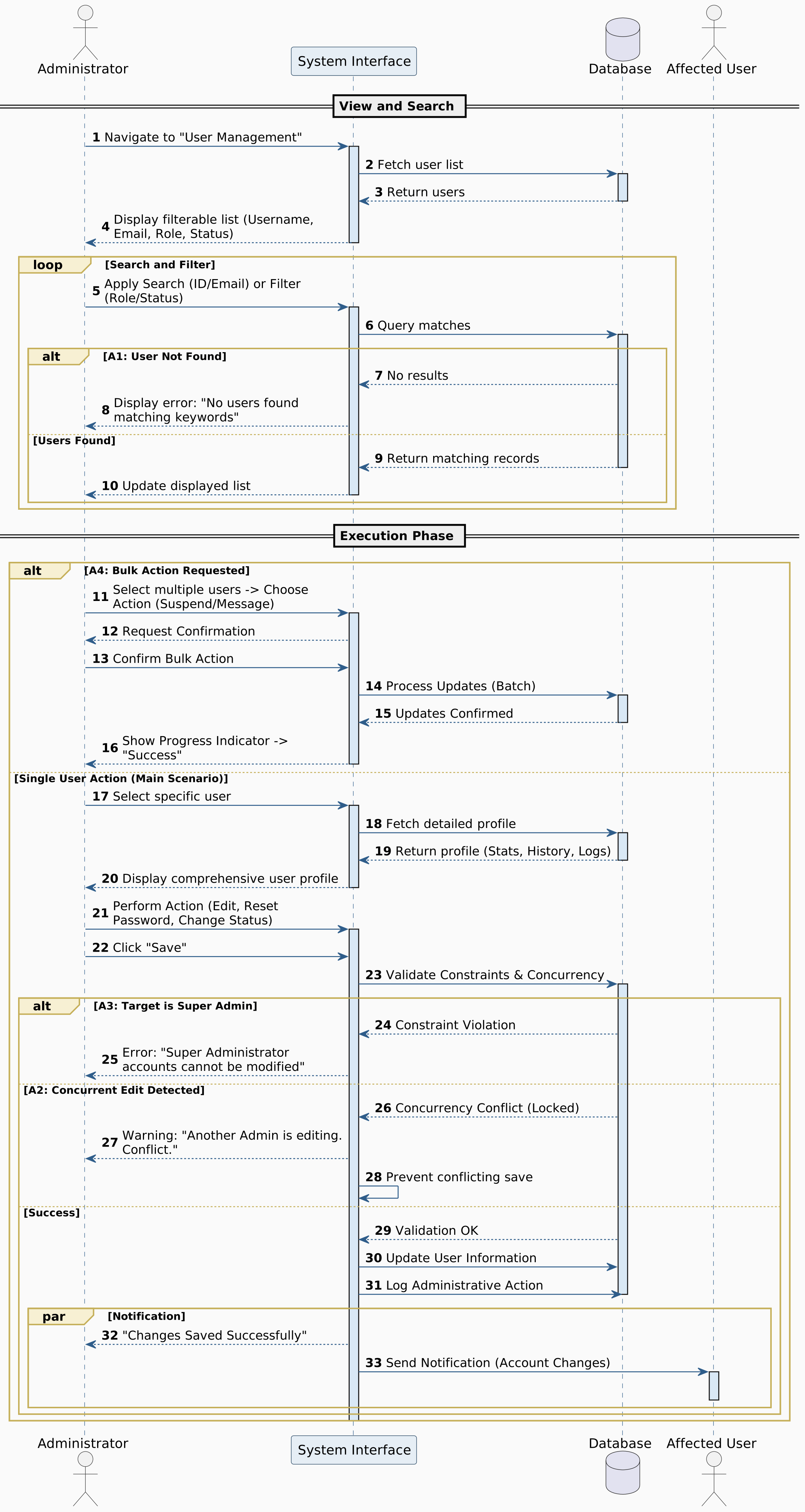
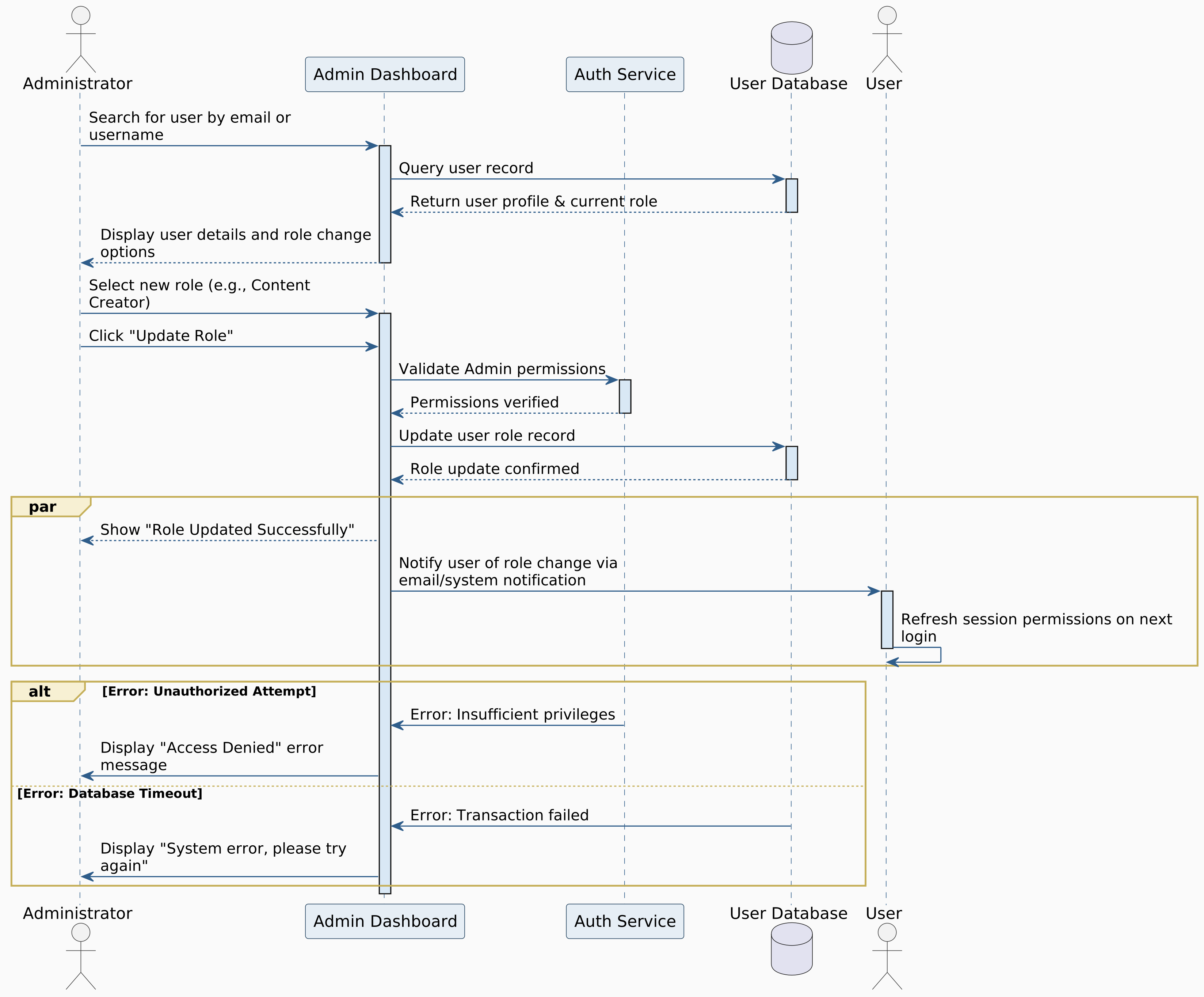
Figure 5.2: Manage User Accounts

Figure 5.3: Assign User Role

Figure 5.4: Monitor Platform Analytics

Figure 5.5: Review And Filter System Logs

Figure 5.6: Remove Inappropriate Content

Figure 5.7: Issue User Warning

Figure 5.8: Design Learning Path

Figure 5.9: Register Account

Figure 5.10: Login to System

Figure 5.11: Create Course

Figure 5.12: Create Lesson

Figure 5.13: Add Multimedia Content

Figure 5.14: Localize Content

Figure 5.15: Categorize Exercise Difficulty

Figure 5.16: Udate Course Materials

Figure 5.17: Review Student Submissions

Figure 5.18: Manage Course Structure

Figure 5.19: Create Coding Exercise

Figure 5.20: Validate Exercise before Publishing

Figure 5.21: Contribute to Learning Path

Figure 5.22: Register Account

Figure 5.23: Login to System

Figure 5.24: Recover password

Figure 5.25: Choose Learning Path

Figure 5.26: View Lesson Content

Figure 5.27: Complete Exercise

Figure 5.28: Track Progress

Figure 5.29: Learn XP and Level Up

Figure 5.30: Set Language Preferences

Figure 5.31: Bookmark Lesson

Figure 5.32: Share Solution

Figure 5.33: Enable Two-factor Authontecation

Figure 5.34: Practice Coding

Figure 5.35: Practice Coding with Blockly Editor

Figure 5.36: Receive AI-Powered Hints

Figure 5.37: Complete Certification Track

5.5 Class Diagram

Class diagrams are structural diagrams that show the static structure of the system, including its classes, attributes, operations, and the relationships among objects. They provide a detailed view of the system's architecture and design.


Part 1: Core User and Authentication System

This section presents the foundational classes for user management, authentication, and authorization within the DuoCodo platform. It includes user roles, profile management, and security features.

Figure 5.38: Core User and Authentication System
Figure 5.38: Class Diagram - Core User and Authentication System

Part 2: Learning Content Management

This section illustrates the classes responsible for managing educational content, including courses, lessons, exercises, and learning paths. It shows how content is structured and organized within the platform.

Figure 5.39: Learning Content Management
Figure 5.39: Class Diagram - Learning Content Management

Part 3: Submissions and Code Execution

This section demonstrates the classes that handle submission and code execution. It shows how the platform motivates and engages learners.

Figure 5.40: Progress Tracking and Gamification
Figure 5.40: Class Diagram - Submissions and Code Execution

Part 4: Exercises, Attempts and Code Analysis

This section presents the classes that enable exercises, attempts and code analysis, including comments, discussions, friend connections, sharing capabilities, and community engagement features.

Figure 5.41: Social and Community Features
Figure 5.41: Class Diagram - Exercises, Attempts and Code Analysis

Part 5: Certification and Gamification

This section shows the classes related to certification and gamification, and validation mechanisms. It demonstrates how the platform evaluates learner competency and awards credentials.

Figure 5.42: Assessment and Certification
Figure 5.42: Class Diagram - Certification and Gamification

Part 6: Administration and Platform Management

This section illustrates the classes responsible for platform administration, including system monitoring, analytics, content moderation, user management, and reporting capabilities.

Figure 5.43: Administration and Platform Management
Figure 5.43: Class Diagram - Administration and Platform Management

Key Design Patterns and Relationships

The class diagrams above illustrate several important design patterns and relationships:

  • Inheritance: User roles (Administrator, Content Creator, Learner) inherit from a base User class
  • Composition: Courses are composed of Lessons, which contain Exercises
  • Association: Many-to-many relationships between Learners and Courses through enrollment
  • Aggregation: Learning Paths aggregate multiple Courses
  • Dependency: Classes depend on authentication and authorization services

These diagrams provide a comprehensive view of the DuoCodo platform's architecture, showing how different components interact to deliver a complete learning experience.


Chapter 6: Database Design

6.1 Entity Relationship Diagram

Entity Relationship Diagrams (ERD) represent the data model of the DuoCodo platform, showing the entities, their attributes, and the relationships between them. This comprehensive database design ensures data integrity, efficient querying, and scalability.


Part 1: User Management and Authentication

This section presents the core entities for user management, including user accounts, roles, authentication mechanisms, and profile information. It establishes the foundation for user identity and access control.
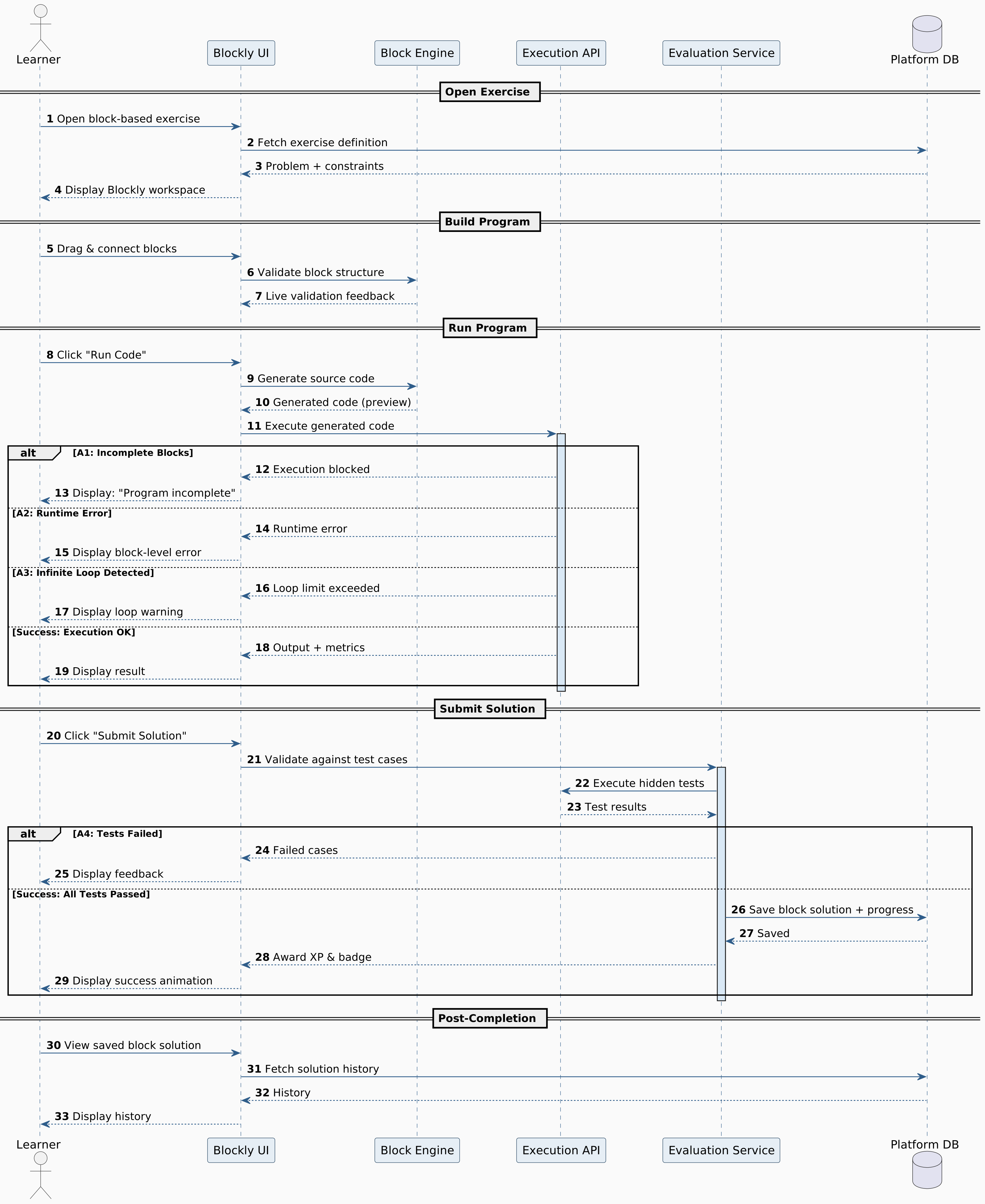
Figure 6.1: User Management and Authentication ERD
Figure 6.1: Entity Relationship Diagram - User Management and Authentication

Part 2: Learning Content and Course Structure

This section illustrates the entities related to educational content organization, including courses, lessons, modules, exercises, and learning paths. It shows how content is structured and interconnected within the platform.

Figure 6.2: Learning Content and Course Structure ERD
Figure 6.2: Entity Relationship Diagram - Learning Content and Course Structure

Part 3: Submissions and Code Execution

This section demonstrates the entities that track submission and code execution. It shows how the platform motivates learners through gamification elements.
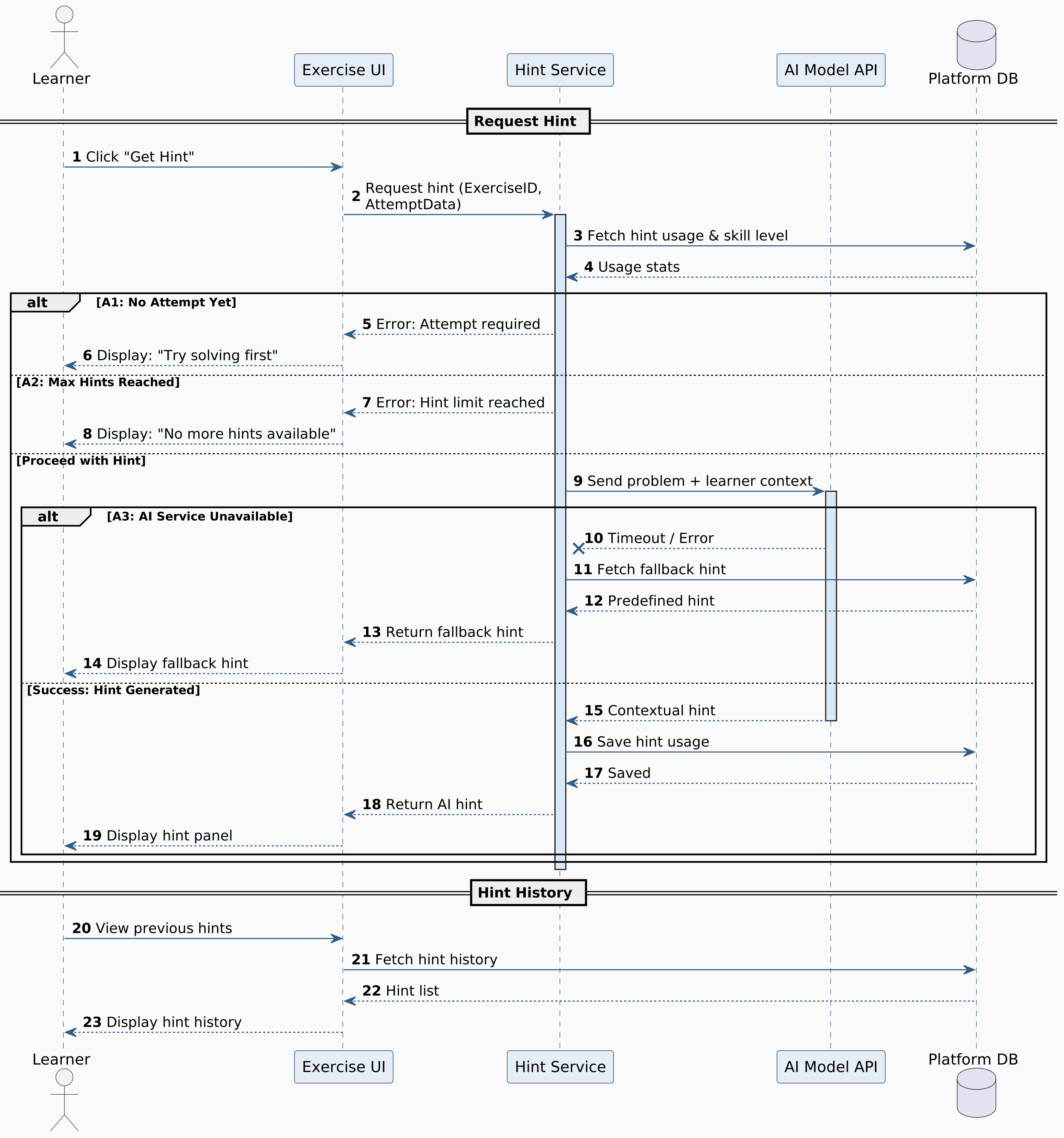
Figure 6.3: Progress Tracking and Gamification ERD
Figure 6.3: Entity Relationship Diagram - Submissions and Code Execution

Part 4: Exercises, Attempts and Code Analysis

This section shows the entities for exercises, attempts and code analysis. It demonstrates how the platform evaluates learner competency and issues credentials.

Figure 6.4: Assessment and Certification ERD
Figure 6.4: Entity Relationship Diagram - Exercises, Attempts and Code Analysis

Part 5: Certification and Gamification

This section presents the entities that enable certification and gamification, including comments, discussions, friend connections, notifications, sharing, and community engagement features.

Figure 6.5: Social Features and Community ERD
Figure 6.5: Entity Relationship Diagram - Certification and Gamification

Part 6: Administration and System Management

This section illustrates the entities for platform administration, including system logs, analytics, content moderation, reports, backups, and monitoring capabilities.

Figure 6.6: Administration and System Management ERD
Figure 6.6: Entity Relationship Diagram - Administration and System Management

Database Design Principles

The ERD design follows these key principles:

  • Normalization: Entities are normalized to reduce data redundancy and improve data integrity
  • Referential Integrity: Foreign key relationships ensure data consistency across tables
  • Scalability: Design supports horizontal and vertical scaling for growing user base
  • Performance: Indexed fields and optimized relationships for efficient queries
  • Flexibility: Schema allows for future extensions and feature additions
  • Security: Sensitive data fields include encryption and access control mechanisms

These diagrams provide a comprehensive view of the DuoCodo platform's data architecture, showing how information is stored, organized, and related to support all system functionalities.


6.2 Database Schema

Database Schema represents the logical structure of the DuoCodo platform database, showing tables, columns, data types, constraints, and relationships. This detailed schema design ensures optimal performance, data integrity, and supports all platform functionalities.


Part 1: User Management and Authentication

This section presents the database tables for user management, including user accounts, roles, authentication mechanisms, and profile information. It establishes the foundation for user identity and access control with detailed field specifications.
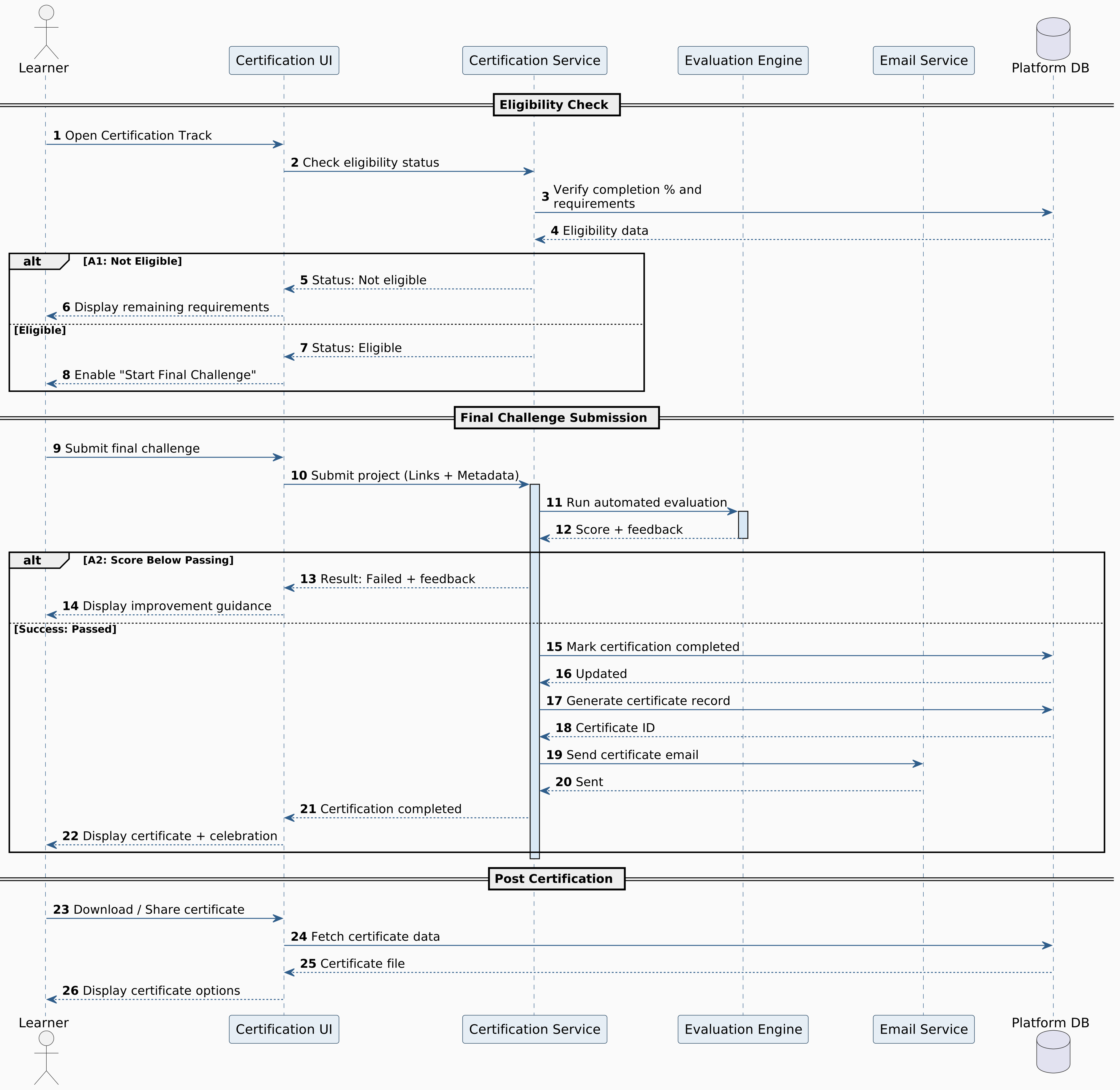
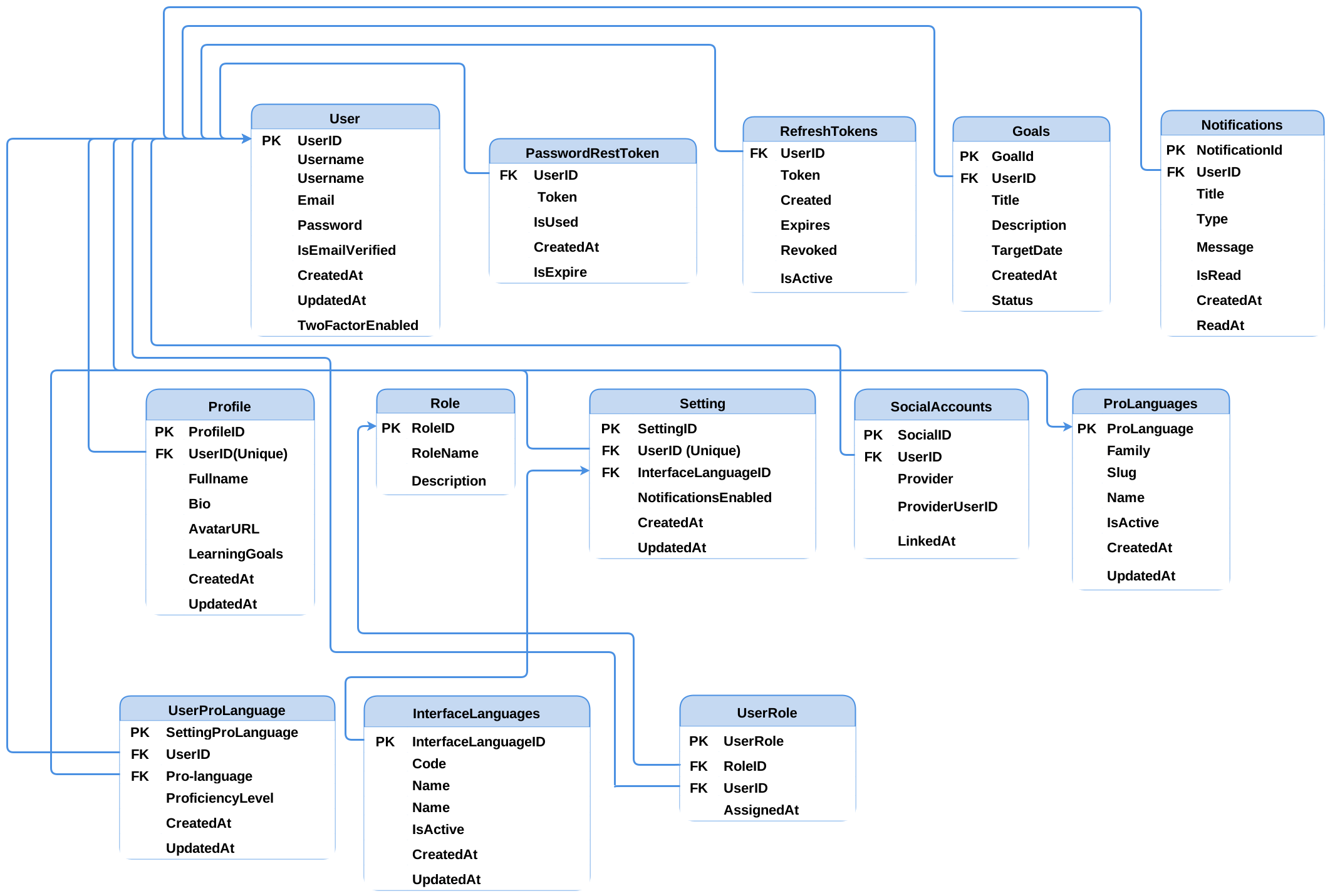
Figure 6.7: User Management and Authentication Schema
Figure 6.7: Database Schema - User Management and Authentication

Part 2: Learning Content and Course Structure

This section illustrates the database tables related to educational content organization, including courses, lessons, modules, exercises, and learning paths. It shows how content is structured and stored within the database with proper data types and constraints.
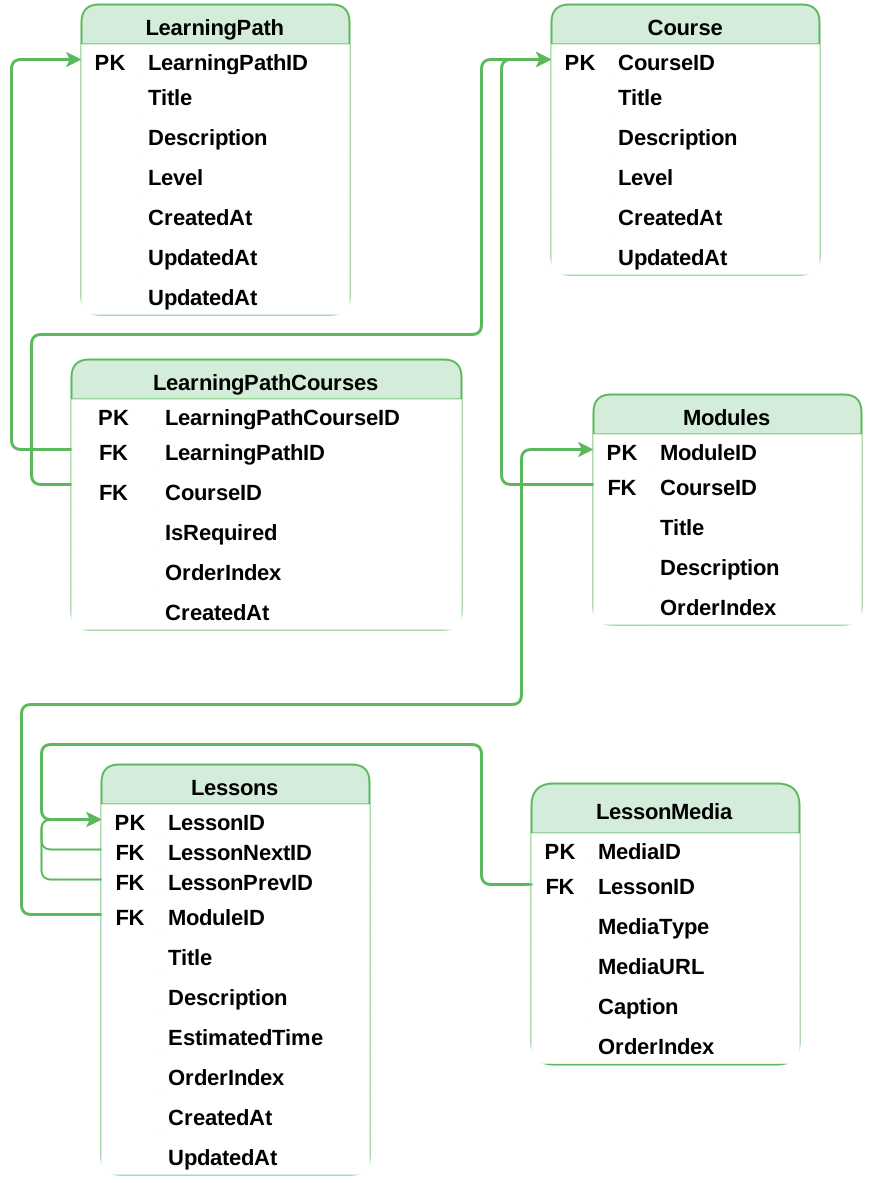
Figure 6.8: Learning Content and Course Structure Schema
Figure 6.8: Database Schema - Learning Content and Course Structure

Part 3: Submissions and Code Execution

This section demonstrates the database tables that track learner progress, achievements, experience points (XP), badges, streaks, and leaderboard rankings. It shows how the platform stores and manages gamification elements with appropriate indexing.
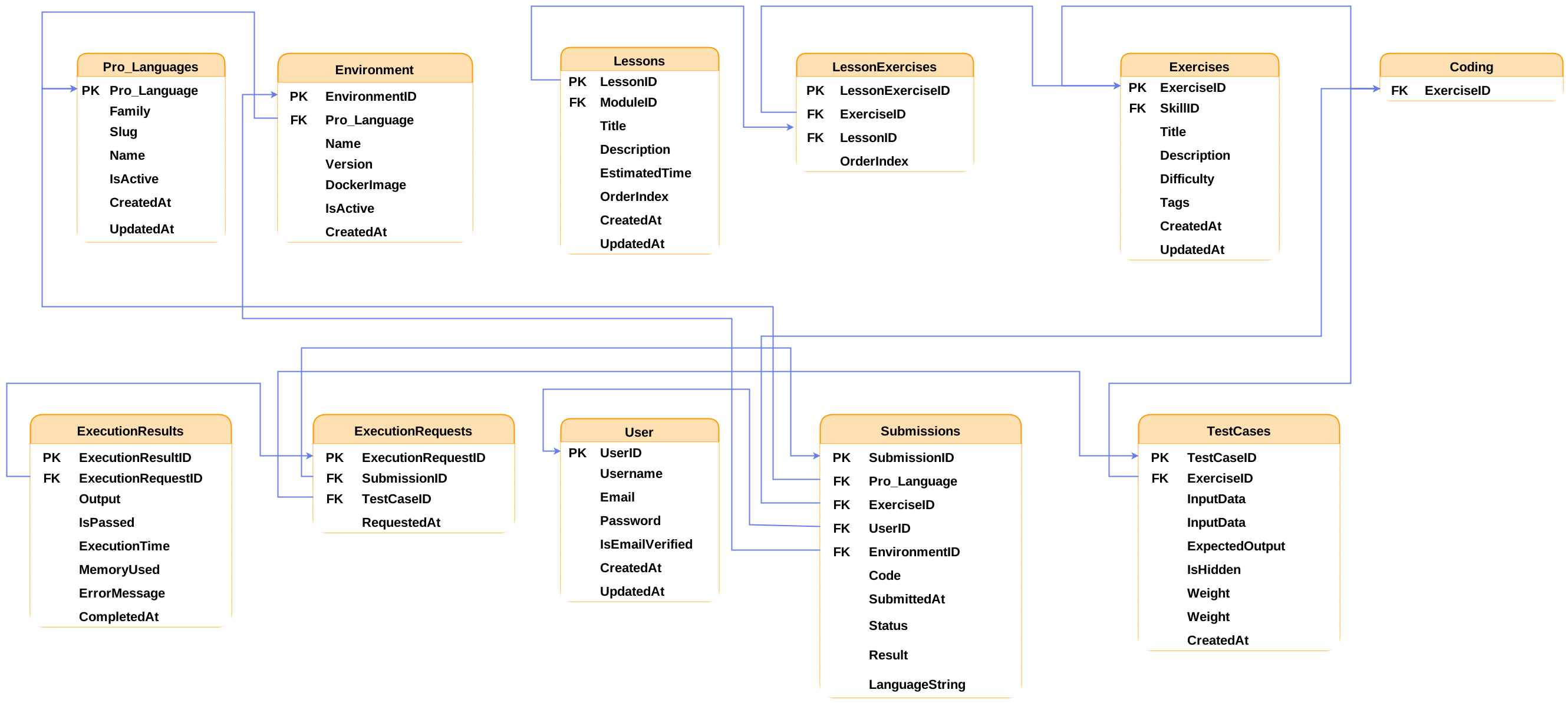
Figure 6.9: Progress Tracking and Gamification Schema
Figure 6.9: Database Schema - Submissions and Code Execution

Part 4: Exercises, Attempts and Code Analysis

This section shows the database tables for quizzes, assessments, test cases, submissions, grading, and certifications. It demonstrates how the platform stores evaluation data and manages credentials with proper validation constraints.
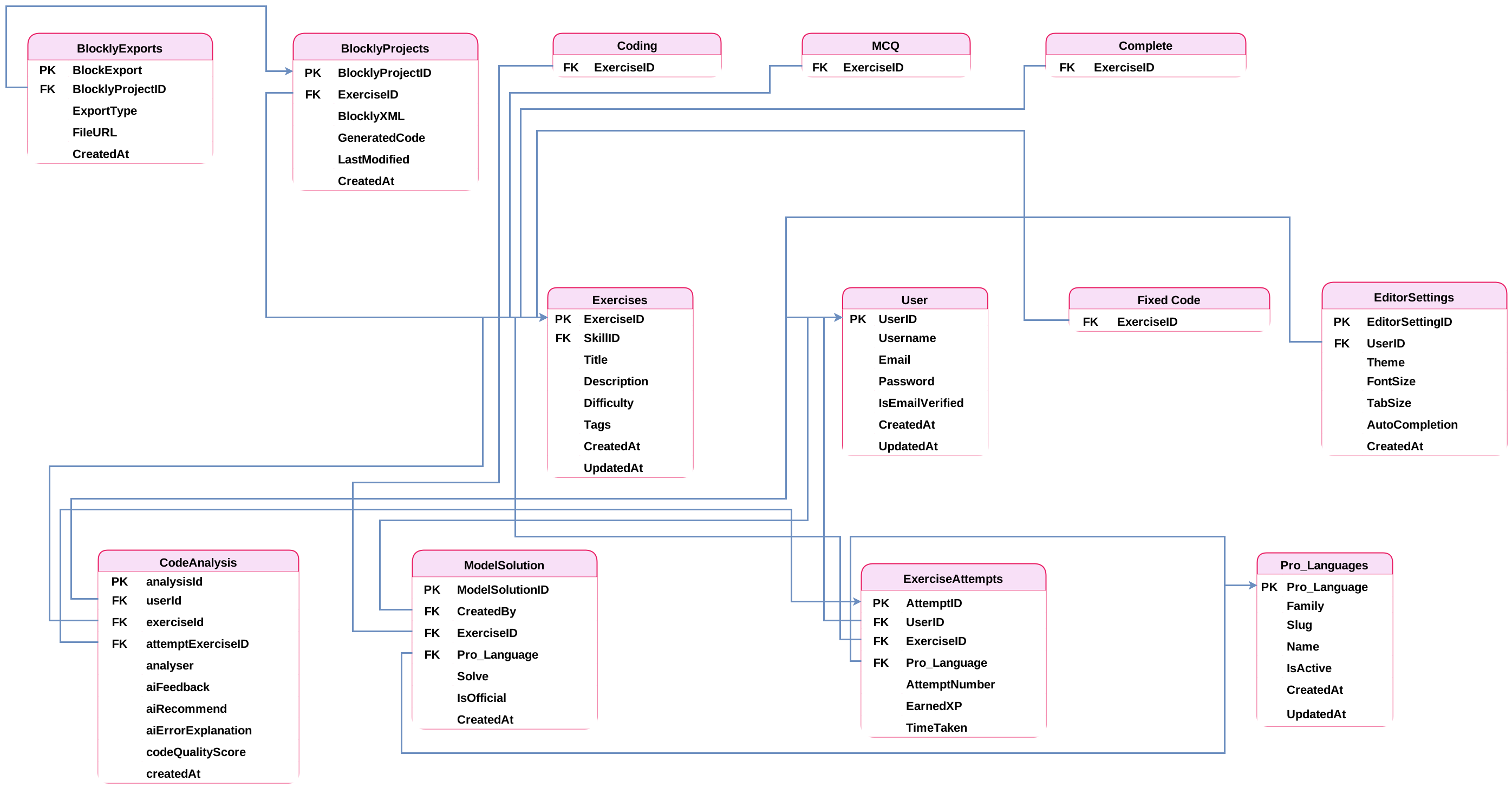
Figure 6.10: Assessment and Certification Schema
Figure 6.10: Database Schema - Exercises, Attempts and Code Analysis

Part 5: Certification and Gamification

This section presents the database tables that enable social interactions, including comments, discussions, friend connections, notifications, sharing, and community engagement features with optimized query structures.
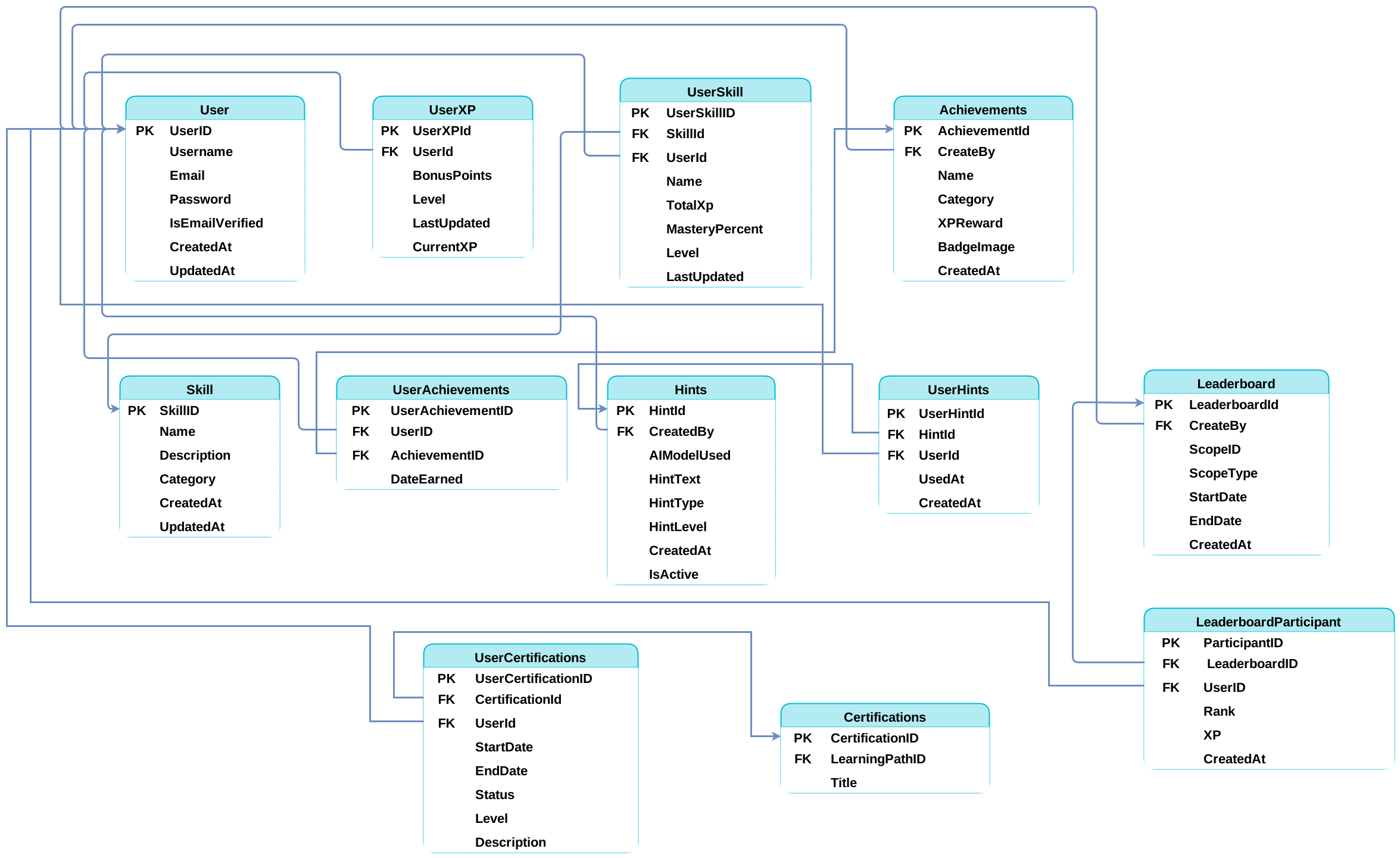
Figure 6.11: Social Features and Community Schema
Figure 6.11: Database Schema - Certification and Gamification

Part 6: Administration and System Management

This section illustrates the database tables for platform administration, including system logs, analytics, content moderation, reports, backups, and monitoring capabilities with appropriate data retention policies.
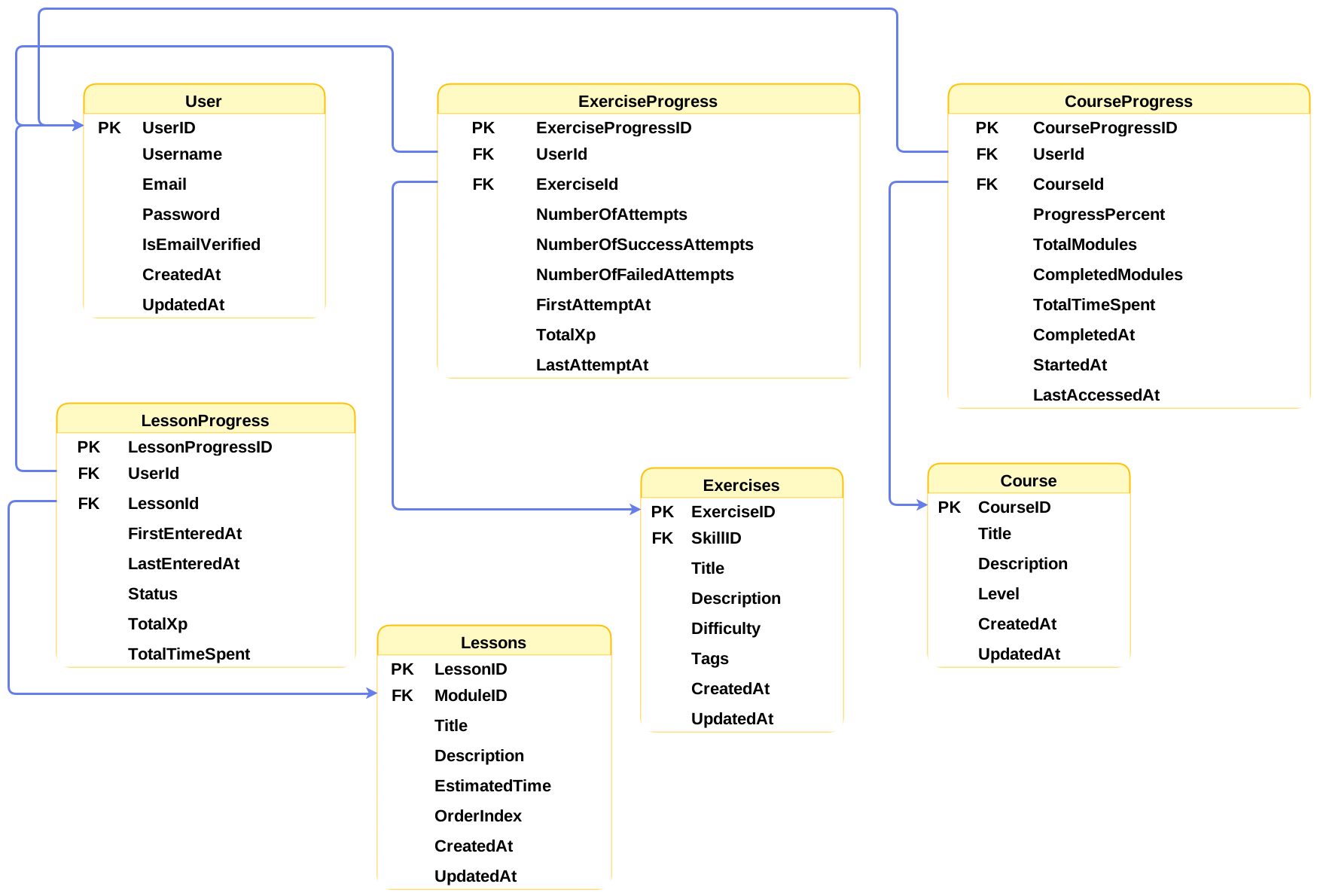
Figure 6.12: Administration and System Management Schema
Figure 6.12: Database Schema - Administration and System Management

Database Schema Specifications

The database schema implementation follows these key specifications:

  • Data Types: Appropriate data types chosen for optimal storage and performance
  • Constraints: Primary keys, foreign keys, unique constraints, and check constraints ensure data integrity
  • Indexing: Strategic indexes on frequently queried columns for optimal performance
  • Normalization: Tables normalized to 3NF (Third Normal Form) to eliminate redundancy
  • Referential Integrity: Foreign key relationships maintain consistency across related tables
  • Security: Sensitive fields include encryption specifications and access control measures
  • Scalability: Schema design supports partitioning and sharding for future growth
  • Backup Strategy: Tables include timestamp fields for incremental backup operations

This detailed schema provides the implementation blueprint for the DuoCodo platform's database, ensuring robust data management and optimal query performance across all system components.


Chapter 7: User Interface

7.1 Authentication Screens
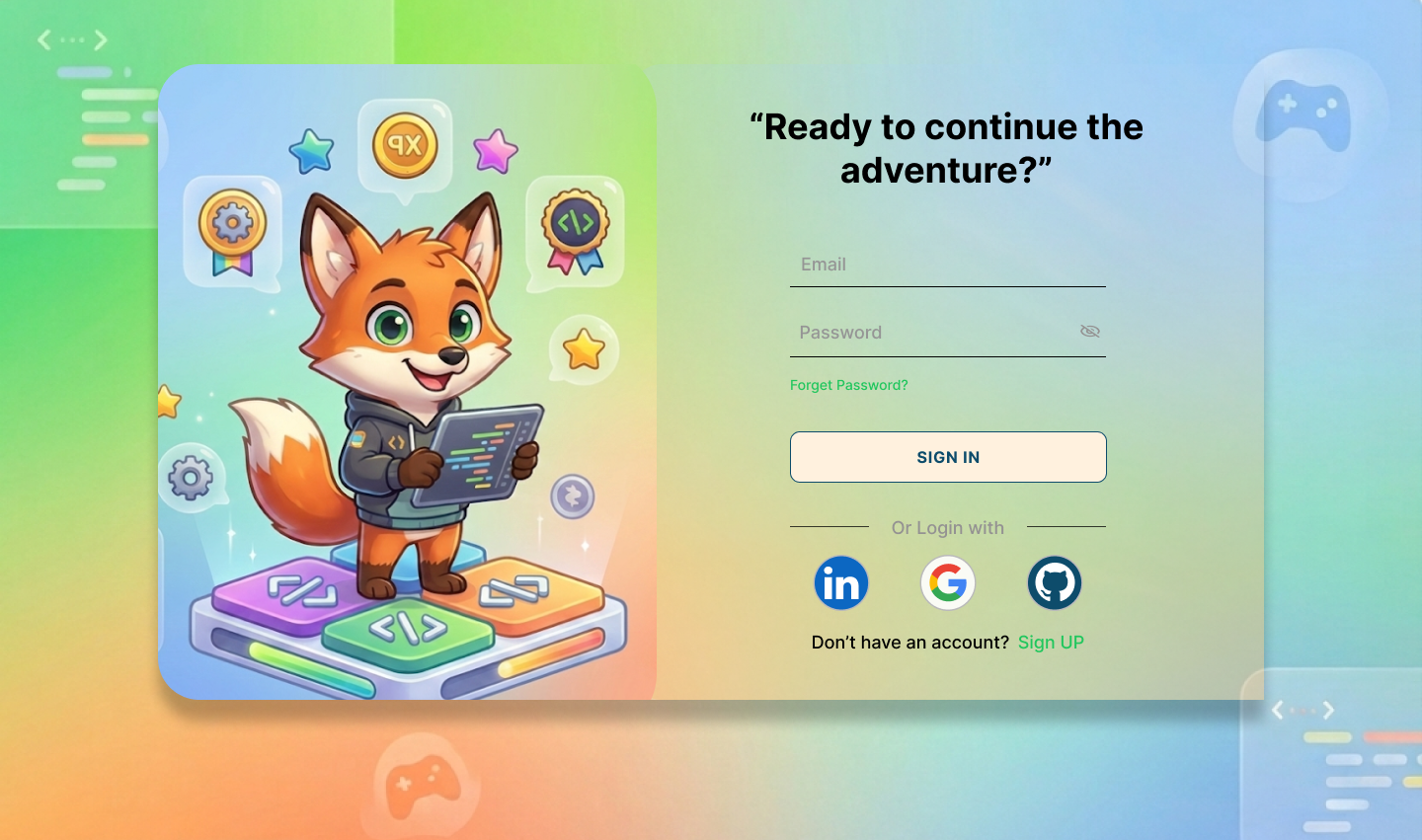
Login Screen
Figure 7.1: Login Screen
Register Screen
Figure 7.2: Registration Screen
OTP Verification
Figure 7.3: OTP Verification Screen
Password Screen
Figure 7.4: Password Entry Screen
New Password Screen
Figure 7.5: New Password Creation Screen
Set Username
Figure 7.6: Set Username

7.2 Main Dashboard

Learning Path
Figure 7.7: Learning Path Interface
Collapsed Sidebar
Figure 7.8: Interface with Collapsed Sidebar
Chat Interface
Figure 7.9: Chat Interface
Video Player
Figure 7.10: Video Player Screen
Quiz MCQ
Figure 7.11: Multiple Choice Quiz
Quiz Code
Figure 7.12: Code Quiz Interface
Quiz Completed
Figure 7.13: Quiz Completion Screen
7.3 Learning Paths
Main Dashboard
Figure 7.14: Main Dashboard
Dashboard Details
Figure 7.15: Dashboard Details View
Dashboard with Filtration
Figure 7.16: Dashboard with Filtration Options
7.4 Progress Tracking & Analytics
Progress and Analysis
Figure 7.17: Progress & Analysis Dashboard
7.5 Theme Options
Dark Mode
Figure 7.18: Dark Mode Interface